
Desktop browser
Clock in straight from the dashboard at your desk — nothing installed, with large buttons for arriving, leaving and taking a break.
See the dashboardworking time recordingshift planning includedhosted in Germany€2.90 per employee per month
Record working hours, plan shifts graphically, approve leave and corrections digitally, reach the whole workforce — without having to buy add-on modules for any of it.
People do not work the same way everywhere. So you decide per site and per group how hours get recorded.
Clock in straight from the dashboard at your desk — nothing installed, with large buttons for arriving, leaving and taking a break.
See the dashboardA PWA on the employee's own phone, without an app store. The device registers itself and is approved by an administrator, and location is mandatory when clocking.
Learn moreOne shared tablet becomes the time clock for the whole team: tap the action, enter your personal PIN, done.
Learn moreAt the RFID terminal — a Raspberry Pi with a touch display and a chip reader — the chip is enough: hold it up and the right action is booked. Or fixed Datafox hardware with chip or fingerprint, supplied and set up by ITN.
Learn moreWho is in and who is not? Attendance can be shown by group — useful for reception, scheduling and emergency lists.
Live attendanceThe complete feature reference with screenshots from the application — from the monthly view to administration.
To the referenceNot stock imagery but screenshots from the running application. Everything can be enlarged in the feature reference. The interface of ITN-Zeiterfassung is currently available in German.
An assistant takes you through the setup step by step — from company details through public holidays, working time models and the team to terminals and the payroll export. It does not just ask questions: it checks your real data for what is already right and what is still missing.
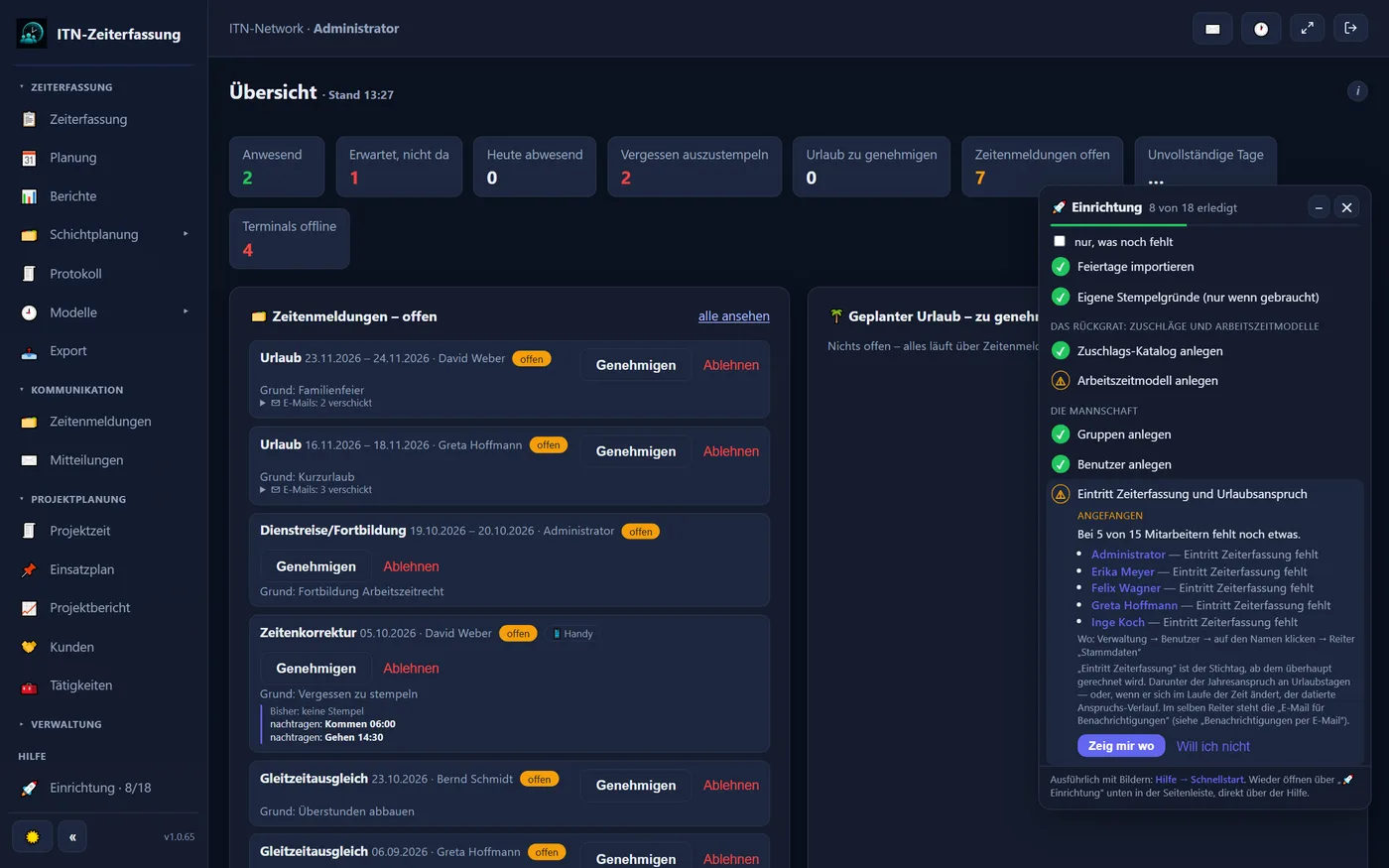
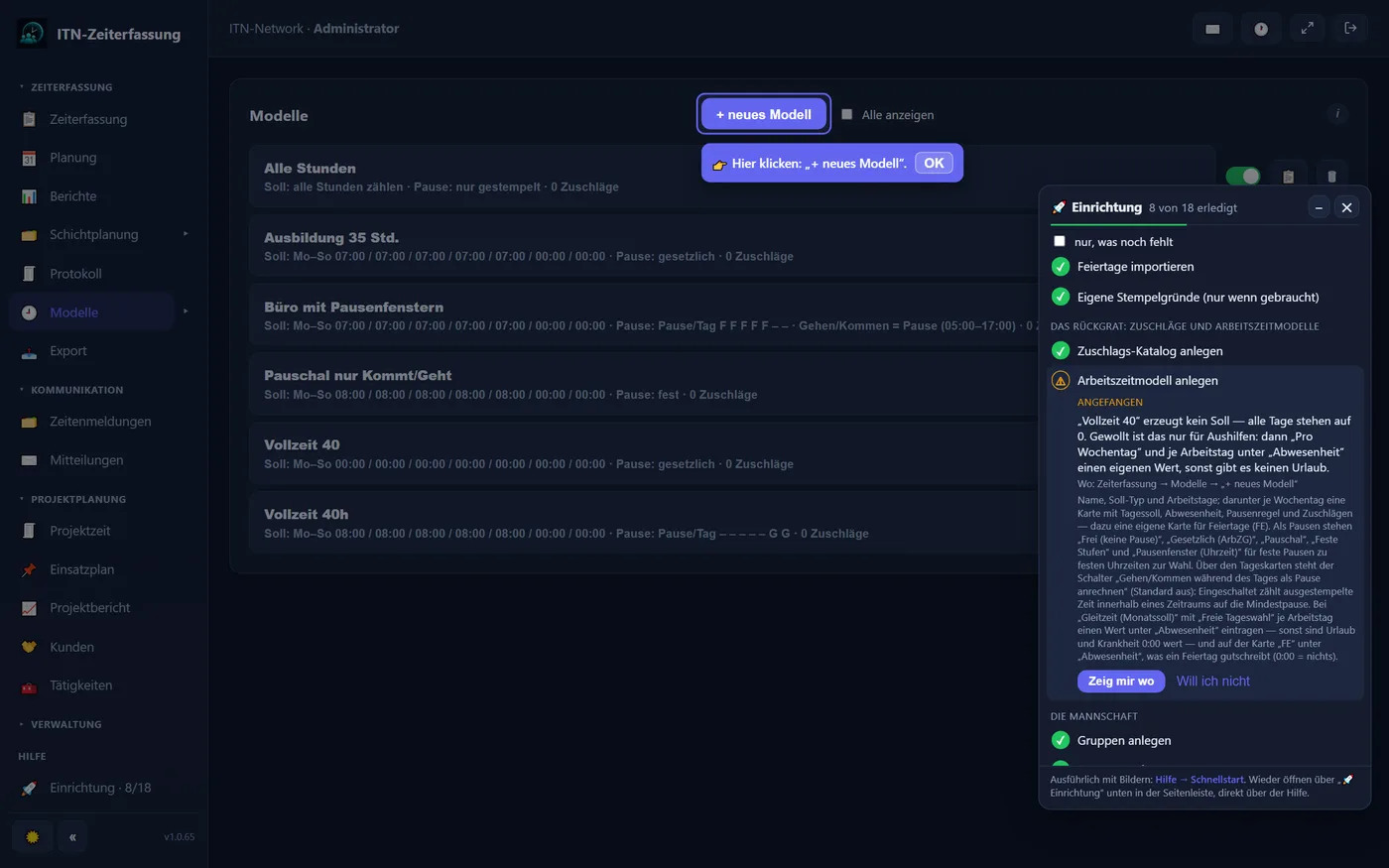
Each of the eighteen steps shows what is done and what is missing — employees without a start date or without a working time model, each by name, a model without a target, missing public holidays or phones waiting for approval.
One click opens the right page, dims the rest and highlights the button to press next. The page stays fully usable meanwhile.
Anything you do not need — terminals, location checking, payroll export — you deliberately skip. It then counts as done and can be brought back at any time.
The window stays open while you work and updates itself; whatever you save is ticked off. Later on, too, a glance shows where something is still missing in a running installation.
Every step can also be read up on in the public manual of ITN-Zeiterfassung (in German).
Capturing the entries is the easy part. The work lies in what gets calculated from them: breaks by rule, targets by weekday, core hours, overnight shifts, premiums by their eligibility window and by shift, a flexitime account with capping. This is exactly where simple clocking apps come apart — and exactly where the effort goes when hours are kept in a spreadsheet.
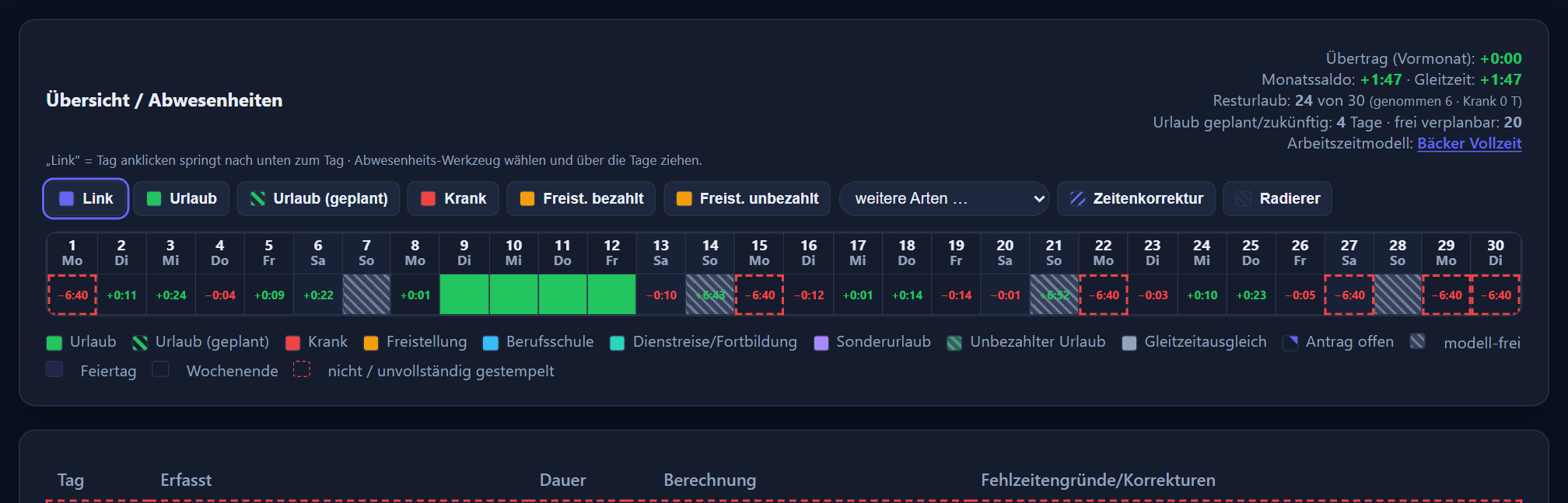
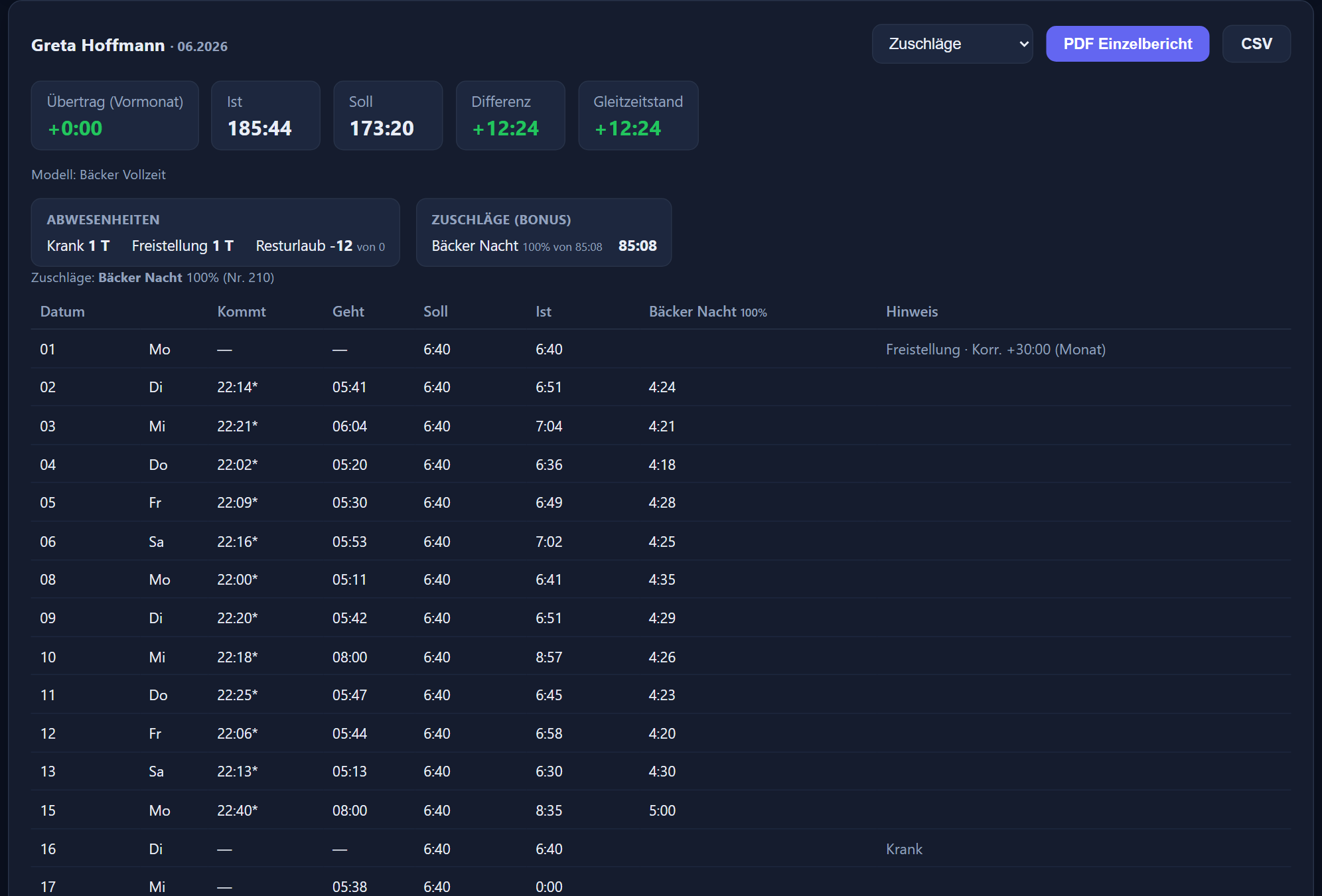
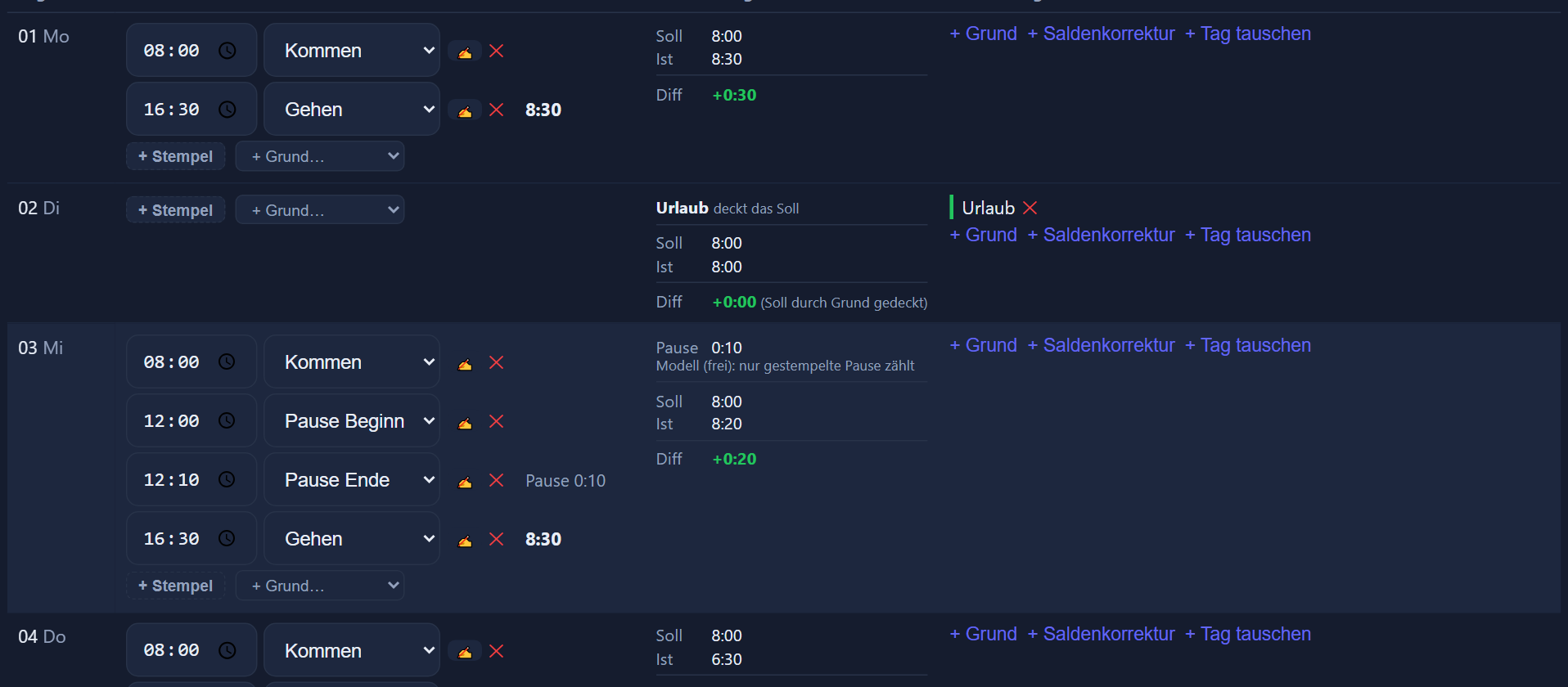
In ITN-Zeiterfassung every daily row can be followed: the clocking entries on the left, break, target, actual and difference in the middle, corrections on the right. You see not only the result but how it came about — which is the difference between a number and a number you can stand behind.
Every row shows which clocking entries produced the actual hours, the break and the difference.
Later entries and changes are documented, and deleted entries go to a recycle bin rather than into nothing.
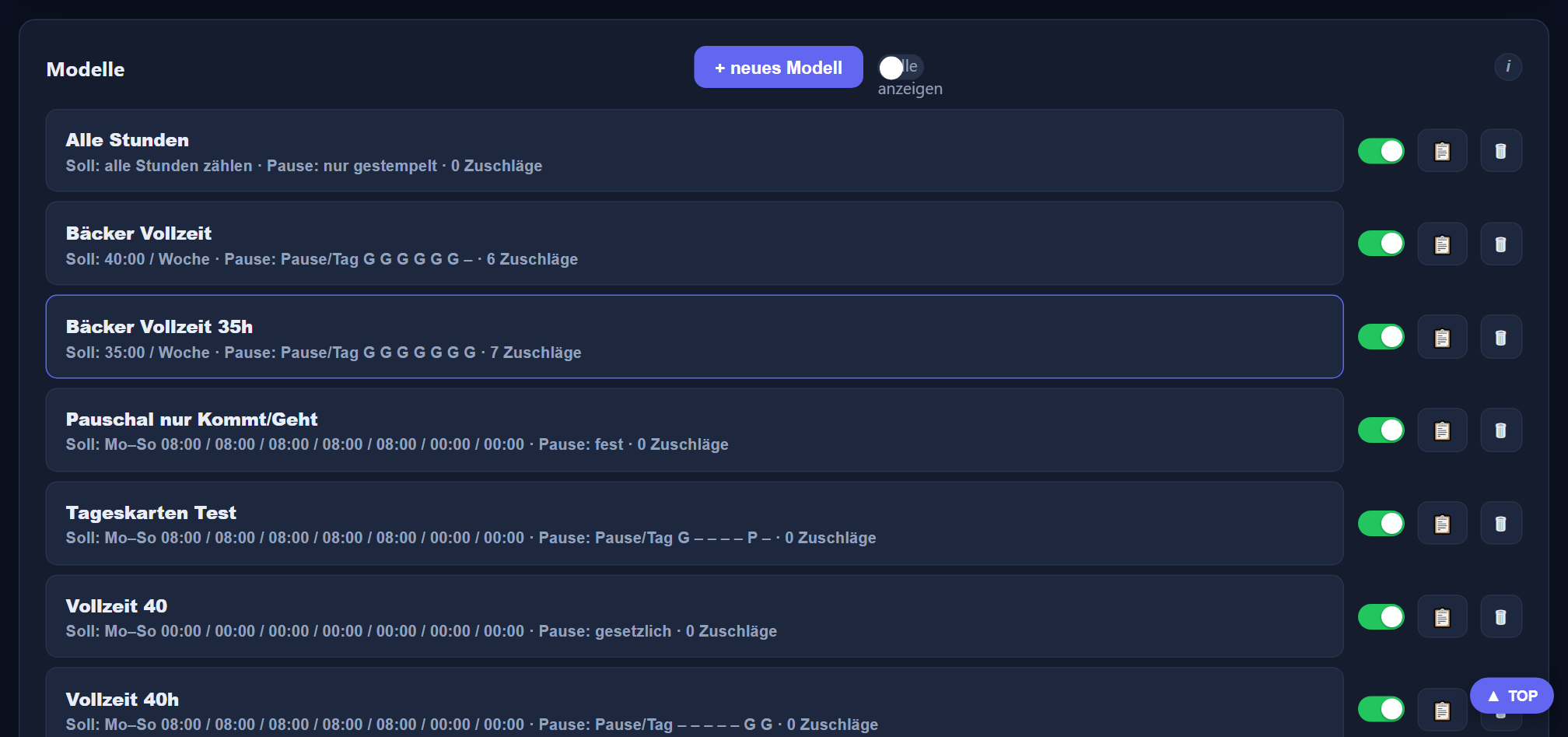
Working time models are built once and assigned to employees — not reinvented per person.
Carry-over, monthly balance, flexitime and remaining leave at a glance, with a link to the assigned model.
Wherever people work in rotating shifts, the answer to „who is on nights next week?“ usually hangs on a notice board that one person keeps and everybody hunts for. Here the monthly grid fills itself from stored shift patterns — and the time of the clock-in decides which shift somebody actually worked. The calculation follows that, not the plan.
Many vendors license and bill shift planning separately — often per employee on top, sometimes only from a larger package upwards.
Planning happens in the rota tool, clocking in the time tracking system. Two lists, two logins, and at the end of the month the question of which of them is right.
Shift planning is part of ITN-Zeiterfassung. No surcharge, no module, no second login — it sits in the same program as clock-ins, leave and the payroll export, and works from the same figures.
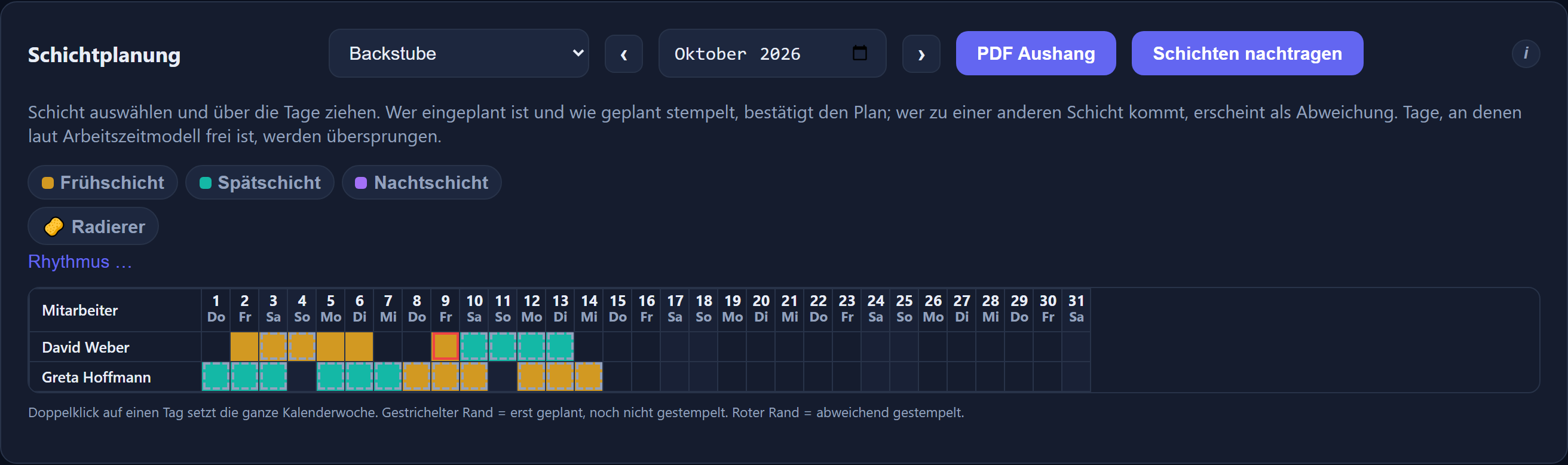
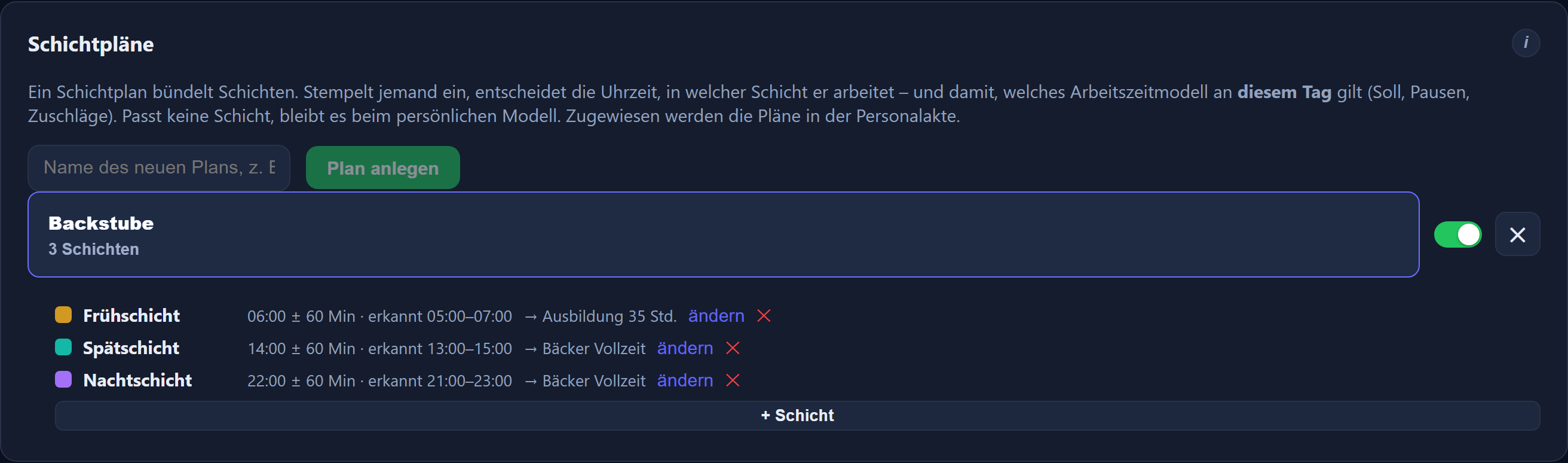
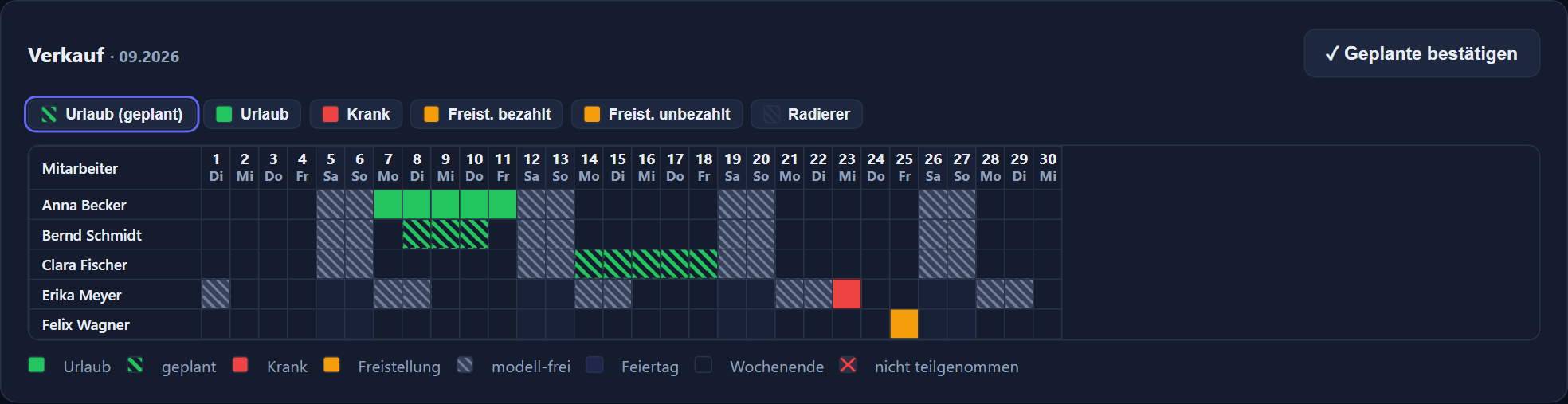
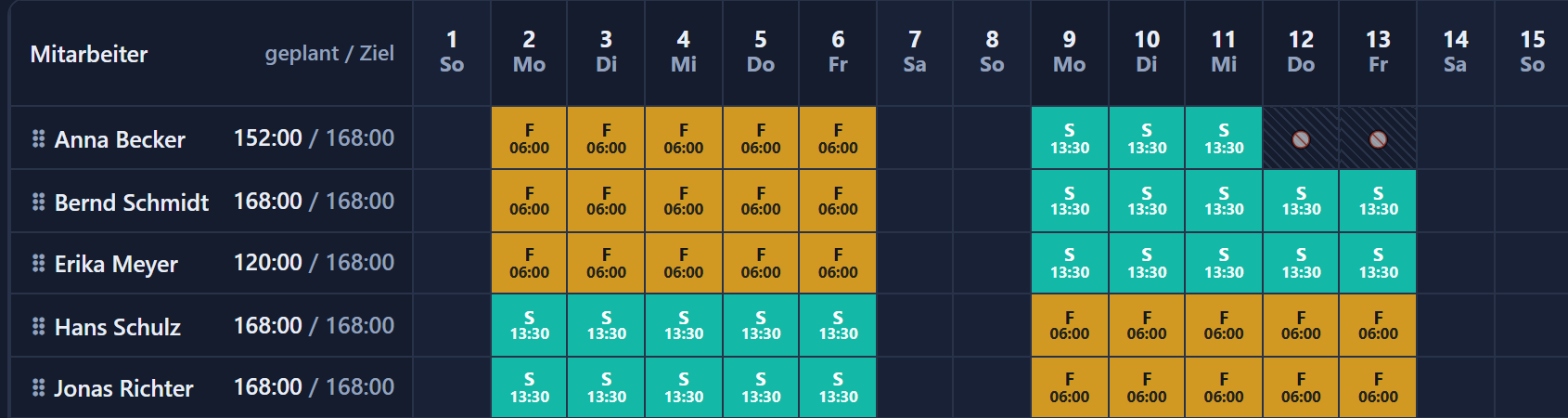
A shift group bundles the shifts of an area, say production. An early shift at 6:00 with 25 minutes of tolerance is recognised on any clock-in between 5:35 and 6:25. Planning is graphical in the monthly grid; a double-click fills the whole calendar week.
Shift planning in detailOne shift pattern per employee: a weekly grid over up to twelve weeks that then repeats, with a column of its own for public holidays. The automatic pre-fill builds the month from it — after a preview showing what will be set and where it does not fit.
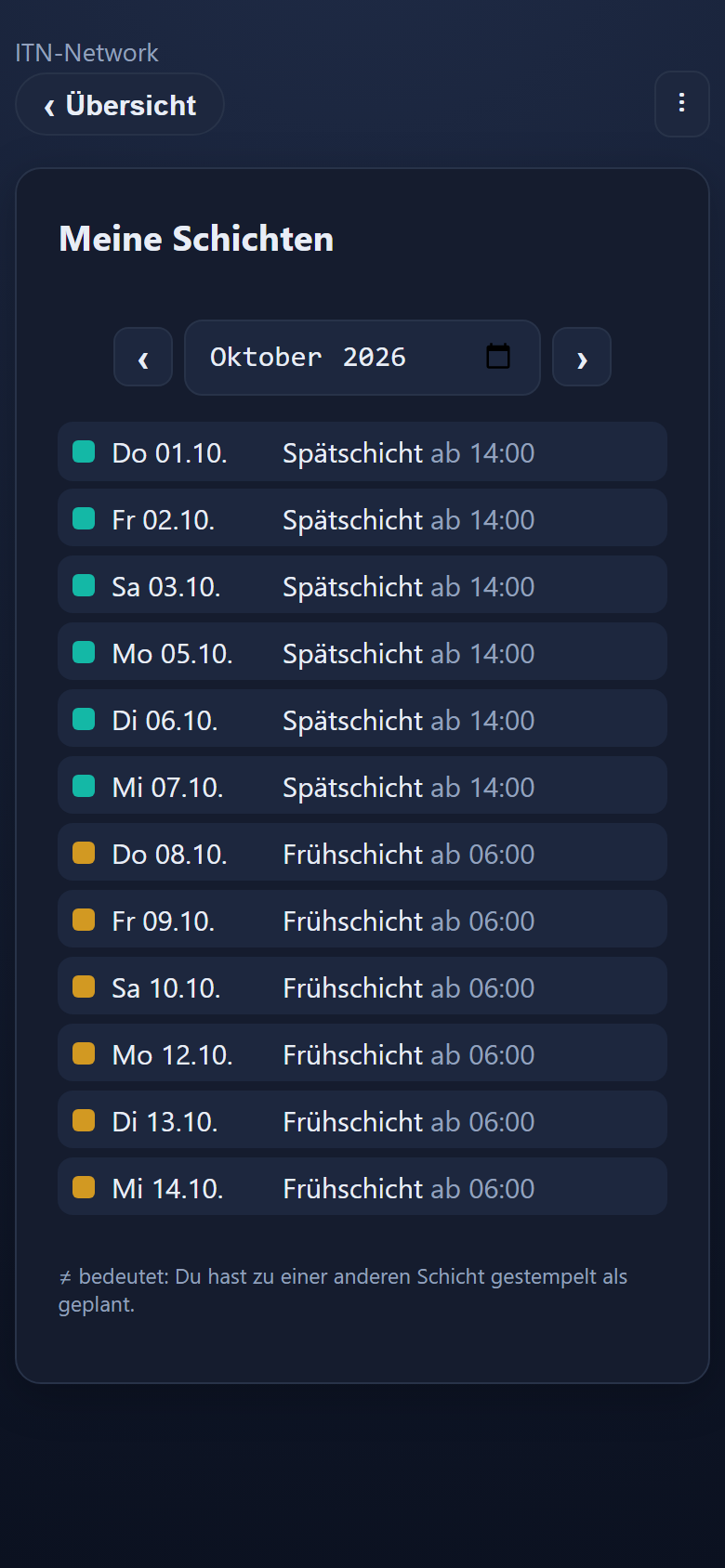
If someone turns up for a different shift than planned, the planning stays visible and the actual shift appears beside it — outlined in red in the grid, shown as ≠ on a phone. The night premium goes to whoever worked at night, even if they were rostered for earlies.
A time window may run across the change of day. The shift belongs to the day on which it begins — a night shift from 23:40 to 07:10 therefore to the day of the clock-in.
Anyone rostered who does not turn up receives the target hours of the planned shift, provided it has a working time model of its own — a day missed from a six-hour shift with its own model produces six hours of deficit, not eight. Without a model of the shift's own, which is the usual case, the person's own target applies. Anyone not rostered is calculated with their own model as before.
The monthly grid as a PDF in landscape format with a colour legend — the grid alone, the grid with staffing levels, or the cover alone without names. Plus a slip for each employee listing their own shift days.
A tile in the app leads to the coming weeks with date, shift and start time — where the shift has a planned end, with the time from–to and, below the list, „Geplant in diesem Monat“ (planned this month) with the person's own monthly total. It can be switched off per device — a tablet that only hangs in the workshop for clocking in stays free of it.
If a month was planned only later, „Add shifts“ reconciles the existing clock-ins with the planning. Days set by hand are left untouched.
Stored per shift and weekday, the rows below the grid count how many people stand there on each day — red when understaffed, yellow above the maximum, green when it fits. The pre-fill tops up open places to the minimum.
As a whiteboard, a screen — in the corridor, say — shows a shift group's monthly plan full-screen, with absence codes and the „appointments“ row. It refreshes itself and needs no login; planning still happens in shift planning.
One button sends everyone affected a message with their own days — new, changed or dropped, compared with the last state announced. A window shows beforehand who gets what.
„Copy month“ takes over a plan weekday for weekday and only fills empty days. „Excel (CSV)“ outputs the same grid as a table, with a „geplante Std.“ (planned hours) column per employee — for reading and further calculation.
More on this: shift planning in detail · premiums for nights, Sundays and public holidays
Whoever plans shifts wants to know how many hours someone is already rostered for in the month. And allowances should not have to be added up by hand. Shift planning now takes care of both — and every daily row shows how the figures come about.
With a planned end and a planned break per shift, „geplant / Ziel“ (planned / target) appears beside every name — 152:00 of 168:00, for instance. The tooltip shows the weekly totals and what is still left to plan, and „Excel (CSV)“ adds a „geplante Std.“ (planned hours) column. Your staff see their times from–to under „Meine Schichten“ (my shifts), together with their own monthly total.
Anyone who leaves, say, within the last 30 minutes before the planned end is credited with the time up to the end; the clocking entry itself stays as it is. Anyone who stays longer gets their actual time — overtime counts. The day then shows something like „gewertet bis 22:00“ (counted until 22:00). Off by default.
Night, late or other premiums can be attached directly to the shift. They apply on every day with that shift, in addition to the working time model and on public holidays too; nothing counts twice.
Say €20.00 for every early shift, always shown as pay. The reports show „5 × 20,00 € = 100,00 €“, the payroll summary the number and the total. The allowance does not go into the DATEV file — your payroll office takes it over from the payroll summary.
The planned end and break change neither the target nor the clocked time; the shift is still recognised from the clock-in.

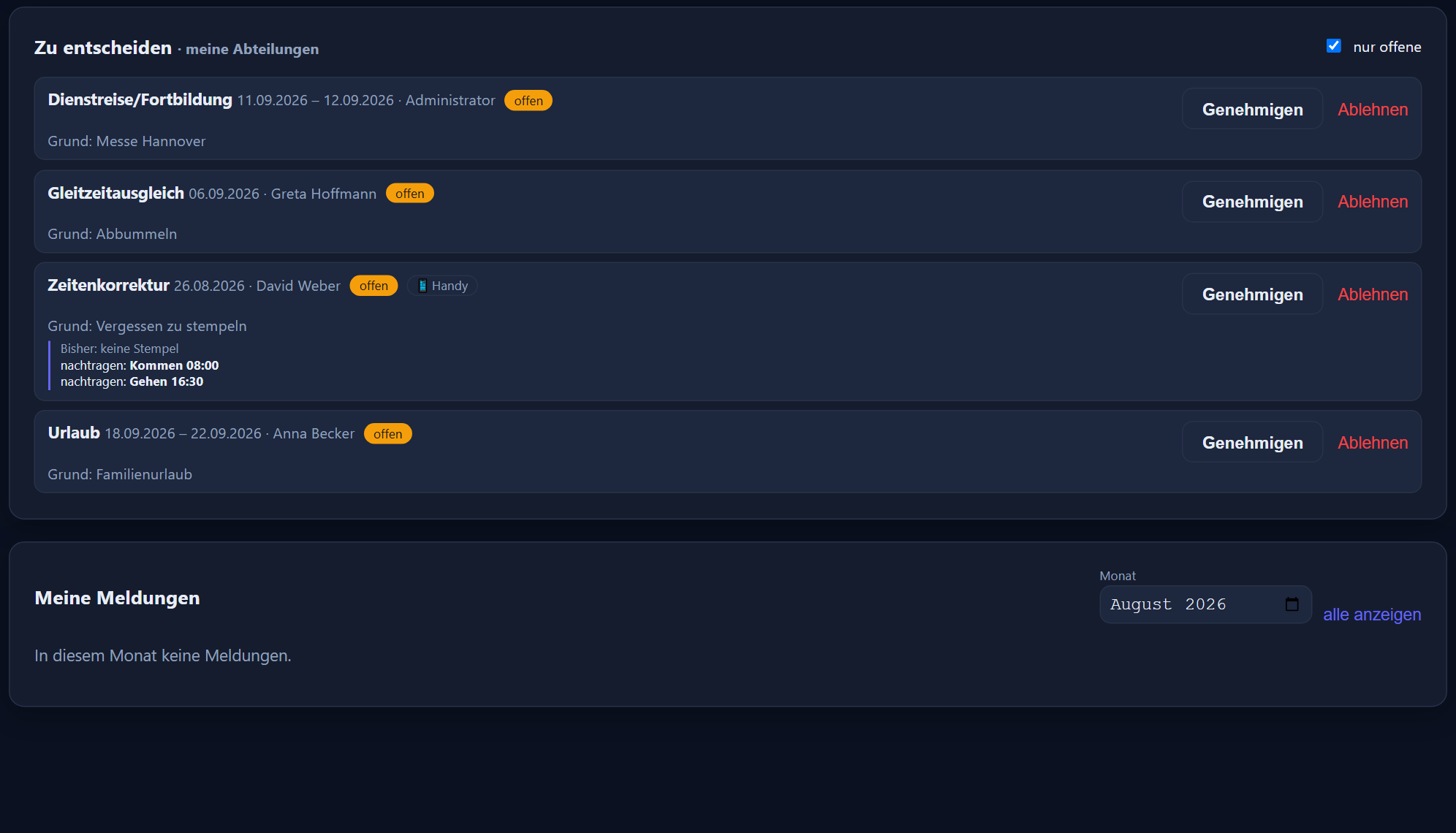
The note on the desk and the question shouted across the room both disappear. Staff submit at a desk or on a phone, and decisions are made with one click from the dashboard — until then nothing on the time account changes.
Type, period, reason — done. Leave, half days included, special leave, unpaid leave, business travel and training, flexitime compensation, correcting a forgotten clocking time and cancelling a day already entered. On a phone there is a tile of its own for it.
The requests chapterOpen submissions appear as a figure and a card on the dashboard. Approving enters everything automatically; rejecting requires a reason. If the day has changed since the request, the approval is refused rather than pasting a stale correction over it.
The department head role decides for its own groups, and a deputy can be stored per group. Anyone without a line manager of their own goes to the management status. Nobody approves their own request.
The time account is untouched until a decision is made. Requested leave appears in the group's grid as planned, so cover becomes visible early.
On request a message goes out through your mail server to those responsible when a request arrives and to the employee — as an acknowledgement of receipt, when it is decided and when leave pencilled in is confirmed. Every request shows whether the email was sent. Without a stored address, everything simply appears in the web and mobile app.
Who decided what, and when, stays traceable with the time, the person and the reason.
„The delivery will not arrive until 7 tomorrow“ — messages like that used to travel by phone chains and private messengers, past the time tracking system and with no record. Here they reach the same people in the same program.
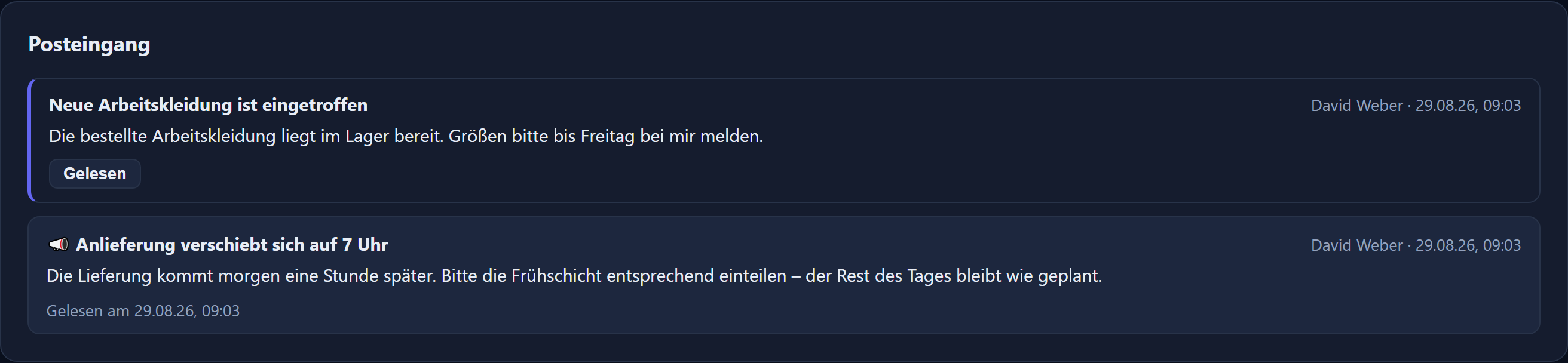
Administrators and management reach everyone, department heads their own departments including any stored deputy, and a named line manager the people assigned to them. Everyone else has a mailbox but no write access.
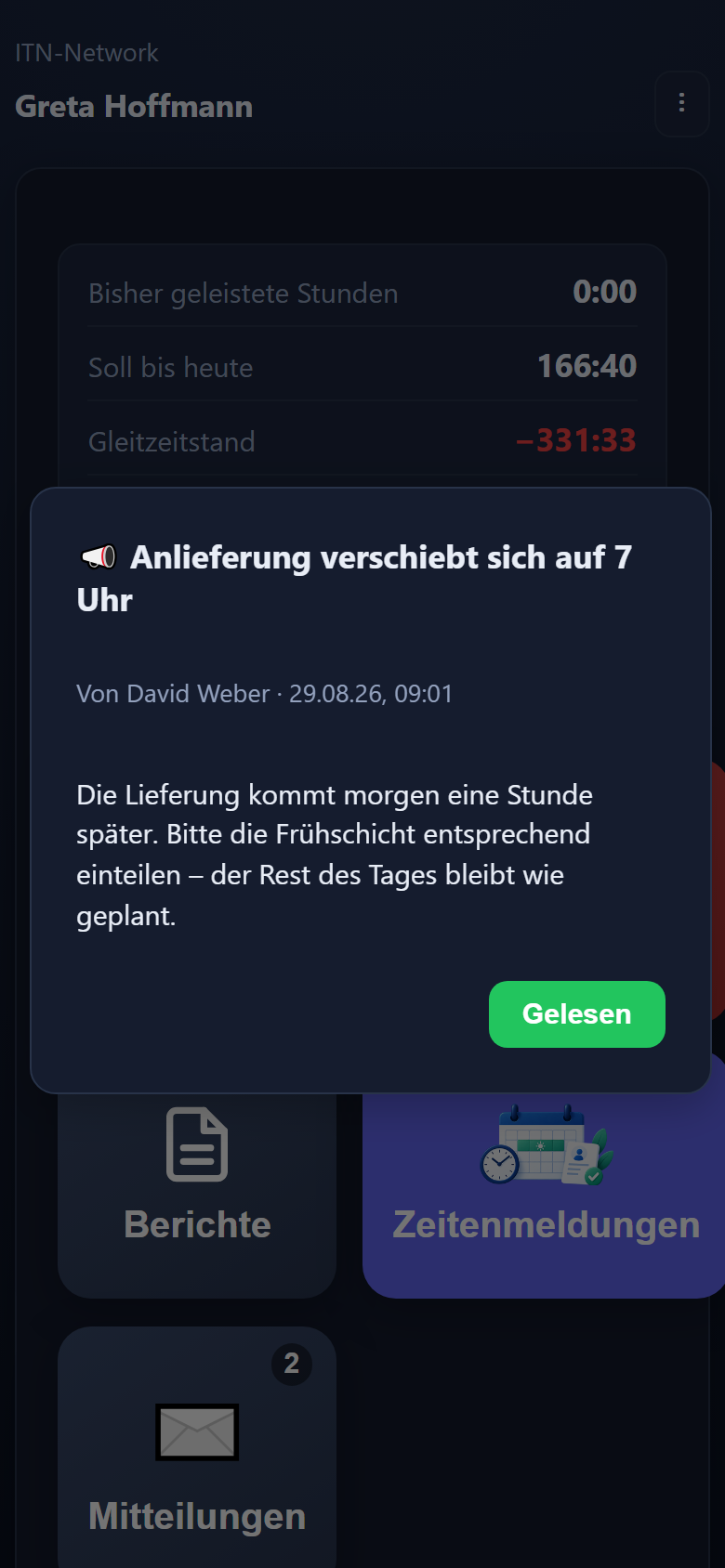
The messages chapterA normal message waits in the mailbox; the bell in the header and the tile in the mobile app show how many are unread. One marked important opens as a window at the next start, and can only be closed with „read“ — and at the time clock straight after the PIN, so it reaches colleagues without a phone or PC as well.
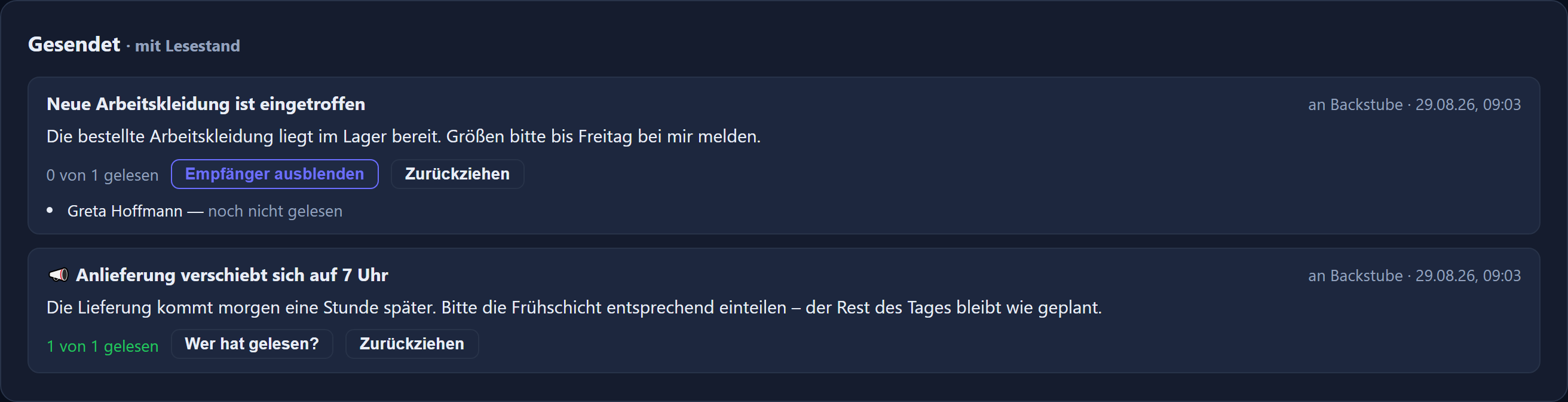
Every sent message shows how many recipients have read it — and, if it also went out by email, how many emails were sent. So it is demonstrable who had the information. A message can be withdrawn; it then disappears from every inbox in the app, although emails already sent remain.
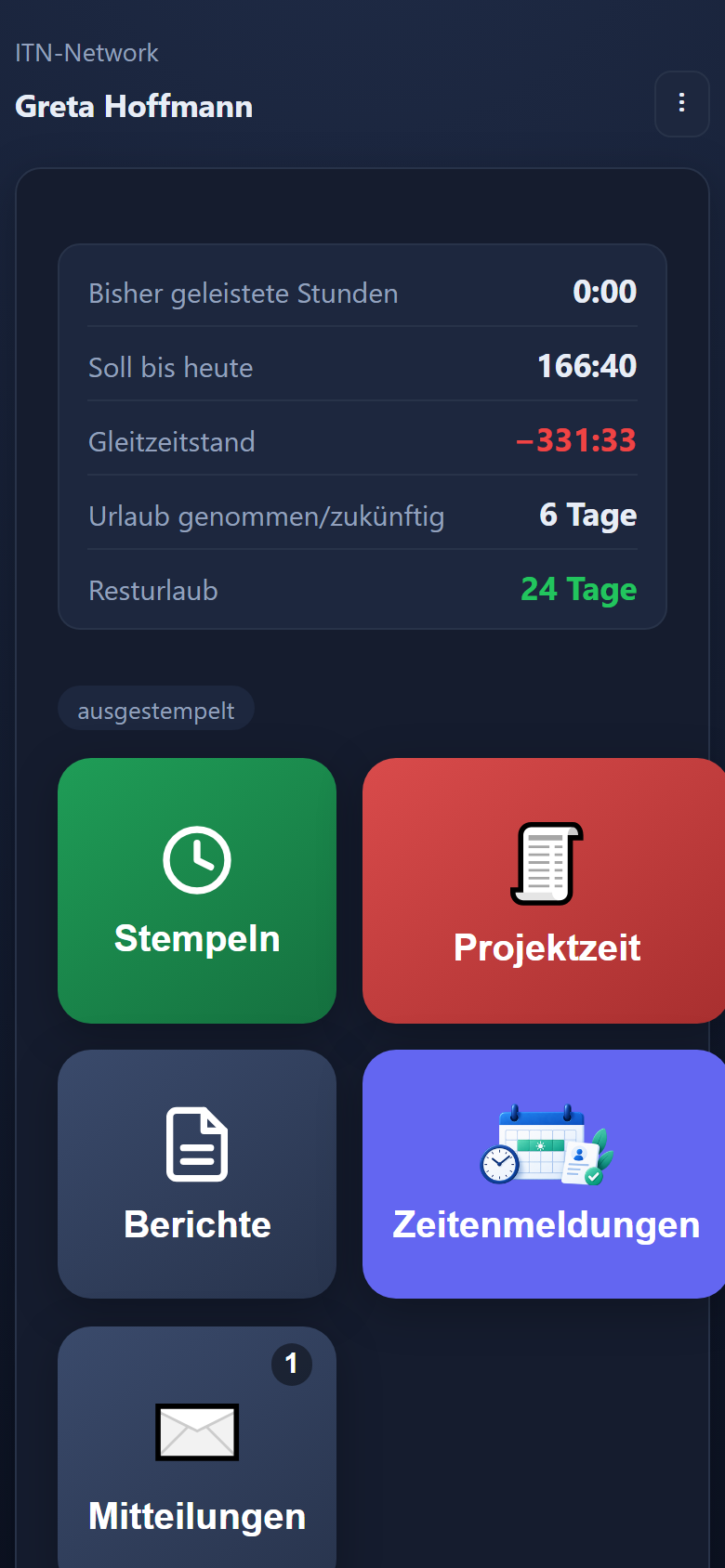
Anyone already using the mobile app to clock in has the messages along with it. They arrive with the rest of the data — nothing to install, nothing to enable and no second login. A tile of its own appears on the home screen with the number of unread messages; one tap opens the inbox, where they are read and acknowledged with „Gelesen“ (read).
A message marked important does not wait in the inbox: it opens as a window the next time the app starts, and closes only on acknowledgement. For the shift handover that really has to reach everyone, that is the difference between „it was on the notice board“ and „they have taken note of it“.
Operating system notifications are deliberately not used. There is no permission anyone could refuse, and nothing appears on the lock screen — which matters on private phones that nobody has to hand over to the business.
The messages last loaded stay in the app, even where there is no signal in the workshop or the basement.
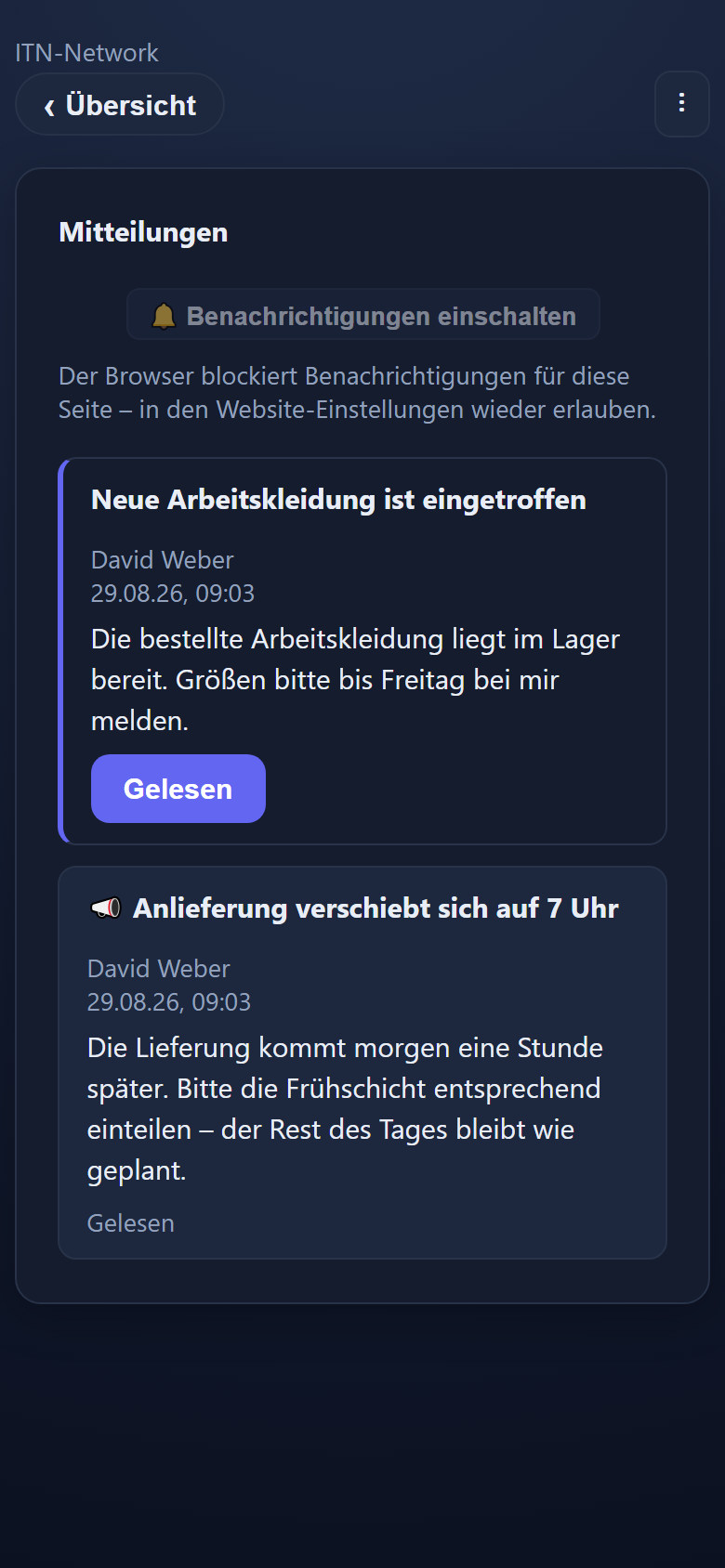
No chat, no discussion. Anyone who wants to request something uses the request workflow — where the route and the decision are settled.
With the „Auch per E-Mail senden“ (also send by email) tick box, every recipient with a stored notification address also receives an email of their own — through your own mail server. In the app the message reaches everyone; acknowledging still happens there, and reading the email does not count as read.
Every send appears in the change log with the sender, the subject and the number of recipients.
Time tracking does not end at the clocking entry. What comes afterwards decides whether any work is actually saved.
Draw absences across the days in the calendar bar, see the whole group in the planning view, approve requests with one click. Add types such as child sick leave, rehabilitation or parental leave and, if you wish, the sick note check that shows where a sick note is still missing.
Leave and absences in detailMonthly and daily reports, a separate report on premiums, a DATEV import file for LODAS or Lohn und Gehalt with wage types and personnel numbers, and for any other payroll software the payroll summary. In the other direction, the application takes over sick notes from the payroll software via CSV.
Learn moreTarget types, break rules per weekday up to break windows at fixed times of day, core hours and clocking windows, overnight shifts, a flexitime account with capping, free choice of days with a monthly target and models for casual staff without fixed target hours — built once, then assigned.
Learn moreHosted in Germany, every data query confined to your own company, changes logged, editor rights per group.
Learn moreEvery change to hours and every decision on a request is recorded with the person, the time and the reason, and can be inspected on a page of its own with filters. Roles and deputies settle who may do what.
The log chapterVocational school times are stored per school year so that school days are treated correctly in targets and balances — with no monthly handiwork.
The vocational school chapterITN-Zeiterfassung is a web application. There is nothing to install, nothing to roll out and no version that has to match the operating system — Windows, Mac and Linux all work with the same interface.
Windows, macOS and Linux — the application is used in a current browser (Edge, Chrome, Firefox or Safari). No installation, no rights needed on the device, no rollout by IT.
iPhone and Android. The mobile app is opened in the browser and added to the home screen as a PWA — no app store and no device management.
Learn moreAny tablet with a browser, Android device or iPad becomes the shared time clock for the team.
Learn moreThe RFID terminal: a Raspberry Pi with a 7-inch touch display and a chip reader that shows the time clock. Or Datafox terminals of the EVO series with an RFID chip or fingerprint reader — we handle the hardware, the connection and the setup.
Learn moreA hosted cloud service in a data centre in Germany, accessed exclusively over HTTPS. Nothing has to run or be updated on your servers.
Learn moreIf the connection drops, the mobile app stores entries locally and transmits them later with their original time. The PIN terminal, the RFID terminal and Datafox terminals buffer as well.
The mobile app chapterAll you need is a current browser and an internet connection. Clocking through the mobile app additionally requires the device's location permission.
Hours go to the payroll software as a file, reports go to the payroll office as PDFs, and sick notes come back from the payroll software. Which files ITN-Zeiterfassung produces, what it takes in and where else it connects.
An import file for DATEV LODAS or Lohn und Gehalt, built to DATEV's interface descriptions — with monthly values, or with the working hours per day instead of the monthly total. It contains actual hours, overtime, premiums and every type of absence as days. Both formats are ASCII files; Lohn und Gehalt also needs an INI file once for its ASCII import wizard. With LODAS, a second import of the same month replaces the first instead of booking everything twice (this can be switched off). If a wage type or a personnel number is missing, the export page warns you beforehand. Flat-rate allowances per shift are not in the DATEV file but in the payroll summary.
DATEV and payrollFor payroll offices without DATEV and for payroll software into which the figures are transferred by hand: per employee target, actual, plus/minus, flexitime balance, premiums, allowances with number and total, and the days of absence by type — as a CSV file for Excel or as a PDF. It is calculated from the same monthly evaluation as the DATEV export.
The payroll and DATEV chapterThe personnel number is kept per user and can only be assigned once within a company; leading zeros do not count. Duplicate numbers from older entries are flagged, and the export page names anyone without a number valid for DATEV beforehand. Only administrators create the payroll export and the payroll summary.
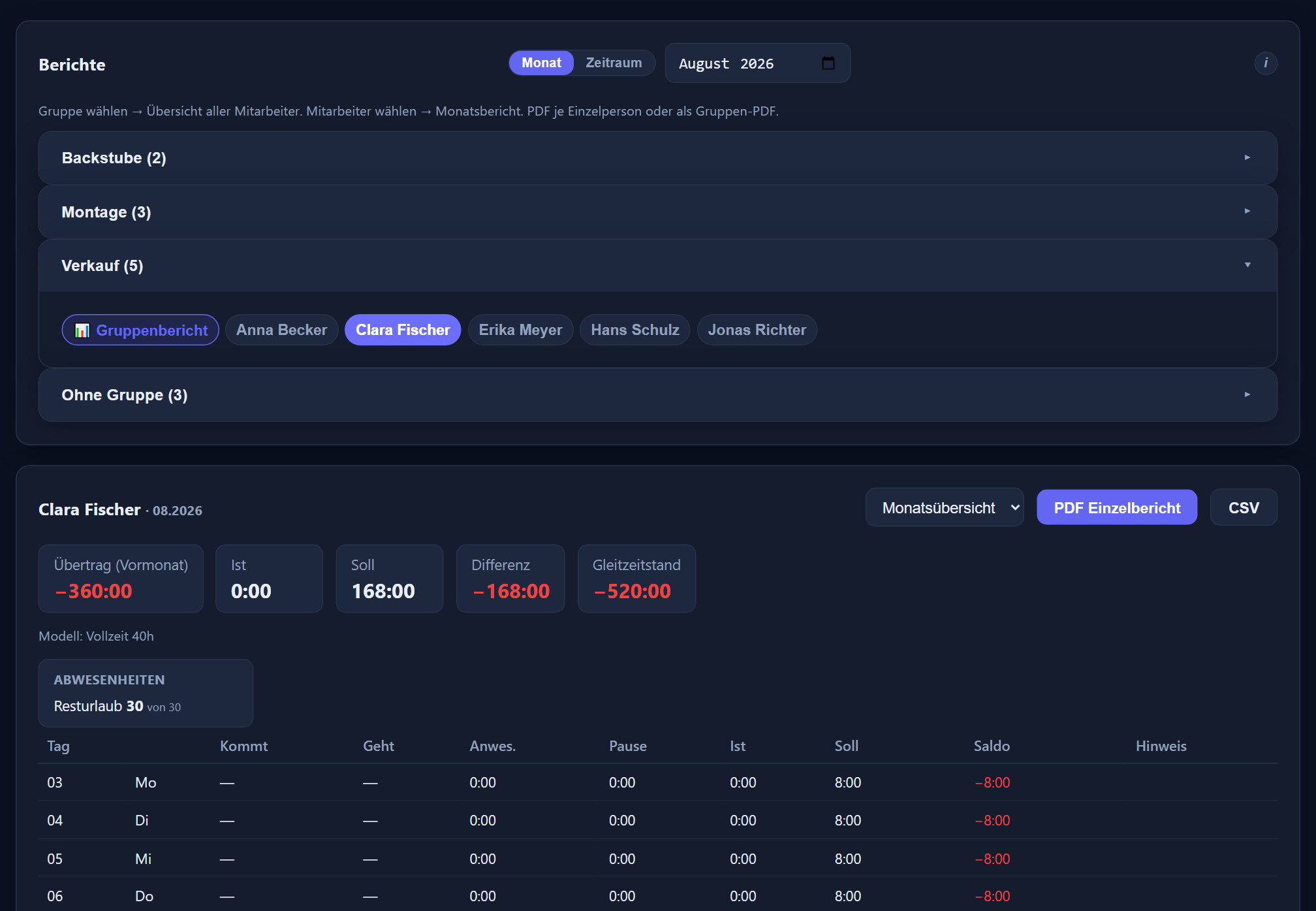
Monthly, daily and premium reports per person as PDF and CSV — in the CSV file the hours as decimal numbers, so Excel can calculate with them straight away — for the whole group a PDF overview or the full report with every individual report, plus the list of all absences. „Per E-Mail senden“ (send by email) sends the selected report as a PDF to up to three addresses, such as the payroll office — with a check before sending and an entry in the log. Flat-rate allowances per shift appear as number × amount.
The reports chapterThe shift plan comes as a PDF in three versions and as „Excel (CSV)“ — the same grid as a table, with a planned hours column per employee. The change log can be exported as a CSV, filtered by period, area and person.
Your payroll software retrieves the electronic sick note (eAU) from the health insurer. You upload its absence records as a CSV file: map the columns once, see in the preview what is new and what is already there, then enter them.
Under „E-Mail (SMTP)“ you enter your mail server and check it with a test email. If you wish, notifications about time correction requests go out that way, as do reports sent by email and — when the sender ticks „Auch per E-Mail senden“ (also send by email) — messages as an additional email. A sending log shows what was sent. There are no push notifications to the phone.
If you wish, the time tracking enters absences in the personal calendar via CalDAV — voluntary and set up per employee. Sparing with data: the entry names the type, such as „Urlaub“ (leave), but sickness, child sick leave, rehabilitation, phased return to work and maternity protection all appear only as „Krank“ (sick), and if you prefer, every entry just reads „Abwesend“ (absent). With the Projektzeit add-on module, each person's own assignments also reach their phone or mail calendar through a personal subscription link.
Leave and absencesDatafox devices report every entry straight to the server. If the network drops, the device buffers the entries and sends them later.
A small window with large buttons for clocking in and out, installable as a small app of its own. Pinned, it stays in front of other programs, where the browser supports it.
Step by step in the manual (in German): DATEV and payroll export · settings · terminals · PC clock-in widget.
No pilot and no trial run — organisations with real rotas, real shifts and a real month-end close.
“A time tracking system that simply works – and contact people who listen. Our staff clock in at the PIN terminal. On their phones they request their leave directly in the time tracking system, and the holiday account keeps count by itself. Important messages reach everyone, and we can see who has read them. When we wanted to use a spare monitor as a digital shift plan, it was done shortly afterwards – the paper notice has had its day.”
“We are very glad that we chose ITN-Zeiterfassung. It is refreshingly simple: our staff clock in at the PIN terminal. At the terminal, a tap on ‘Kommen’ (arrive) or ‘Gehen’ (leave) and the personal PIN is all it takes. And we in the HR department can see at a glance what is being calculated – target, actual hours and balance are set out side by side, easy to follow.
Leave planning is a great relief. Leave is no longer requested on slips of paper or by calling across the room, but directly in the time tracking system – on the PC or by phone. The manager decides with one click, and only then is the leave entered. The holiday account works out entitlement, carry-over and remaining leave by itself, half days included. In the planning view we see the whole department at a glance: who is on leave, who is off sick and what has already been pencilled in.
What we particularly value are the people at ITN-Network: competent, quick to reach and genuinely listening to what we ask for. A good example is our shift plan: we create it for the laboratory directly in the time tracking system. We still had a spare monitor and wanted it to show the month's shift plan and replace the paper notice. Shortly afterwards the plan was hanging on the wall in digital form – always up to date, with no printing out and swapping.
It was the same with other requests, such as a note on whether a sick note has been handed in, or additional absence types such as rehabilitation, phased return to work, maternity protection and parental leave. Requests like these are not put on the back burner but implemented – sometimes the very same day. For us, the time tracking system makes everyday work genuinely easier.”
Ms Janesch, Head of Laboratory, Pathologie Rosenheim
The Deutscher Kinderschutzbund Ortsverband Neumünster e. V., a non-profit provider of child and youth welfare services, uses ITN-Zeiterfassung. Around fifty employees work with it: they started with the mobile app, and staff also clock in through the browser at their desks.
No feature tiers: every function of the time tracking is in the price, and the only thing you can add is the Projektzeit add-on module. Billing is monthly in arrears, based on the highest number of users enabled at the same time during the month — the administrator counts too.
plus VAT
Every function of the time tracking is included — from clocking in through working time models and premiums to reports and the payroll export.
plus VAT
For local authorities and public bodies, for parishes and free churches, and for non-profit organisations. Whether your organisation qualifies is something we can establish in a short conversation.
| Working time recording | ✓ | Working time models | ✓ |
|---|---|---|---|
| Browser on Windows, Mac, Linux | ✓ | Premiums, derived automatically | ✓ |
| Mobile app for iOS and Android | ✓ | Flexitime account with capping | ✓ |
| PIN terminal | ✓ | Reports and analysis | ✓ |
| Fixed terminals connected | ✓ | Payroll and DATEV export | ✓ |
| Shift planning | ✓ | Messages to staff | ✓ |
| Leave management | ✓ | Read receipts | ✓ |
| Absences | ✓ | Change log | ✓ |
| Request workflow | ✓ | Vocational school planning | ✓ |
| Setup assistant | ✓ | Sick note check | ✓ |
| Time corrections | ✓ | Live attendance | ✓ |
Notice is one month to the end of a calendar month. Deactivated and departed employees cost nothing from the following month.
€1.90 per user per month plus VAT, not included in the price and only available together with ITN-Zeiterfassung. Clock hours against customer, project and activity — at a desk or on a phone, with journeys and a visit report including signature. Plus a deployment plan and the project report, and per project a budget in hours and/or euros with a warning threshold; consumption is shown as a traffic light.
We set the application up together with you and stay on hand by phone while we do — a one-off flat fee of €250 plus VAT. If you would rather do it yourself, the setup assistant takes you through it.
Fixed terminals are quoted separately — the price depends on the model and the number of sites. Tell us how many employees and sites are involved and you will get a figure you can rely on.
A bakery plans differently from a public body, and a building site has other worries than a chain of shops. Six ways into the same program.
Clocking in happens on site — even with no signal. Sites with a radius, retrospective entries with approval, hours instead of a slip in the glove compartment.
Time tracking in the tradesNight shifts across midnight, night and Sunday premiums from the clock-ins, several branches and apprentices at vocational school.
Time tracking in bakeriesChanging duties in the monthly grid, shift patterns for rolling sequences — and short-notice changes reach the workforce with a read receipt.
Time tracking in hospitalityOne group per branch with its own manager, attendance per house on a board, evaluations for head office. Priced per employee, not per site.
Time tracking across branchesFlexitime with core hours and a clocking window, a time account with carry-over and capping, plus a log for every change. 1.00 € per employee.
Time tracking in the public sectorThe full scope of features even with five employees, leave without paper slips, cancellable monthly. For non-profit organisations 1.00 € per employee.
Time tracking for non-profitsPrice, devices, data protection and running it — answered plainly.
Use costs €2.90 per employee per month plus VAT. Billing is monthly in arrears, based on the highest number of users enabled at the same time during the month — the administrator counts too, and deactivated or departed employees cost nothing from the following month. Every function of the time tracking is included; the only thing you can add is the Projektzeit add-on module for project time, at €1.90 per user per month plus VAT. If you would like help, we set the application up together with you and stay on hand by phone — this setup assistance costs a one-off flat fee of €250 plus VAT. Fixed terminals are quoted separately.
No. Shift planning is part of ITN-Zeiterfassung and is included in the price of €2.90 per employee per month — it is not an add-on module, and there is no higher tier and no separate licence. It sits in the same program as clock-ins, leave and the payroll export, and works from the same figures.
Each shift is stored with a long name and a short name, a start time, a tolerance in minutes and a colour — an early shift at 6:00 with 25 minutes of tolerance is recognised on any clock-in between 5:35 and 6:25. If you wish, a planned end with a break, a tolerance before the end of the shift and premiums of the shift's own can be added; with the planned end, the planning shows „geplant / Ziel“ (planned / target) beside every name. For rotating duties, every employee gets a shift pattern: a weekly grid over up to twelve weeks that then repeats. „Automatisch vorbelegen“ (pre-fill automatically) turns those patterns into the monthly plan, after a preview and on confirmation; afterwards any day can still be changed graphically in the grid. When someone clocks in, the time of day decides which shift they are actually working.
The planning stays visible and the actual shift appears beside it — outlined in red in the grid, shown as ≠ in the mobile app. The calculation always follows the shift actually worked: whoever works at night receives the night premium, even if they were rostered for the early shift. Anyone who is rostered and does not turn up receives the target hours of the planned shift, provided the shift has a working time model of its own — so a day missed from a six-hour shift with its own model produces six hours of deficit, not eight. Without a model of the shift's own, which is the usual case, the person's own target applies.
Yes. For church, non-profit and public-sector employers, use costs €1.00 per employee per month plus VAT — for regional churches, dioceses and parishes just as for free churches. Get in touch and we will quickly establish whether your organisation qualifies.
No. Staff can clock in and out in the browser at their desk, with the mobile app, on a shared tablet used as a PIN terminal, or at a fixed terminal. You decide per site and per group of employees which route fits — several at once, if you like.
Yes, on all three. ITN-Zeiterfassung is a web application and is used in a current browser — Edge, Chrome, Firefox or Safari. There is nothing to install and no version that has to match the operating system. On phones, iOS and Android are added, as a PWA without an app store, and for the PIN terminal any tablet with a browser will do.
No. No software is installed on the PCs or the phones, and nothing runs on your servers. The application is operated as a hosted cloud service in a data centre in Germany, and access is over HTTPS in the browser.
Yes. The mobile app is opened in the browser and added to the home screen as a PWA — no app store and no rollout by IT. After signing in, the device registers itself and has to be approved by an administrator; only then do the clocking tiles appear.
When clocking in through the mobile app, location is mandatory. Permitted locations can additionally be stored and checked against. The level — off, mark only or block — applies to the whole account, separately for phone and PC. Individual users or devices can be exempted from the check or restricted to particular permitted locations. If the positioning is too imprecise, the entry is rejected with a note explaining why.
Yes. Without a connection, entries are stored locally and transmitted with their original time once a connection returns. Every entry shows its status, so it stays clear what has already been transmitted and what is still waiting.
Yes. The data of each company is kept entirely separate, and within one company you can form groups with editors assigned their own rights. A site manager then sees only their own area, while head office sees the whole.
Through the reports and the export. The month-end close can be produced as an overview per employee, along with daily detail and a separate report on premiums — as a PDF, as a CSV file or emailed straight to the payroll office. For payroll there is the DATEV import file carrying wage types and personnel numbers, and for any other payroll software the payroll summary as a CSV file or PDF. Anyone who has left the company is included up to and including the month in which they left.
Yes. The export page produces an import file for DATEV LODAS or Lohn und Gehalt, built to DATEV's interface descriptions; your payroll office reads it into its payroll software. The wage type numbers for hours and absences are kept in the settings, the wage type of a premium sits on the premium itself, and personnel numbers are maintained per user. That way the exported values land on the right wage types in the payroll software. For any other payroll software there is the payroll summary as a CSV file or PDF.
Yes. Working time models handle different target types, break rules per weekday — statutory, flat, staggered or as break windows at fixed times of day — core hours and clocking windows. If you wish, clocking out and back in during the day counts as a break. The flexitime account runs alongside and can be capped. Overnight shifts are attributed to the correct day. Public holidays can be counted as a full day, a half day or a fixed number of hours off — Christmas Eve as a half day, for example.
Yes. Premium types are stored with the window in which they apply — at night, on Sundays and public holidays, for instance — and are then derived automatically from the clocking entries. They are assigned in the working time model or directly to a shift; if the same premium sits in both places, it counts once. For each premium you can decide whether it is paid out or credited as time. On top of that there can be a flat-rate allowance per shift, say €20.00 for every early shift: it is always shown as pay and appears in the reports and the payroll summary.
Absences can be drawn straight across the days in the calendar bar. For the group there is a planning view with every employee shown one above the other, and requests are approved from the dashboard with one click. The holiday account shows entitlement, days taken, days planned and days still free to plan. A half day of leave counts as 0.5 days and credits half the day's value; the other half is clocked as usual. When leave is entered over a period, full public holidays that are days off are skipped. Besides leave, sickness and time off, the application knows child sick leave, rehabilitation, phased return to work, maternity protection, parental leave, business travel and training, special leave, unpaid leave, flexitime compensation and vocational school — parental leave counts as neutral, with no deficit on the account.
Yes, once you switch on the sick note check. A tick on the period of sickness then reads „sick note received“; from the sickness day you set — by default the third calendar day — „sick note missing“ appears in time tracking, planning, on the dashboard and in the reports until it is ticked. Sick notes your payroll software has retrieved electronically (eAU) can be uploaded as a CSV file and then count as received automatically. Only administration and department heads see any of this.
Yes. Staff submit their own requests — at their desk or on the move with the mobile app. Available are leave — including half days — special leave, unpaid leave, business travel and training, flexitime compensation, correcting a forgotten or incorrect clocking time, and cancelling a day already entered. Nothing on the time account changes until a decision is made; requested leave appears in the group's grid as planned.
The line manager named for that person. The department head role decides for its own groups, and a deputy can additionally be stored per group. Anyone without a line manager of their own goes to the management status, which several people can hold. Nobody approves their own request — not even a department head.
On request the application sends emails through your own mail server in both directions: to those responsible when a request comes in, and to the employee — as an acknowledgement of receipt on submission, once it has been decided, and when leave pencilled in is confirmed. Every request shows whether the email was sent; „verschickt“ (sent) means your mail server has accepted it. If no notification address is stored, the message simply appears in the web and mobile app — no mailbox is needed for that.
Yes. Messages go to one person, a whole department or everyone. The recipient confirms with „read“, and the sender sees under „sent“ who has taken note — with names and times, if you want. Messages marked as important open as a window at the next start, which can only be closed by confirming. If you wish, a message also goes out as an email through your own mail server; there are no push notifications to the phone. Administrators, management, department heads for their own departments and named line managers may write; everyone else has a mailbox. It is deliberately not a chat — requests go through the request workflow.
Yes. Changes to times and decisions on requests are recorded with the person, the time and the reason, and can be inspected with filters on a dedicated log page. Deleted entries go to a recycle bin rather than into nothing.
Yes. Vocational school times can be stored per school year for apprentices, so that school days are treated correctly in targets and balances and do not have to be maintained by hand.
The application runs as a hosted cloud service in a data centre in Germany, and access is over HTTPS. Every data query stays confined to your own company, and changes are logged.
Introducing a system for recording working hours engages co-determination. In practice that mainly concerns how it is arranged — which routes are used, for instance, and how location data is handled. Technically the application supports that through graded editor rights and logging. For a legal assessment of your own case, please consult your legal advisers.
Yes, on request. We show the application against your own processes once a date is arranged — that tells you more than a trial account with no relation to your working time models.
A current PC is enough for the browser, an iPhone or Android device for the app, and any tablet for the PIN terminal. To clock in with a chip, there is the RFID terminal: a Raspberry Pi with a 7-inch touch display and a chip reader that shows the same time clock — holding up the chip is enough, and anyone who has forgotten it uses their PIN. Fixed Datafox terminals with an RFID chip or fingerprint reader are supplied, set up and connected to the application by us.
A setup assistant takes you through it in eighteen steps — from company details through public holidays, working time models and the team to terminals and the payroll export. It checks your real data for what is already right and what is still missing, such as employees without a start date, each listed by name. „Zeig mir wo“ (show me where) opens the right page and highlights the button to press next. Anything you do not need you can deliberately skip. Every step is also described in the public manual (in German).
There is no minimum term. Notice is one month to the end of a calendar month.
By email to support@itn-network.de, Monday to Thursday from 9:00 to 16:00 and on Fridays from 9:00 to 13:00 (German time). Availability of the application is 98% as a monthly average. Every step of the setup is also described in the public manual (in German).
Yes, as the Projektzeit add-on module at €1.90 per user per month plus VAT. It is not included in the base price and can only be booked together with ITN-Zeiterfassung. Hours are clocked against customer, project and activity — at a desk or on a phone, with journeys and a visit report including signature. A deployment plan and the project report come with it. Each project can carry a budget in hours and/or euros with a warning threshold; the project report shows consumption as a traffic light.
What the law requires by way of records is covered separately under the legal position. Basics such as target hours, actual hours and the time account are explained in the guides.
With your headcount, your sites and your payroll software we can get specific straight away. Leave out anything you do not know.
The button below opens your mail programme with a prepared draft that already lists the details we need in order to quote. Prefer to talk? Give us a call.
Or simply write to info@itn-network.de. Please do not send us credentials or any of your employees' time records — figures are enough for a quote.
Once a date is arranged we show the application using your working time models, not those of an imaginary company.
If you wish, we set up models, accounts and absences together with you as part of the setup assistance — the first month-end close is the real test.
Figures are enough for a quote. Please do not send names or employees' time records.
We develop and look after ITN-Zeiterfassung ourselves, at ITN-Network in Neumünster, Germany. Your enquiry comes straight to us.
Rather talk to someone? +49 (0)4321 7835800 or info@itn-network.de.