
Colour rather than form
Leave green, planned leave hatched, sick red, release yellow. The span colours in as you drag and the account recalculates at once. The eraser takes a marking back just as quickly.
The leave chapterLeave, illness and release are drawn across the calendar rather than typed into forms — for individuals as much as for whole groups. Requests are made digitally, decided with one click, and the time account recalculates at once.
Entry works without forms. Pick a tool, drag across the days — done.
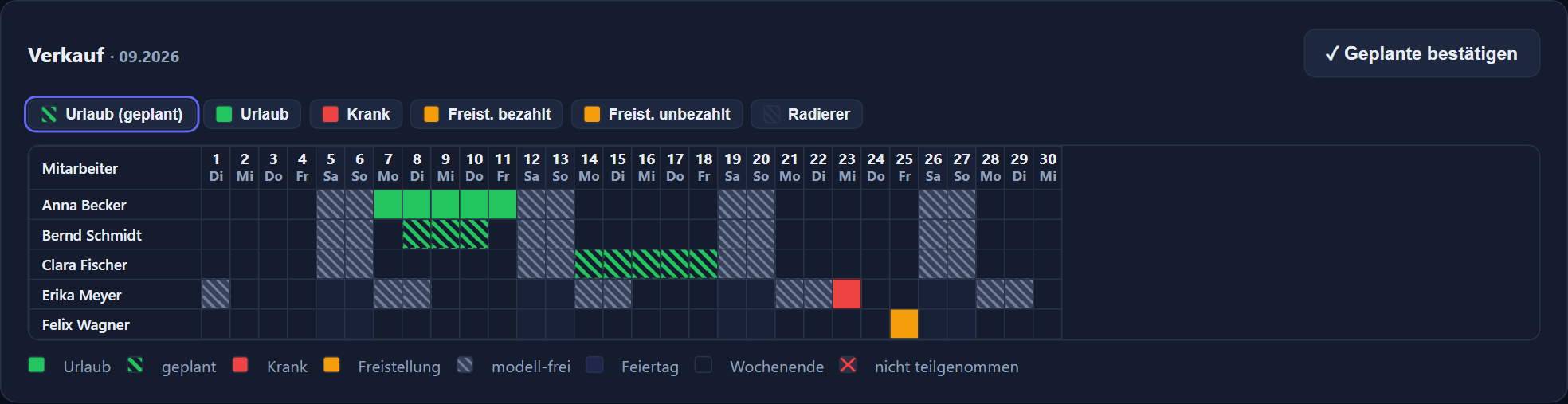
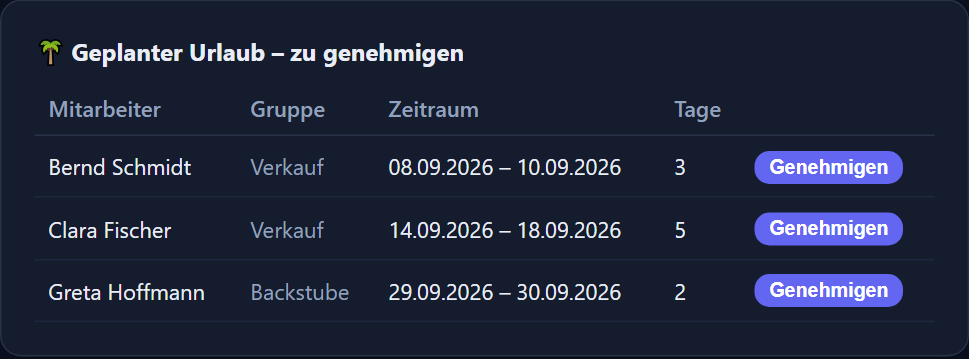
Leave green, planned leave hatched, sick red, release yellow. The span colours in as you drag and the account recalculates at once. The eraser takes a marking back just as quickly.
The leave chapterThe planning view lays the whole group on top of one another: one row per person, one column per day. Two sales assistants in the same week stand out before the second request is decided — and planning happens in the view itself, not in lists.
One holiday account per employee with entitlement, carry-over and remainder. The entitlement is dated: if weekly hours change mid-year, how the entitlement came about stays traceable.
The slip on the desk and the question in passing both go. Until a decision is made, the time account stays untouched.
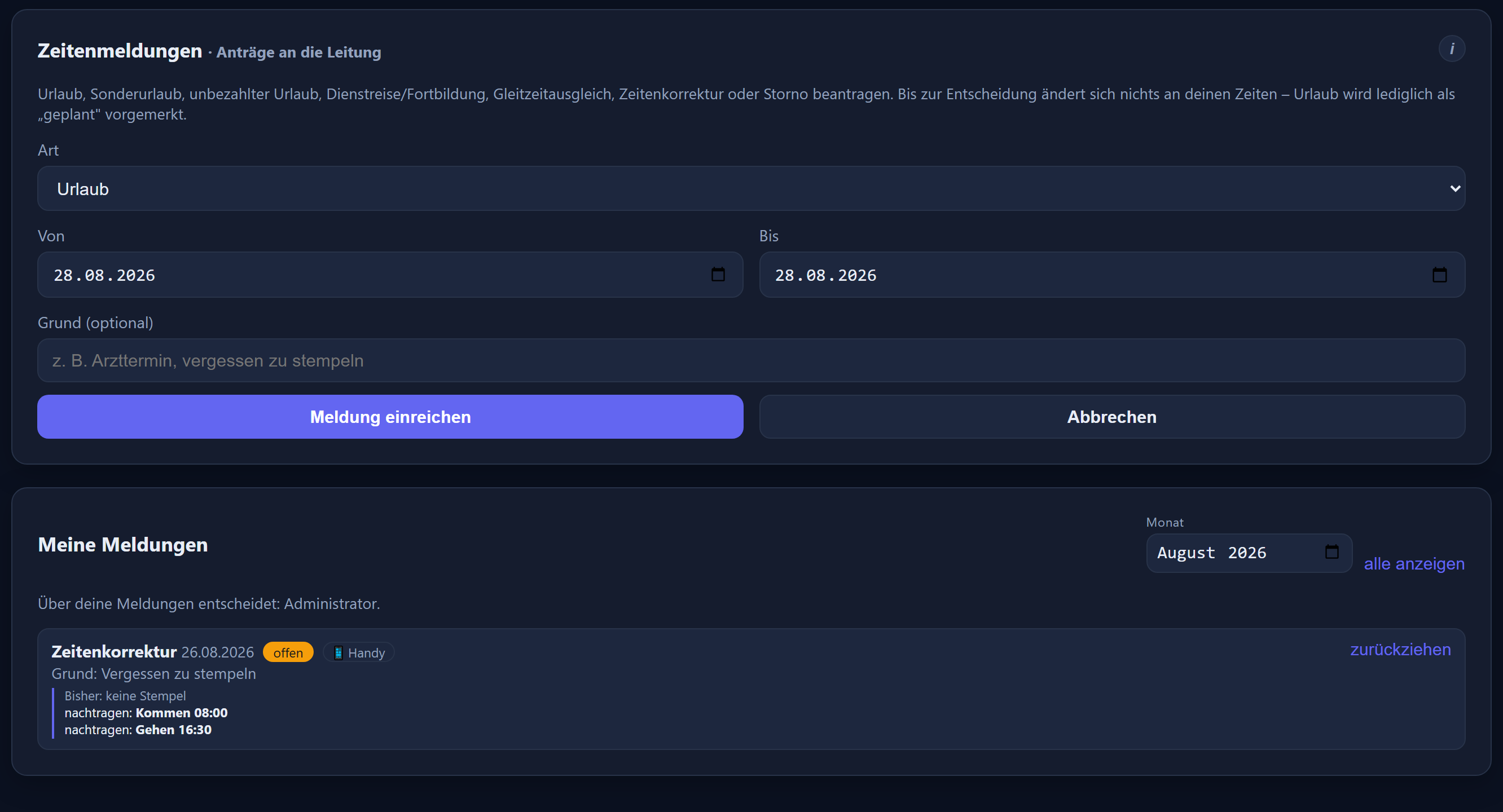
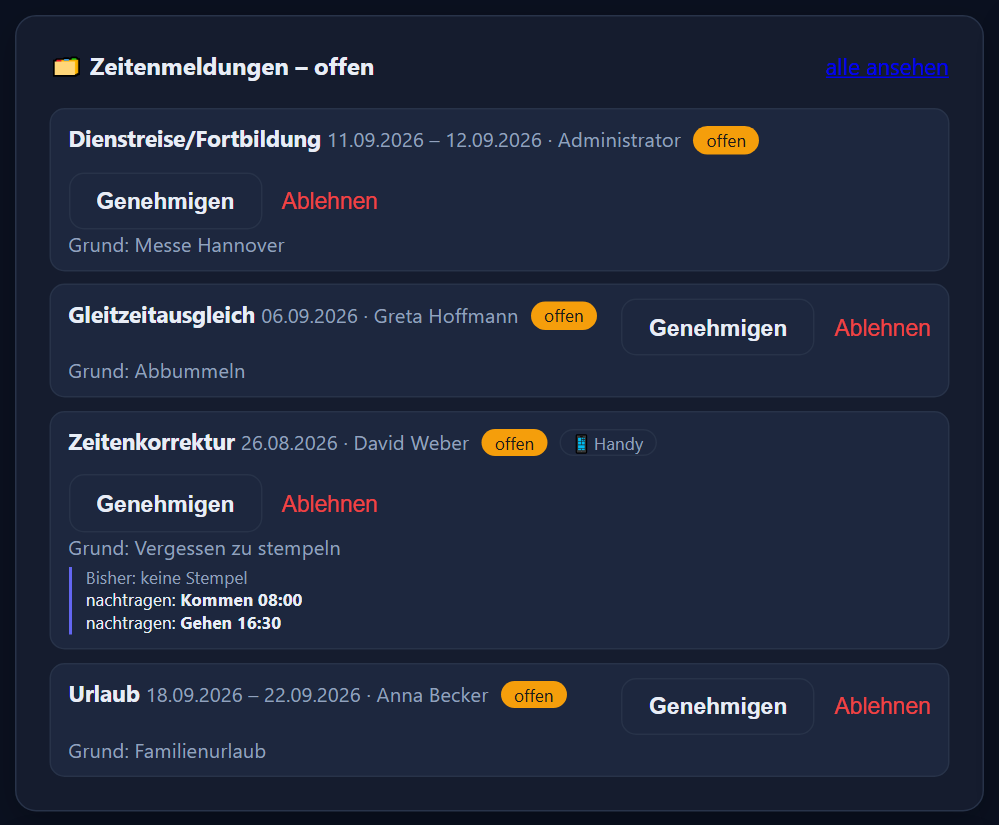
Leave — as a half day too —, special leave, unpaid leave, business travel/training, flexitime compensation, time correction and the cancellation of an entered day. Common reasons are offered for selection and free text stays possible; for a time correction the form shows the day's clock-ins.
The named line manager decides; without one, management does, otherwise the administrators. A deputy can be stored per group so nothing stalls during a holiday.
Not even a department head — for your own request the button is simply not there.
Before approving a time correction the server checks whether the day has been edited since. If so, it declines rather than overwriting a newer change.
Through your mail server: a message to those responsible on arrival, and to the employee as a confirmation of receipt and on the decision. Under each request it says whether the email was sent. Without a stored address it all simply appears in the web and mobile app.
Who decided what and when is in the change log — with person, time and reason.
Anyone who wants their leave in their mail program should not have to enter it twice.
With the calendar connection set up, every full-day absence is entered as an appointment in the personal calendar — on a computer, on a phone or in webmail.
Planned leave appears as a tentative appointment. On approval the same appointment is set to confirmed; if the absence is removed, the appointment goes too.
The exchange runs over CalDAV. That lets the time tracking work with a whole range of mail and groupware servers, self-hosted ones included.
The connection is set up for each employee individually, with their own password stored encrypted.
Graphically, with no form. In the calendar bar you pick the tool — leave, planned leave, sick, paid or unpaid release — and drag it across the days. The span colours in immediately and the account recalculates at once. When leave is entered over a period, whole public holidays that are days off are skipped; sickness and similar absences run straight through. The eraser takes a marking back just as quickly.
Yes. When entering or requesting leave there is a „halber Tag“ (half day) tick, and group planning has a „½ Urlaub“ tool. A half day of leave counts as 0.5 days and credits half the day's value; the other half is clocked as usual. In the grid the day is half filled.
Yes, that is what the planning view is for: one row per person, one column per day, the whole group side by side. Leave, planned requests and sick days lie on top of one another in colour, so bottlenecks stand out — two sales assistants in the same week are visible before the second request is approved.
Yes, at a computer or on a phone. Requested leave appears immediately as „geplant“ (planned) in the grid, so whoever does the department's planning sees early who would like time off. Nothing changes on the time account until a decision is made.
Special leave, unpaid leave, business travel/training, flexitime compensation, the correction of a forgotten clock-in, and the cancellation of an entered day. Common reasons are offered for selection — forgot to clock, wrong time, clocked twice, terminal unreachable, doctor's appointment, business errand — and free text stays possible.
The person's named line manager. If none is stored, management decides, otherwise the administrators. Open requests appear as a figure and a card on the dashboard and are approved there, or declined with a reason.
No, not even a department head — the button simply is not there for your own request. A deputy can be stored per group so that nothing stalls while the manager is away.
Before a time correction is approved, the server checks whether the day has been edited in the meantime. If it has, the approval is declined rather than pushing a stale correction over a newer change.
If you want, the system sends email through your mail server, in both directions: to those responsible when a request arrives, and to the employee — as a confirmation of receipt on submission, once it is decided, and when planned leave is confirmed. Under each request it says whether the emails were sent, meaning accepted by the mail server; administrators also have a sending log covering the last 30 days. Without a stored address the decision simply appears in the web and mobile app — nobody needs a mailbox for it. There are no push notifications to the phone.
Yes, through CalDAV — the open calendar standard. With the connection to your mail server set up, every full-day absence is entered as an appointment in the personal calendar: planned leave as a tentative appointment, switched to confirmed on approval, and deleted again if the absence is removed. The connection is voluntary and set up per employee with their own, encrypted password.
Each employee has a holiday account with entitlement, carry-over and remainder. The entitlement is dated, so a change mid-year — a change in weekly hours, for instance — stays traceable.
Child sick leave, rehabilitation, phased return to work, maternity protection and parental leave, plus paid or unpaid time off, business travel and training, special leave, unpaid leave, flexitime compensation and vocational school. The rarer types sit under „more types …“ in the calendar bar; in group planning, rehabilitation, phased return, maternity protection and parental leave have buttons of their own. Child sick leave counts like sickness but is shown separately; parental leave is neutral — no deficit on the account and no working hours in the payroll export.
With the sick note check, which you switch on in the settings. Each period of sickness then gets a tick „sick note received“. From the sickness day you set — by default the third calendar day — „sick note missing“ appears in time tracking, planning, the dashboard and the absence overview until it is ticked. Only those who may edit times see it — administrators for everyone, department heads and editors for their own groups — and it changes nothing in targets, actual hours or pay.
When entering „sick“ (or „child sick“) there is a tick to count the rest of the day as sick. From the last clock-out, the time up to the daily target is then credited and the day is fulfilled — instead of a full-day sickness entry crediting the whole target on top of the hours already worked.
Everything in detail is in the chapters leave and absences and requests of the feature reference. How leave without paper slips works in an organisation with no HR department of its own is shown on the page for non-profit organisations.
Step by step in the manual (in German): planning and absences · time correction requests.
A spreadsheet, a paper form, a word in passing? Tell us how it is handled today and how many people are involved — then we will show the route on your own case.
The button below opens your mail programme with a prepared draft that already lists the details we need in order to quote. Prefer to talk? Give us a call.
Or simply write to info@itn-network.de. Please do not send us credentials or any of your employees' time records — figures are enough for a quote.