NIS2 compliantBSI GrundschutzGDPR compliantProxmox hosted in GermanyOPNsense firewallsManaged mail serversNIS2 compliantBSI GrundschutzGDPR compliantProxmox hosted in GermanyOPNsense firewallsManaged mail servers
Night, Sunday, public holiday — calculated, not added by hand
Premiums arise from the clock-ins as soon as the entitlement windows are stored once. Whoever worked at night gets the night premium, without anyone going through lists at the end of the month.
Night, Sunday and public holiday each with their own window
Windows may run across midnight, 22:00 to 06:00 for instance
Overtime daily or weekly
Premiums on the working time model or directly on the shift
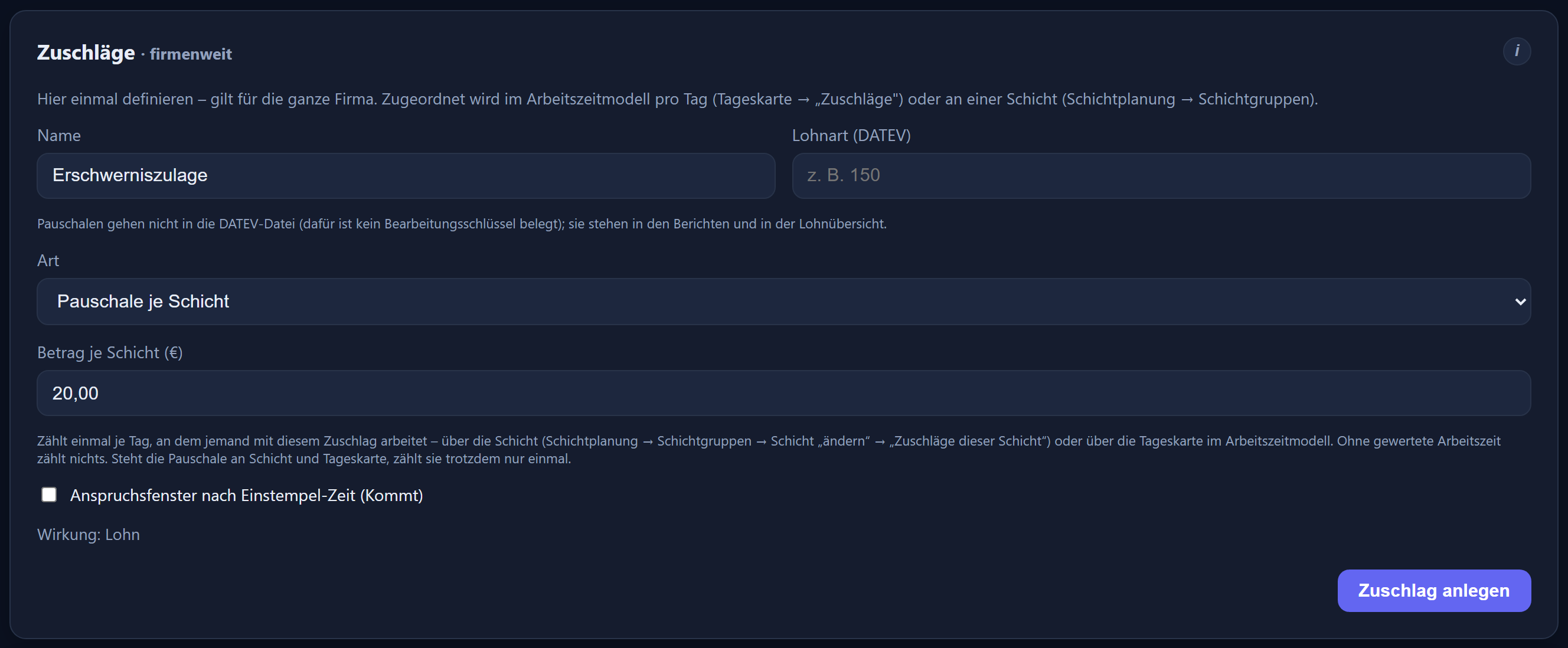
A flat-rate allowance per shift, €20.00 per early shift for instance
Premiums paid out or credited as time, the allowance always with the wages
Premiums are a company-wide catalogue. Where they apply is decided by the working time model and the shift.
Per entry: type, time window, rate and wage type — for the flat-rate allowance, the amount per shift. The interface is in German.
An entitlement window, not a rule of thumb
Night, Sunday, public holiday and freely defined premiums apply within a from-to window, which may run across midnight. Several premiums per type are possible, such as night 25% and night 40% with different wage types. If you wish, a premium applies only when the first clock-in of the day falls within a given time window.
Daily above the daily target, or weekly as whatever lies above the target in the calendar week. For everything else there is the „Frei definiert“ (freely defined) type with a time window of its own, for an evening premium from 20:00 to 22:00, say.
Money or time
For each premium you set the effect: paid out with the wages or credited to the time account, along with the percentage; a flat-rate allowance per shift is always paid out with the wages. A premium takes effect only once it is assigned to a day card in the working time model or to a shift — so different weekdays and shifts carry different premiums.
On the shift
Allowances that belong to the shift
Premiums can also be assigned directly to a shift — as a percentage of the time within the window or as a fixed amount per shift.
Creating a flat-rate allowance: type „Pauschale je Schicht“, amount €20.00, paid out with the wages. The interface is in German.
Premiums of this shift
On the shift you pick premiums from the catalogue. They apply on every day with that shift — rostered or recognised at clock-in — in addition to the premiums of the working time model, and on public holidays too. If the same premium sits on the shift and the model, it counts only once.
Flat-rate allowance per shift
A fixed amount instead of a percentage, €20.00 for every early shift, for instance. It counts once per day with working time credited; a day of leave or sickness without a clock-in does not count. It is always paid out with the wages.
In the reports and the payroll summary
The reports show the allowance as count × amount, for example „5 × 20,00 € = 100,00 €“. The payroll summary has a count and a total (€) column for each flat-rate allowance.
Not in the DATEV file
Flat-rate allowances are not included in the DATEV file; the export page points this out. Your payroll office transfers them from the payroll summary.
How shifts are planned and recognised at clock-in is covered under shift planning.
To the payroll office
With the right wage type
A premium is of little use if it lands in the wrong account in the payroll run.
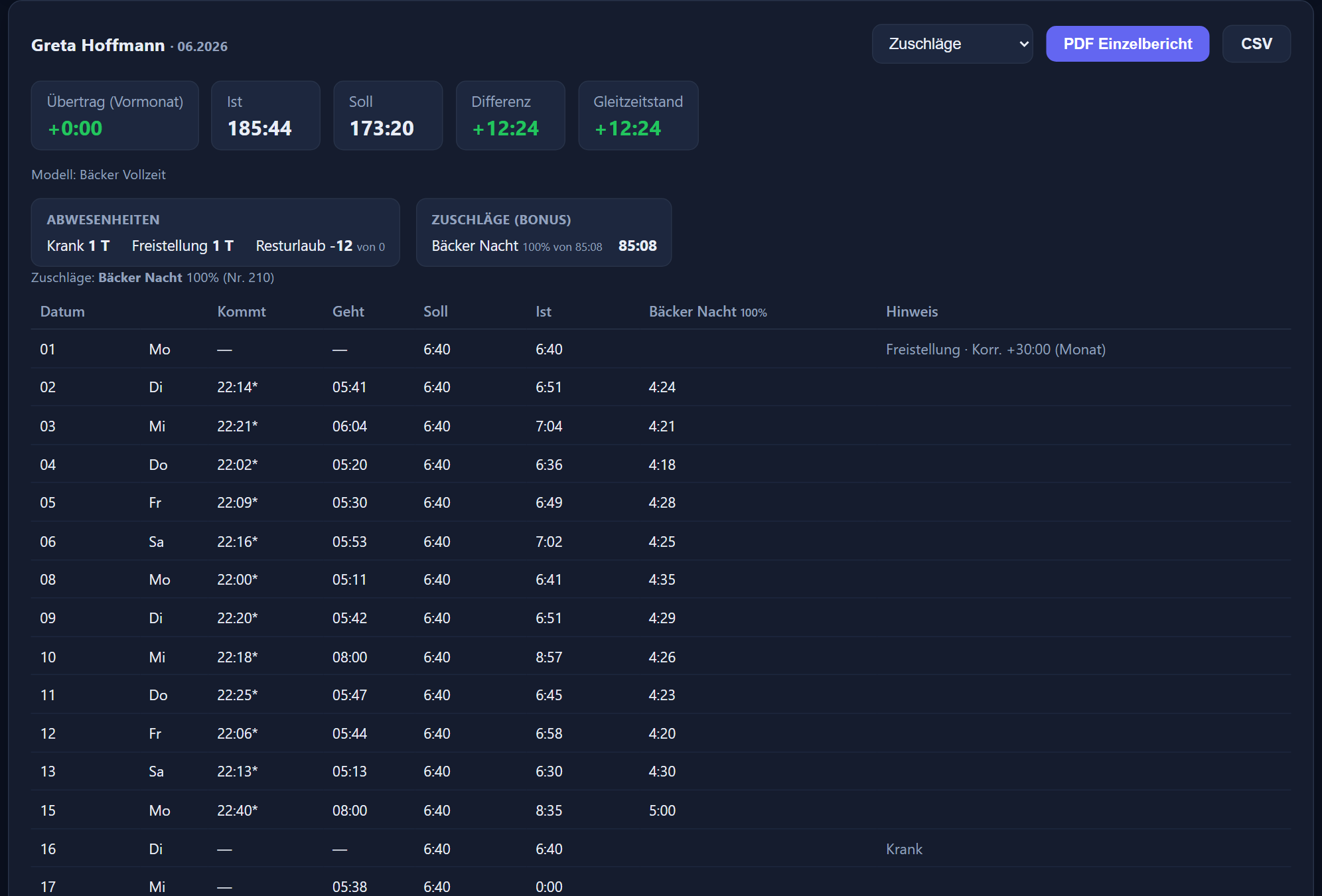
A separate report on the premiums: the premium-eligible time per day, flat-rate allowances as count × amount — as a table, PDF and CSV. The interface is in German.
Wage type on the premium
The number stored on the premium is its DATEV wage type — and it is maintained there only. Several premiums per type with different wage types are possible. What is exported are the hours that fall under the premium. Without a number a premium is not included in the DATEV file, and the export page warns about it.
Its own report
Besides the monthly and daily overviews there is a report covering the premiums alone — per day clock-in, clock-out, target, actual and a column for each premium. For checking before the export and for questions afterwards; the CSV file gives the hours as decimals.
A payroll summary for any payroll software
For payroll offices without DATEV: the payroll summary as CSV or PDF shows per employee, among other things, the premium-eligible time per premium and the count and total per flat-rate allowance.
What was worked is what counts
If someone works a different shift than planned, the premiums of the shift actually worked apply. Night work brings the night premium, even when rostered for earlies.
The whole route from clock-in to payroll file is under DATEV and payroll, and the models behind it under working time models. What premiums look like day to day in particular industries is shown on the pages for bakeries and hospitality.
Questions and answers
Frequently asked questions about premiums
Are premiums calculated automatically?
Yes. Premiums are stored with their entitlement window — at night, on Sundays or on public holidays, for instance — and are then derived from the clock-ins. Nothing has to be worked out afterwards.
How is a night premium across midnight handled?
An entitlement window may run across midnight, from 22:00 to 06:00 for example; what counts is the working time inside the window. For night and freely defined premiums, from and to must differ; for Sunday and public holiday, from = to stands for the whole day. Several premiums per type are possible, such as night 25% and night 40%.
How is overtime calculated?
Daily as whatever lies above the daily target — or weekly as whatever lies above the target in the calendar week. Which of the two applies is set on the premium.
Can we create premiums of our own?
Yes. Alongside night, Sunday, public holiday and overtime there is the „Frei definiert“ (freely defined) type with a from-to window of its own, for an evening premium from 20:00 to 22:00, say, and there is the flat-rate allowance per shift. Several premiums can be created per type.
Is a premium paid out or credited as time?
For each premium you set the effect — paid out with the wages or credited to the time account — along with the percentage. A flat-rate allowance per shift pays a fixed amount and is always paid out with the wages.
Do the same premiums apply on every weekday?
Not necessarily. A premium only takes effect once it is assigned to a day card in the working time model or to a shift. That way different weekdays and different shifts can carry different premiums. If the same premium sits on both the day card and the shift, it counts only once; on a public holiday the premiums of the public holiday card apply, plus those of the shift.
Are there flat-rate allowances per shift?
Yes, with the „Pauschale je Schicht“ (flat-rate allowance per shift) type: a fixed amount instead of a percentage, €20.00 for every early shift, for instance. It counts once per day with working time credited, even if the allowance sits on both the shift and the day card. The reports show it as count × amount, the payroll summary with count and total.
How do the premiums reach the payroll office?
Through the DATEV export: the number stored on the premium is its DATEV wage type, and what is exported are the hours that fall under the premium. Flat-rate allowances per shift are not included in the DATEV file; your payroll office transfers them from the payroll summary, which is available for any payroll software as CSV or PDF. There is also a separate report covering the premiums.
What if somebody works a different shift than planned?
The calculation follows the shift actually worked. Whoever works at night receives the night premium, even if they were rostered for the early shift.
Every setting in detail is in the premiums chapter of the feature reference.
Name the premium types and their time windows, and we will tell you how they can be represented — and on request we will recalculate a completed month against your own figures.
Send us your enquiry by email
The button below opens your mail programme with a prepared draft that already lists the details we need in order to quote. Prefer to talk? Give us a call.