
From the clocking entry to the payslip
The month-end close is the moment when it becomes clear whether a time tracking system saves any work. If hours end up being retyped or added together in a spreadsheet, nothing has been gained. So ITN-Zeiterfassung does not stop at the report but goes through to an export carrying wage types and personnel numbers.
Check, then export
Four steps that ideally take half an hour — instead of a day of spreadsheet work.
Check the monthly overview
Carry-over, target, actual, difference, flexitime balance and remaining leave per employee on one page. Anything odd shows up here, not later on the payslip.
Settle the loose ends
Add missing or implausible entries — with a reason, so the correction stays traceable. Deleted entries sit in the recycle bin and can be restored.
- corrections with a reason
- recycle bin
- logging
Read the premiums through
The premium report breaks down which premiums arose in which eligibility window; flat-rate allowances per shift appear there as count × amount. That makes it demonstrable why a line appears on the payslip.
Export
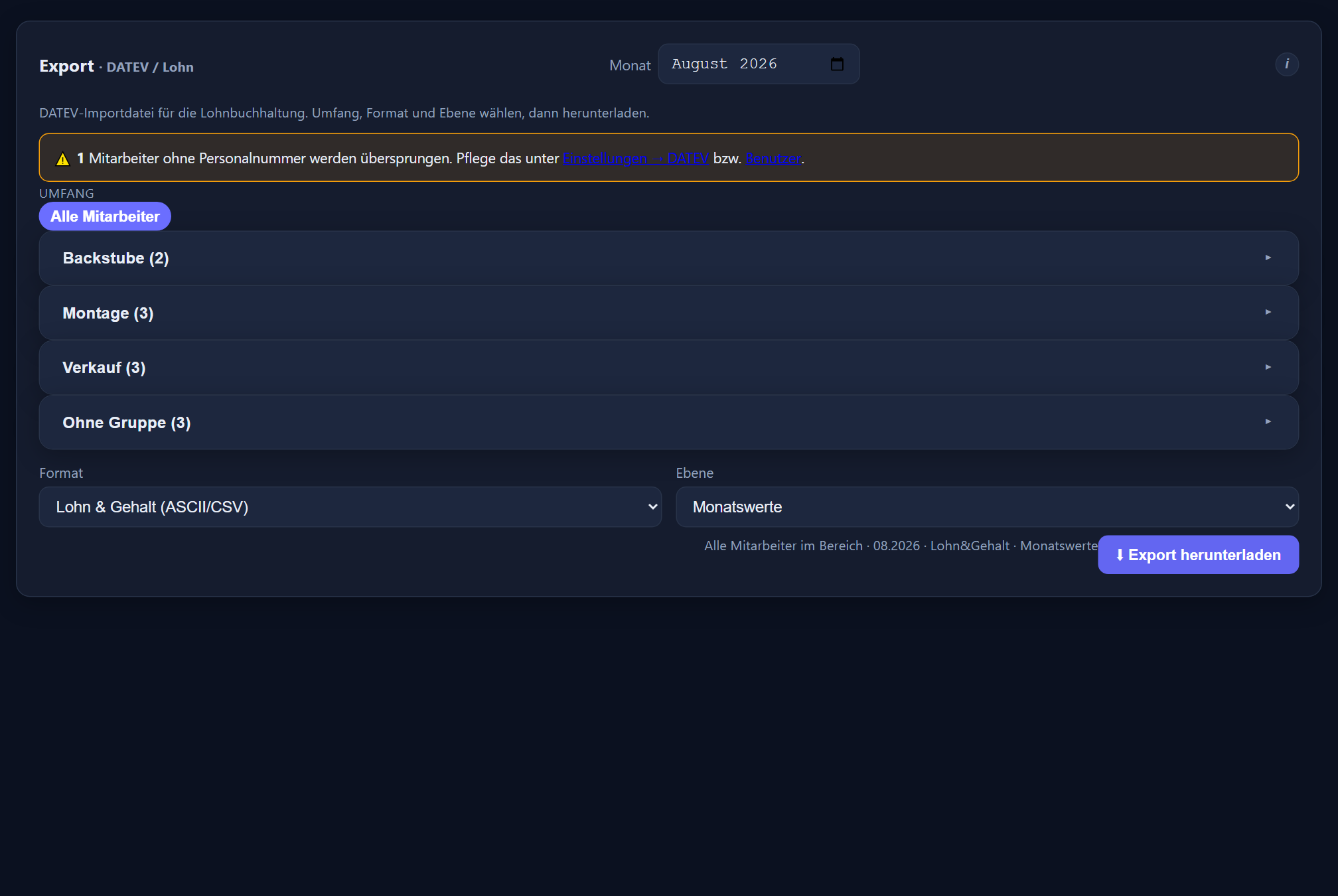
For DATEV the export produces an import file for LODAS or Lohn und Gehalt, built according to DATEV's interface descriptions — with monthly values, or with the working hours per day instead of the monthly total. With LODAS a second import of the same month replaces the first rather than booking everything twice; this can be switched off. Lohn und Gehalt needs an INI file once for its ASCII import wizard. For any other payroll software there is the payroll summary as CSV or PDF.
Mapping wage types and personnel numbers
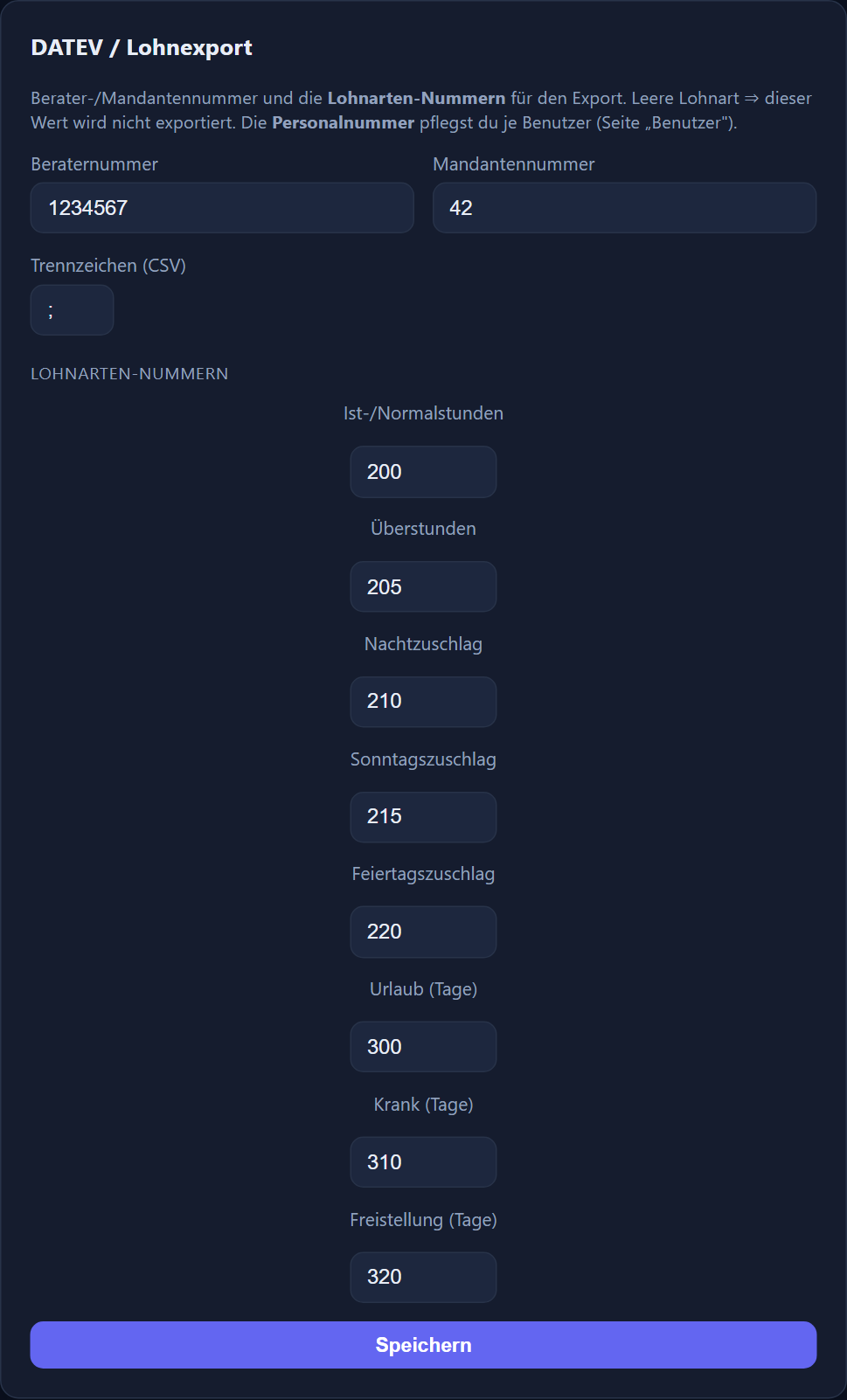
For an export to arrive without rework, two things have to be right: the personnel numbers have to match those in the payroll system, and every exported figure needs the right wage type. The personnel number is kept per user on the „Benutzer“ (users) page, the wage type numbers for hours and absences in the settings under DATEV, and the wage type of a premium directly on the premium.
A personnel number can be assigned only once per client; leading zeros do not count („00471“ = „471“). DATEV accepts personnel numbers from 1 to 99999 — anyone without a valid one is named on the export page beforehand. Only admins create the payroll export and the payroll summary.
This mapping is the point where projects like to stall, because it sits between time tracking, bookkeeping and the tax adviser. We do it together with you at the start — with your tax adviser at the table, if you want. After that the month-end close is a routine that a holiday stand-in can handle.
A recommendation from practice: run the first month in parallel — once the way you have always done it, once through the application. If both results agree, the mapping is right and you have a documented starting point. A test import in the payroll software belongs before the first real month.
Every figure per employee on one page, as the basis for sign-off.
Every row with clocking entries, break, target, actual and difference — for when someone asks.
A breakdown of which premiums arose and how; flat-rate allowances per shift as count × amount.
An evaluation across a whole group, by site or department for instance.
One row per employee as CSV or PDF — for payroll offices without DATEV, with premiums, flat-rate allowances and days of absence.
The mapping and the export
The setting is made once; the file goes out through it every month after that.
If you run payroll for clients
A note for firms considering whether to recommend it.
From a payroll point of view, a time tracking system is good when the values it delivers can be substantiated and queries can be settled without a phone call. Both hold here: premiums can be followed through their own report, corrections carry a reason, and changes are logged.
Because the application is multi-tenant, several clients can be kept separate, each with its own editor rights. For firms looking after several businesses that is the practical part — the separation is technical, not merely organisational.
If you are considering the application for clients, get in touch directly. For orientation: use costs €2.90 per employee per month, and €1.00 for church, non-profit and public-sector employers.
Frequently asked questions about the export and payroll
Does ITN-Zeiterfassung support DATEV?
Yes, with an import file for DATEV LODAS or Lohn und Gehalt, built according to DATEV's interface descriptions. You download the file on the export page, and your payroll office reads it into the payroll software. So that the values land in the right accounts there, the wage type numbers for hours and absences are kept in the settings, the wage type of a premium on the premium itself, and the personnel number per user.
What exactly is exported?
The month's values per employee: actual hours, overtime and premiums in hours as decimals, plus each type of absence as days, each under the wage type stored. Optionally the file carries the actual hours per calendar day instead of the monthly total. A flat-rate allowance per shift is not included in the DATEV file; it appears in the reports and in the payroll summary with count and total (€). Employees who have left are included up to and including the month they leave — what counts is „Austritt Zeiterfassung“ (leaving date for time tracking) or, if that is empty, „Austritt Firma“ (leaving date for the company). Raw clocking entries do not belong in a payroll export; anyone who needs them will find them in the reports.
Does my tax adviser have to change anything?
As a rule, no more than agreeing the wage types once. What the DATEV documentation leaves open — processing and absence keys, for instance — is kept under Settings → DATEV in the „Feinheiten der Importdatei“ (import file details), with defaults that your tax adviser confirms or changes. A test import belongs before the first real month: its check log shows whether the payroll software accepted every line. That is exactly the exercise we go through with you at the start and, if you like, with your tax adviser — after which the month-end close is routine.
How are premiums handled?
Premiums are calculated automatically from the clocking entries — from the working time model and from the shift of the day. For each premium you decide whether it is paid out or credited as time; its DATEV wage type sits directly on the premium. A flat-rate allowance per shift is always paid out with the wages: the reports show it as count × amount, but it is not included in the DATEV file — your payroll office transfers it from the payroll summary. For checking there is a separate report that breaks the premiums down so they can be followed.
We do not run payroll with DATEV — what then?
Then you use the payroll summary: a table with one row per employee, as CSV for Excel or as PDF. It lists personnel number, name, target, actual, the month's plus/minus, the flexitime balance, the premium-eligible time per premium, count and total per flat-rate allowance and the days per type of absence. It needs no wage types. For Lexware Office Lohn you transfer the values from it by hand.
Can I check everything before exporting?
Yes, and that is the recommended route. The monthly overview shows carry-over, target, actual, difference, flexitime balance and remaining leave per employee; the daily overview shows every individual row. Loose ends such as missing entries show up there, before they reach the payslip.
Do sick notes from the payroll software reach the time tracking?
Yes. Your payroll software retrieves the electronic sick note (eAU) from the health insurer. You export its absence records there as a CSV file and upload them in the settings. The first time, you map the columns — personnel number, from, to and optionally the type — once; after that, uploading is all it takes. A preview shows beforehand what is new and what cannot be matched. Uploading again creates no duplicates, and existing absences are never overwritten.
How the values arise is covered under working time models; every report in detail is shown in the feature reference.
Step by step in the manual (in German): DATEV and payroll export · reports.