
Flexitime, core hours, shifts — represented, not recalculated
Any app can capture clocking entries. The effort comes afterwards: breaks by rule, targets per weekday, core hours, overnight shifts, premiums, a flexitime account with capping. If a system does not know those rules, the work goes back into the spreadsheet.
Where simple clocking apps come apart
Not at capturing the entries but at evaluating them. Six places where it typically sticks.
Targets that differ
Anyone working longer Monday to Thursday and shorter on Friday needs a target per weekday. A flat daily figure produces a wrong difference every week.
Break rules
Is the break deducted, or only recognised when clocked? From what duration, at what time of day? And what applies when someone simply clocks out at lunchtime and back in again? Without a rule per weekday, every payroll run brings an argument.
Midnight
Shifts crossing the day boundary get cut in two if the system does not know about them. Night shifts then look like two half days.
Premiums
Nights, Sundays, public holidays: work them out by hand and you recalculate every month — and get them wrong and you either overpay or underpay.
Flexitime with no limit
A balance that grows without limit eventually becomes a problem. Without capping, the instrument for controlling it is missing.
Individual special cases
If every deviation needs a construction of its own, maintenance becomes a second job. Models have to be reusable.
Build one model, assign it to many
In ITN-Zeiterfassung a working time model is an object in its own right: it consists of day cards from Monday to Sunday and a public holiday card, each with a target, an absence value, a break rule and premiums, plus core hours, clocking windows, the public holiday rule, the treatment of overnight shifts and the settings for the flexitime account including its cap. Premiums attached to a shift are added to those of the model.
Employees are assigned to that model. If a rule changes — the break arrangement or a premium rate, say — it is changed once on the model and applies to everyone. That is the difference between a setup that grows with you and one that gets murkier with every special case.
The result becomes visible in the daily row: clocking entries on the left, break, target, actual and difference in the middle, corrections on the right. You see not just the number but how it arises — which matters when somebody asks.
A target, a break rule — break windows at fixed times included — and premiums of its own for each weekday and for public holidays.
If you wish, clocking out and back in during the day counts as a break, limited to a time range; off by default.
When work should happen and which attendance is credited.
Shifts crossing midnight are attributed to the correct day.
The balance runs along, and credit can be limited.
Assigned per day card and calculated automatically, paid out or credited as time; premiums on the shift are added on top.
What a model looks like
Target type, working days, flexitime account, core hours — and at the end the day row, where you can read off how the figure came about.
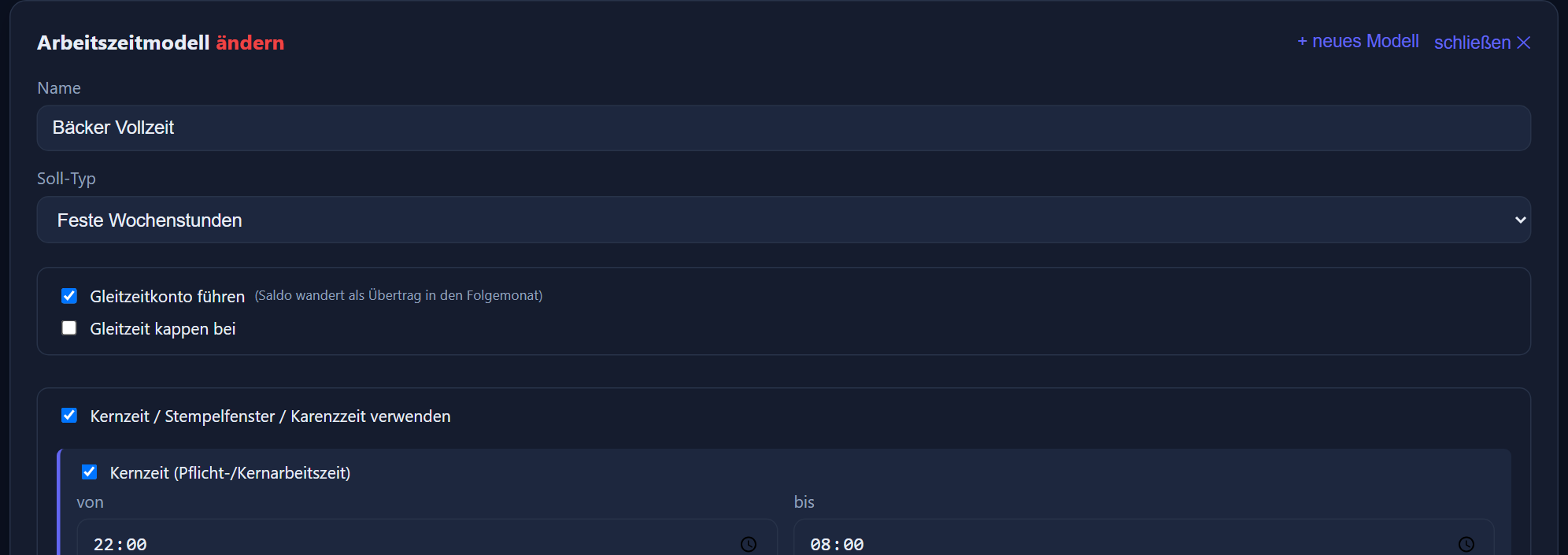
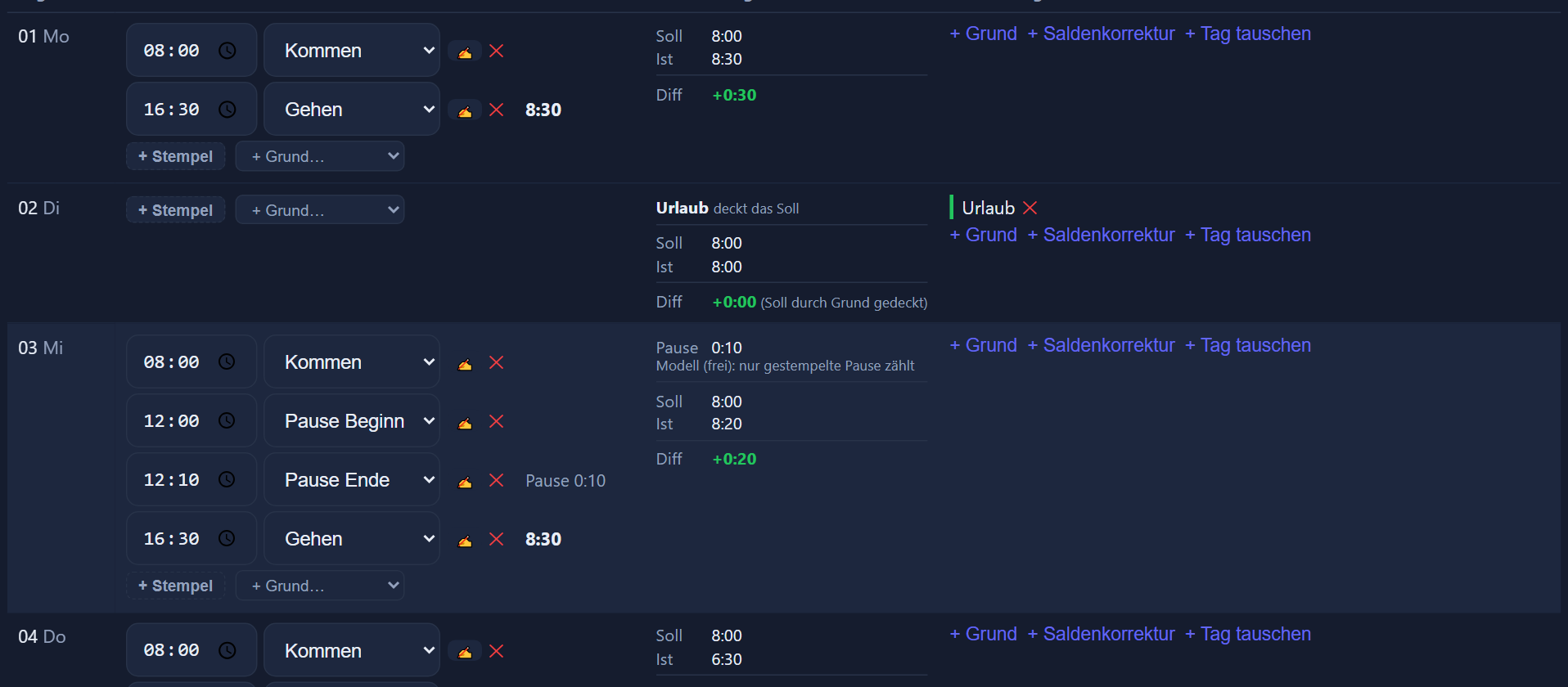

How the premiums arise from it — night, Sunday, public holiday, overtime — is under premiums.
How the setup works
The models are the part worth sitting down for properly, once. After that it runs.
Gather the rules
What target hours apply, how are breaks handled, are there core hours, how are premiums arranged? Most of this sits in employment contracts, works agreements and unwritten practice.
Form models rather than mapping people
Out of the rules come a handful of models — full-time, part-time, shift, casual staff — instead of many individual cases. In our experience three to five models cover most of a workforce.
Assign and cross-check
Employees are assigned, and then a completed month is recalculated: do targets, actual hours and premiums match what was previously worked out by hand?
- calculate a comparison month
- resolve the differences
- only then switch over
Set the carry-over
Existing flexitime and leave balances are entered as a carry-over, so the accounts are right from the first month.
Every setting in detail — with screenshots from the model editor — is in the feature reference.
Step by step in the manual (in German): working time models · calculation rules.
Frequently asked questions about working time models
Can I set a different target for each weekday?
Yes. A working time model consists of day cards from Monday to Sunday plus a public holiday card (FE), each with its own target, its own break rule and its own premiums. That covers the short Friday, the four-day week or part-time arrangements without building a separate model for every person.
How does the flexitime account work?
The difference between actual and target runs along as a balance and is shown on the account card in the month header — together with the carry-over from the previous month. A cap can be set for the flexitime account so that credit does not grow without limit.
Are breaks deducted automatically?
That depends on the break rule stored for each weekday: only the break actually clocked, the statutory minimum break, a flat minimum break, tiers by length of the working day, or break windows at fixed times, such as 30 minutes between 12:00 and 12:30. The break clocked is deducted, but at least the prescribed one. With the „Gehen/Kommen während des Tages als Pause anrechnen“ switch (count clocking out and back in during the day as a break), time clocked out in between counts towards the minimum break too — only what is still missing is deducted. The daily row shows which break was applied.
What happens with shifts that run past midnight?
Overnight shifts are attributed to the correct day rather than being torn apart at the day boundary. With night shifts, on-call duty and long shifts, that is the point at which simple solutions produce wrong figures.
How are premiums calculated?
Premiums are stored with the window in which they apply — at night, on Sundays, on public holidays — and assigned to the day cards of the model; premiums attached to a shift are added on top. They are derived automatically from the clocking entries. For each premium you decide whether it is paid out or credited as time; a flat-rate allowance per shift is always paid out with the wages. With the „Alle gearbeiteten Stunden zählen“ (all hours worked count) model there are no premiums from the model, but the premiums of the shift still apply.
Do I have to create a separate model for every employee?
No, and that is the heart of the idea: models are built once and then assigned to employees. If a rule changes, it is changed on the model and applies to everyone assigned to it.
Is there a model where only the hours in the month count?
Yes, with free choice of days. On the monthly target you tick „free choice of days“: the monthly target is then not spread across the days, every day has a target of 0, and nobody gets a daily deficit or a warning for a day without clocking. The header of the time tracking shows monthly target, achieved and, separately, overtime. So that a day of leave or sickness is still worth something, each day card carries an absence value; a calculator suggests it and recommends a fixed figure. A public holiday off credits only the value entered under „Abwesenheit“ (absence) on the public holiday card (FE); with free choice of days there is no flexitime compensation. Clocking errors such as a clock-in without a clock-out are reported here as well.
How do I set up casual staff without fixed target hours?
In two ways. With „Alle gearbeiteten Stunden zählen“ (all hours worked count), every hour recorded counts; there is no leave and no flexitime compensation, and sickness and similar absences can be entered as a record but credit no hours. With „Pro Wochentag“ (per weekday), a daily target of 0:00 and an absence value on the usual working days, on the other hand, leave and sickness count on those days and credit the value entered. Whether and to what extent casual staff receive paid leave and sick pay is for your payroll office to settle.
How are public holidays calculated — Christmas Eve and New Year's Eve included?
Through the model's public holiday card (FE), usually with a target of 0 plus the public holiday premiums; on a full public holiday the break rule and premiums of that card apply. Each public holiday also carries a rating: full day, half day or a fixed number of hours off — Christmas Eve as a half day and New Year's Eve with 4:00 hours off, for instance. On a half public holiday the target drops to half the daily target; the break and premiums of the weekday apply, without a public holiday premium.
What goes to the payroll office afterwards is covered under DATEV and the payroll export. The legal requirements on recording itself are under the legal requirement.