
The shift begins before midnight
Whoever starts at 22:00 and leaves at 06:00 works on two calendar days. Split into two halves, neither the daily target nor the break rule nor the premium comes out right.
The shift planning chapterThe bakehouse at night, the shops from six, Sunday duty and apprentices who sit in vocational school twice a week. Shift plan, premiums and payroll export all live in a single program.
Three places where an ordinary clock-in list reaches its limit in a bakery.
Whoever starts at 22:00 and leaves at 06:00 works on two calendar days. Split into two halves, neither the daily target nor the break rule nor the premium comes out right.
The shift planning chapterNight, Sunday, public holiday — each with its own time window and its own rate, plus the flat-rate allowance for certain shifts. Done by hand that is an hour's work at the end of the month and a source of queries afterwards.
The premiums chapterTwo school days a week, plus block teaching and holidays. Anyone who has to keep that in their head while rostering will sooner or later plan a shift that cannot be filled.
The vocational school chapterThe plan is made in the same program as the time tracking. What was actually worked, the system recognises from the clock-in time — and works out target, breaks and premiums to match.
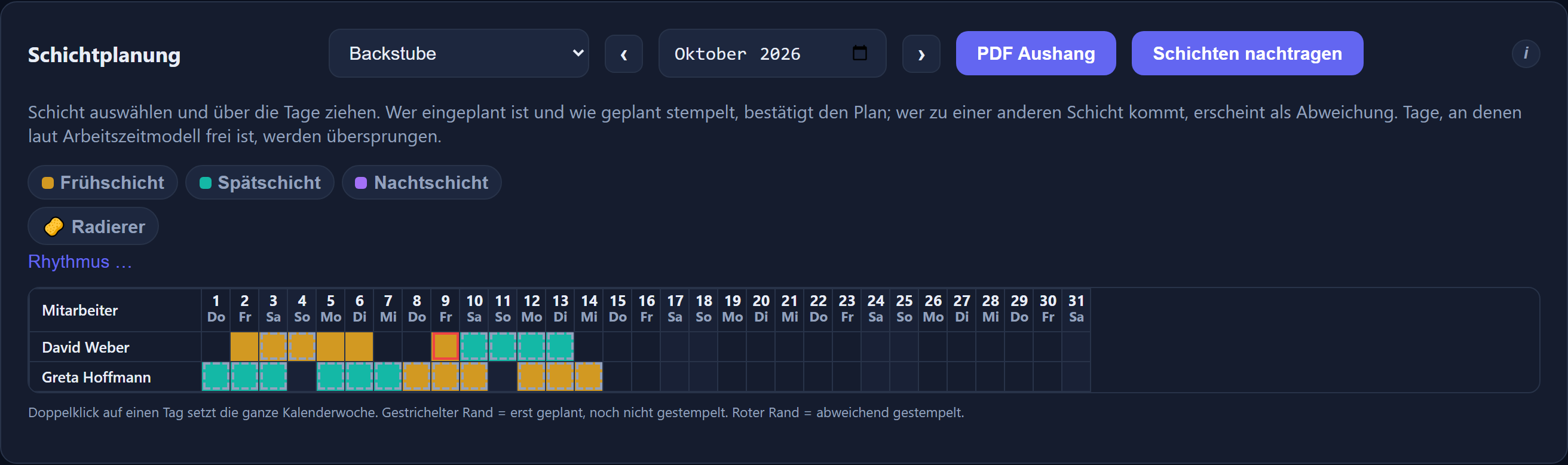
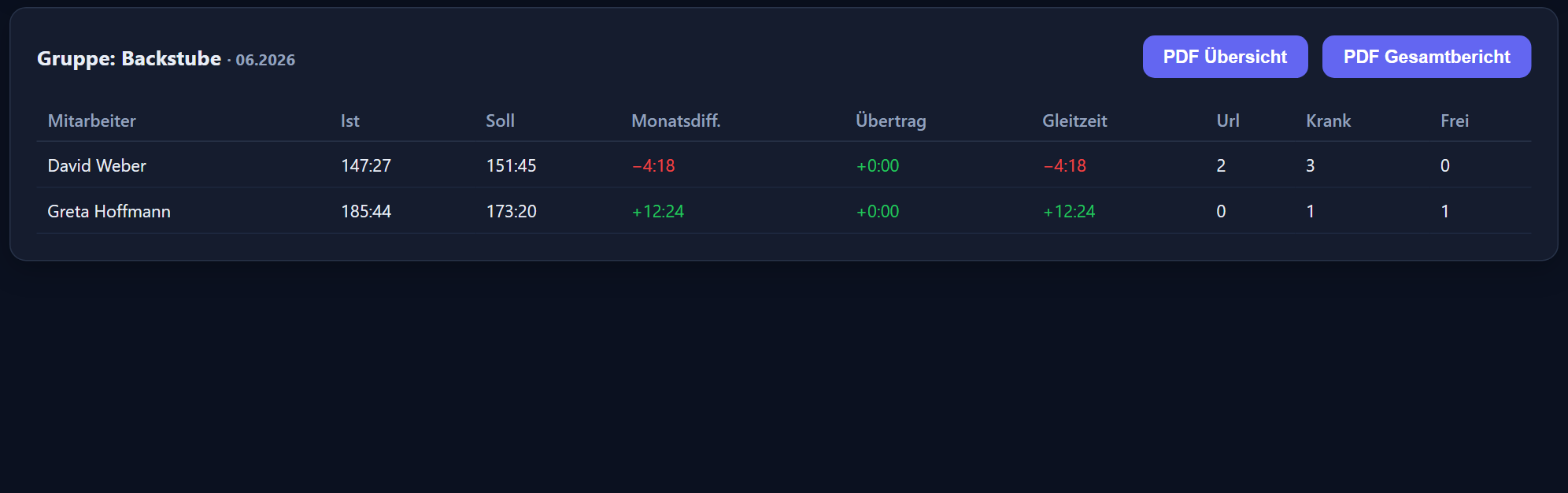

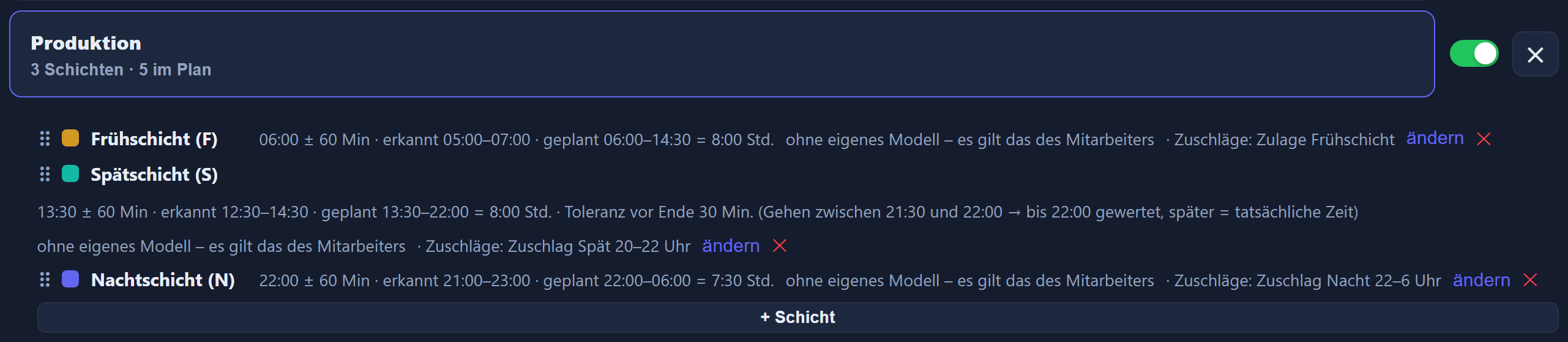

A shift may run across midnight. It is planned as one duty, clocked as one duty and calculated as one duty — with the target and the break rule that belong to it.
Night, Sunday and public holiday premiums carry a time window — for the night premium it may run across midnight — plus a rate and an effect: payment as wages or a credit to the time account. Several premiums per type are possible, such as night 25 % and night 40 %. If you wish, a premium applies only when the first clock-in of the day falls within a set entitlement window.
Premiums sit in the working time model or directly on the shift — then they apply on every day with that shift, public holidays included. This includes a flat-rate allowance per shift, say €20.00 for every early shift, always paid as wages. The reports show it as „5 × 20,00 € = 100,00 €“, the payroll summary with count and total.
The calculation follows the shift actually worked. If somebody steps into the night shift at short notice, the premium is still right — and the difference from the plan stays visible.
Groups and sites represent the branches. Planning, attendance and reports can be viewed per branch; management keeps the view across all of them.
Every apprentice has their school timetable on file. From it the system generates the school days, so they are already blocked in the roster before anyone plans a shift on them.
Each premium carries its own DATEV wage type — maintained in one place, directly on the premium. Flat-rate allowances per shift have no wage type and do not go into the DATEV file; your payroll office transfers them from the payroll summary. On top of that there is a report showing the premiums alone.
More on this: shift planning · premiums · DATEV and payroll · multi-site businesses · feature reference
Step by step in the manual (in German): shift plans · premiums.
As one duty. The shift may cross the calendar day: it belongs to the day on which it begins, and the hours are calculated in one piece. The time windows of the premiums may likewise run across midnight, from 22:00 to 06:00 for instance.
Yes. The premiums sit in the catalogue with their time window and their rate, and are derived from the clock-ins. They take effect through the working time model or directly through the shift. Nothing has to be worked out at the end of the month — a separate report lets you check the result.
Yes, as „Pauschale je Schicht“ (flat-rate allowance per shift): a fixed amount instead of a percentage, say €20.00 for every early shift. It counts once per day on which the allowance applies and working time was counted; a day of leave or sickness without a clock-in does not count. The reports show „5 × 20,00 € = 100,00 €“, the payroll summary the count and total per allowance. The allowance does not go into the DATEV file — your payroll office transfers it from the payroll summary.
Then the calculation follows the shift actually worked. Whoever was rostered for the early shift and works at night receives the night premium. The difference from the plan remains visible.
Yes. Groups represent the branches, sites the addresses that go with them. Planning and the reports can be viewed per branch; anyone responsible for several sees them together on the dashboard and in the absence overview. The attendance board can be filtered by branch.
Through the apprentice's school timetable. It is stored once, after which the system generates the school days from it. They are blocked in the plan before anyone puts a shift on them.
It is part of ITN-Zeiterfassung and included in the price of 2.90 € per employee and month. There are no feature tiers — leave planning, staff messages, the mobile app and the DATEV export belong to it as well.
They are the same program. The plan says who is rostered when; the clock-in says who actually worked when. The system assigns the clock-in time to the matching shift and shows both side by side. With a planned end on each shift, the planning also shows „geplant / Ziel“ (planned / target) beside every name — how many hours are already rostered and what the month's target is.
Tell us the number of employees, your branches and your premium types. On request we will recalculate a month you have already closed against your own figures.
The button below opens your mail programme with a prepared draft that already lists the details we need in order to quote. Prefer to talk? Give us a call.
Or simply write to info@itn-network.de. Please do not send us credentials or any of your employees' time records — figures are enough for a quote.