
Time on customers and projects — from the visit to the margin
For businesses that document and bill their work at the customer's premises: your employees clock in at a desk or on their phone against customer, project and activity, record their journeys and have the visit report signed right there on site. The deployment plan spreads the week's appointments, the project report shows hours, revenue and travel costs, and project controlling shows how the budgets are being used with a traffic light — with post-calculation down to the margin if you wish.
- Clock in and out against customer, project and activity — at the PC and on the phone
- Journeys recorded exactly or as a flat rate, with kilometres and travel costs
- Visit report with the customer's signature, as a PDF by email
- Deployment plan for the week, with a calendar subscription for employees
- Project report with hours, revenue and travel costs, CSV by customer number
- Budget per project with traffic light, post-calculation down to the margin if you wish
Clock in and out against customer, project and activity
At the PC, under Projektplanung → „Projektzeit“ (project planning → project time), you choose the customer, optionally project and activity, and press „▶ Kommt“ (clock in). The running time is counted. „■ Geht“ (clock out) ends it; in the field „Tätigkeit (was gemacht?)“ (activity — what was done?) you briefly note what was done.
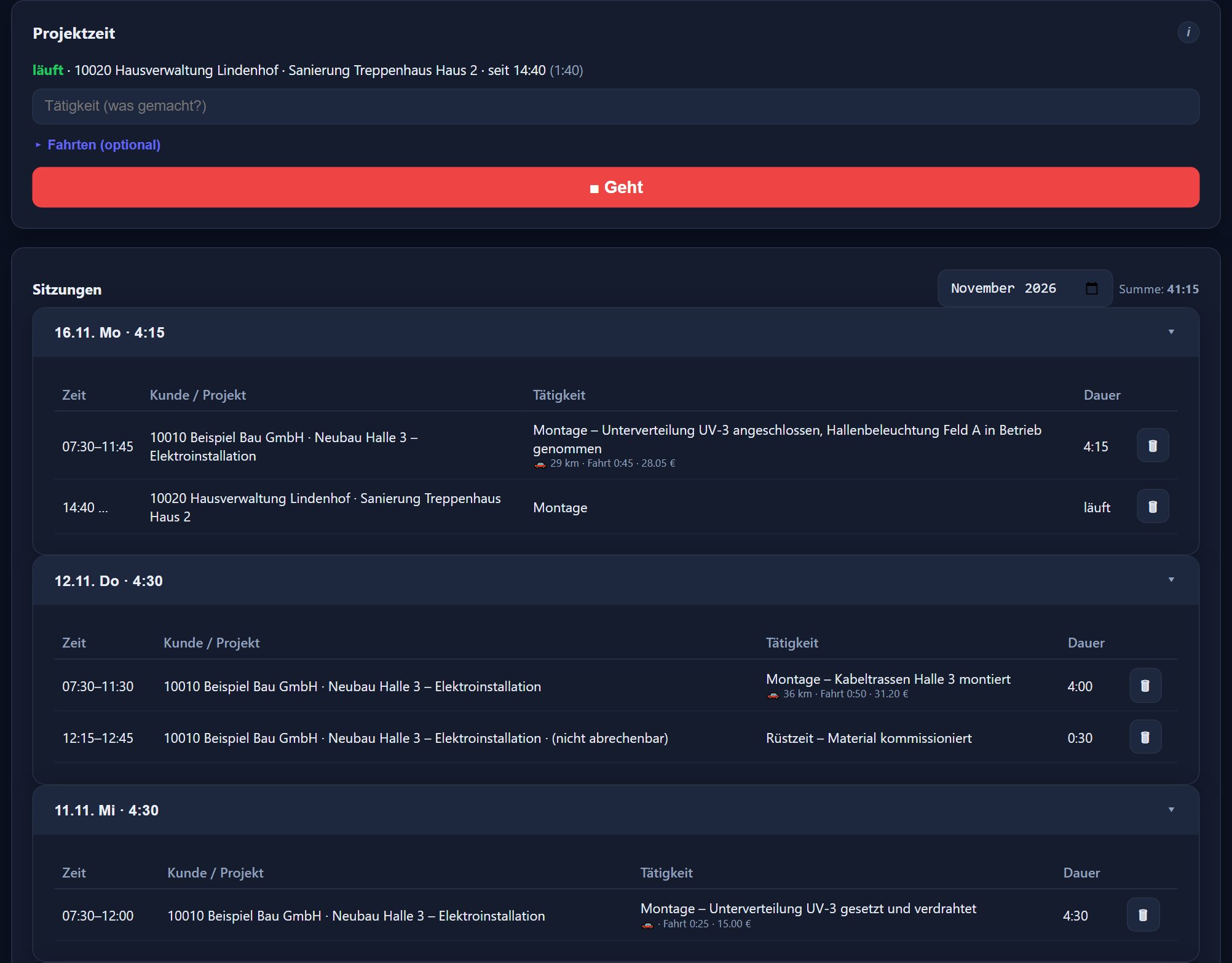
Under „Sitzungen“ (sessions) you find all project sessions of the month by day, with daily and monthly totals.
Start and stop always apply to yourself. Anyone allowed to edit other people's times also sees their project time via „Anzeigen“ (show).
Project time never counts additionally in the time account, because it is billed through the customer. Anyone who clocks in and out with arrival and departure collects their working time only through those clock-ins; project time records alongside what the time was spent on.
Only on days with no arrival or departure at all do the start and end of the project time, including the recorded travel times, count as the working time of the day. In the monthly view the day shows „Abrechnung über Kunde – zählt nicht ins Zeitkonto“ (billed through customer – does not count in the time account) or „keine Stempelung – Sitzung gilt als Kommen/Gehen“ (no clock-in – session counts as arrival/departure).
Today's customers
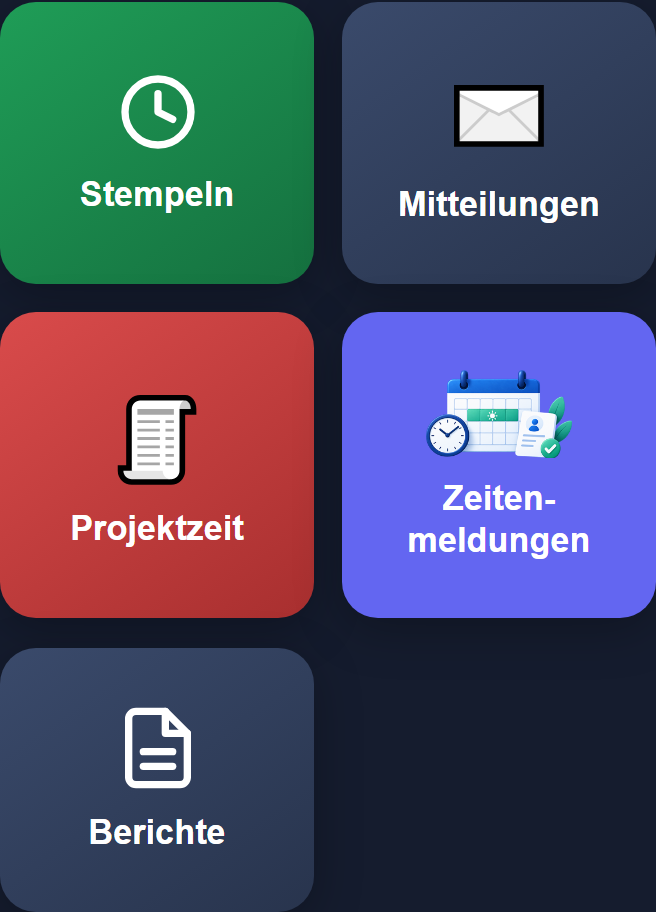
In the mobile app, the „Projektzeit“ tile opens today's customers — those already visited and those planned for today. You tap a customer, or choose another customer from your customer list via „+ Neuer Besuch“ (new visit). Then „▶ Kommt“ (clock in) starts and „■ Geht“ (clock out) ends.
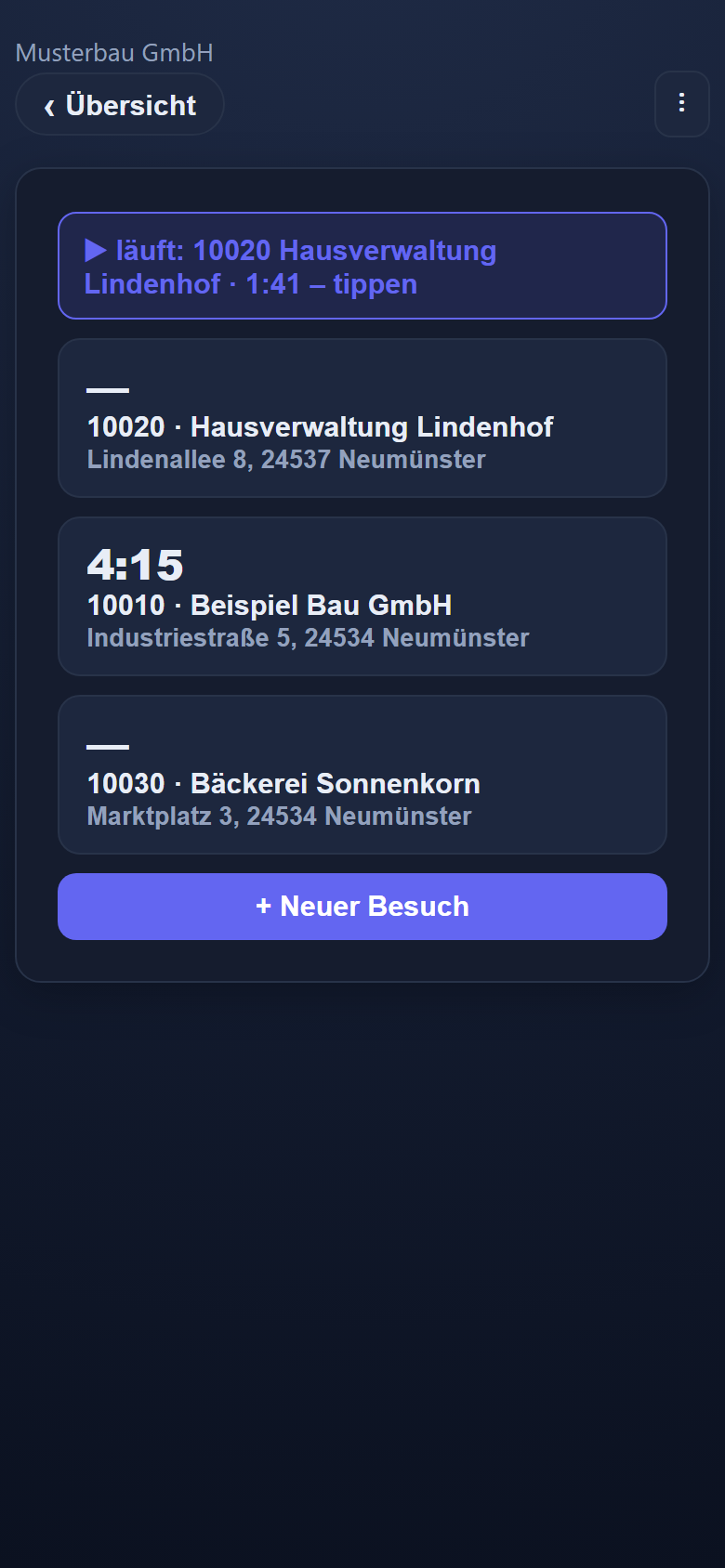
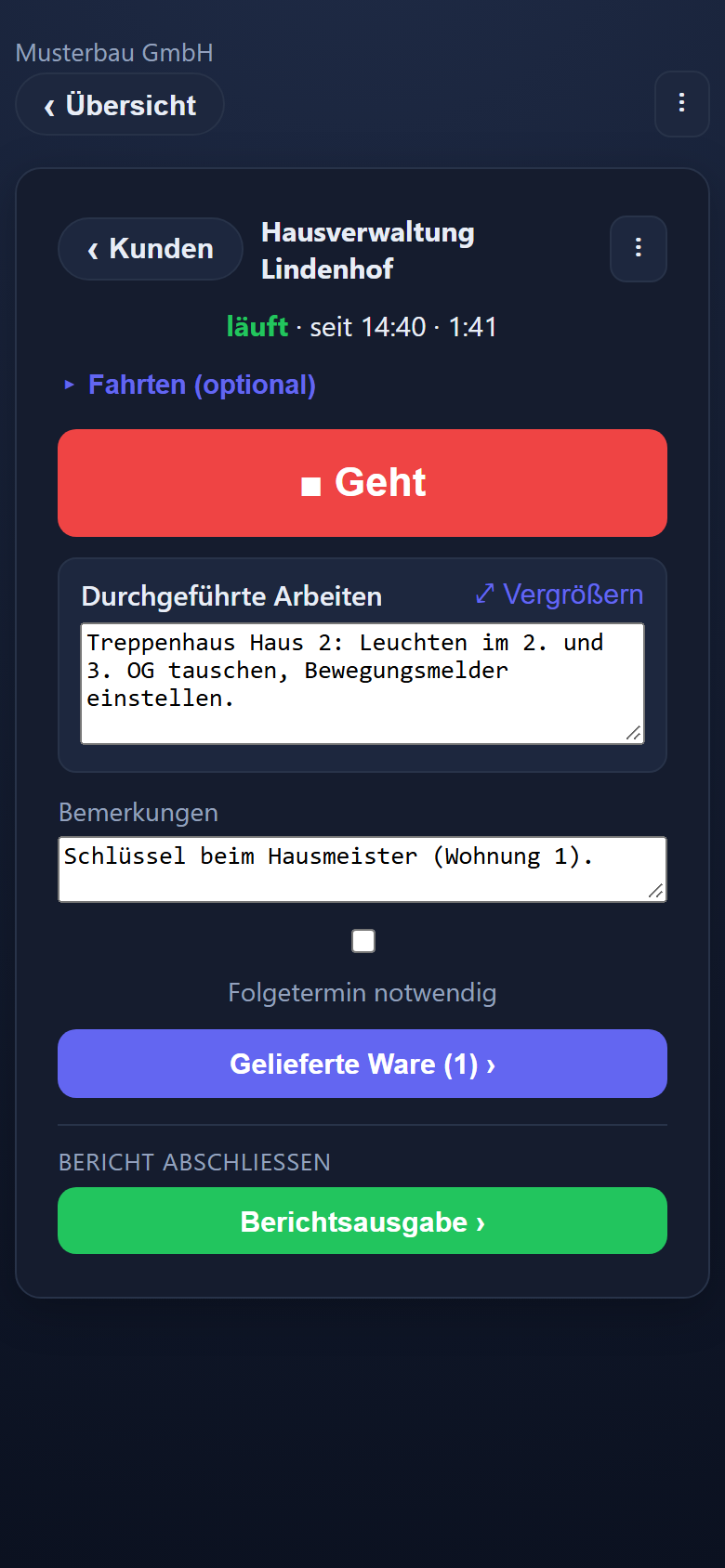
A running time is shown at the top as a notice, with customer and duration. What was done goes into the large field „Durchgeführte Arbeiten“ (work performed), which „⤢ Vergrößern“ (enlarge) expands to the full screen.
The tile appears when Projektzeit is booked and the administrator has enabled the phone for „Projektzeit“; a new phone may only clock in and out at first. Project time and the visit report need an internet connection on the phone.
The mobile app is available in German, Russian, Polish and Hungarian, including Projektzeit with journeys and the visit report; the PC interface is in German.
Exact or flat rate
On „Geht“ (clock out) you record the journey under „Fahrten (optional)“ (journeys, optional) either exactly — „Zeiten erfassen“ (record times): outbound and return trip with starting point or destination, kilometres and times — or as a „Pauschal“ (flat-rate) travel time in minutes. The flat-rate travel time is pre-filled from the customer data; you enter the kilometres.
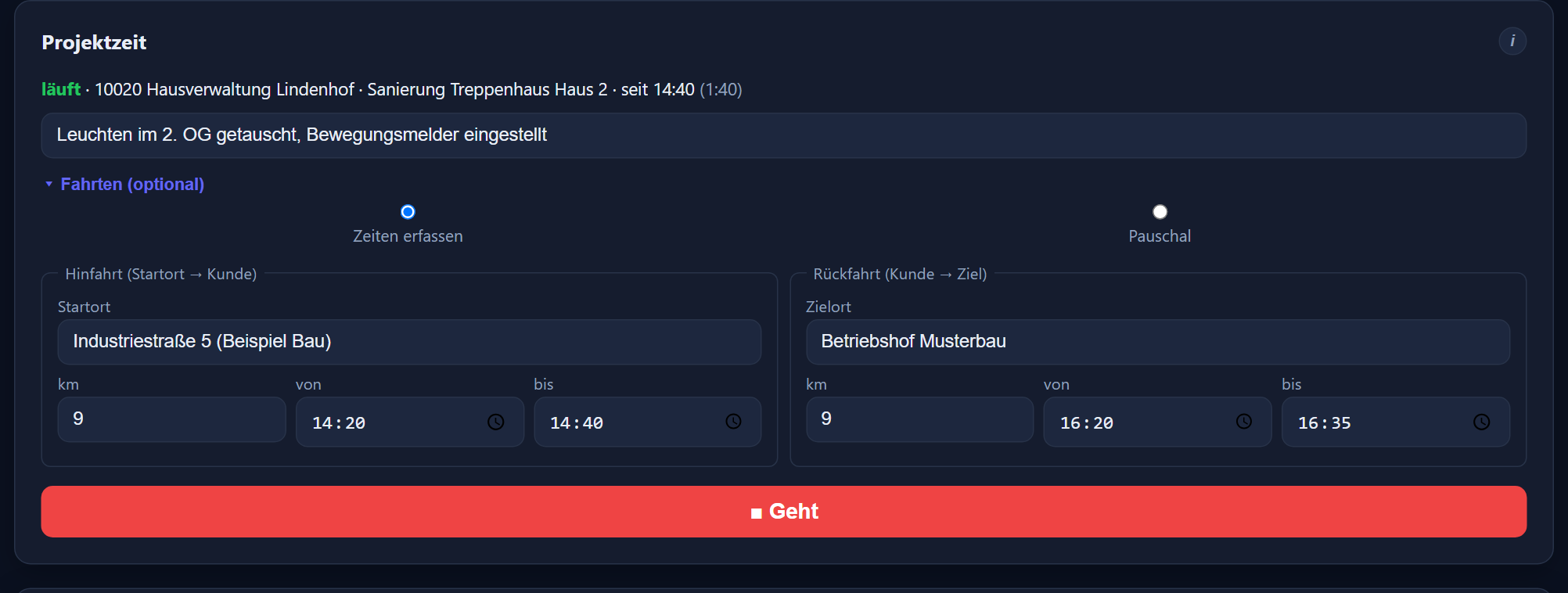
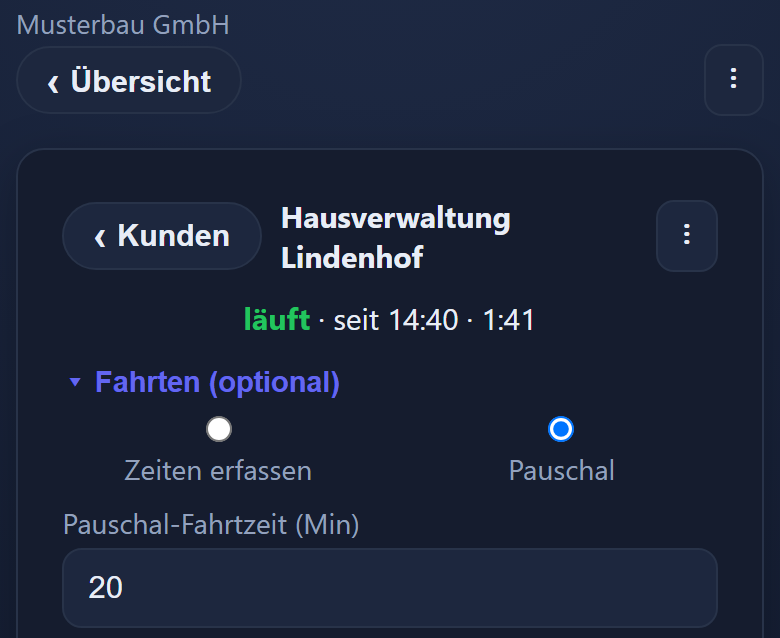
Travel costs are the kilometres times the customer's €/km rate plus the customer's flat charge. Project report, CSV file and visit report show kilometres, travel time and travel costs.
On the phone, „Pauschal“ (flat rate) is already selected if the customer has a flat-rate travel time or — when the customer is tapped in today's list — today's assignment in the deployment plan brings a travel time default; the default from the assignment then takes precedence.
If you change nothing on the phone, the preselected flat rate is applied on „■ Geht“ (clock out), even if „Fahrten (optional)“ was not expanded. At the PC a journey is only recorded if you enter it.
Signed, and sent to the customer as a PDF
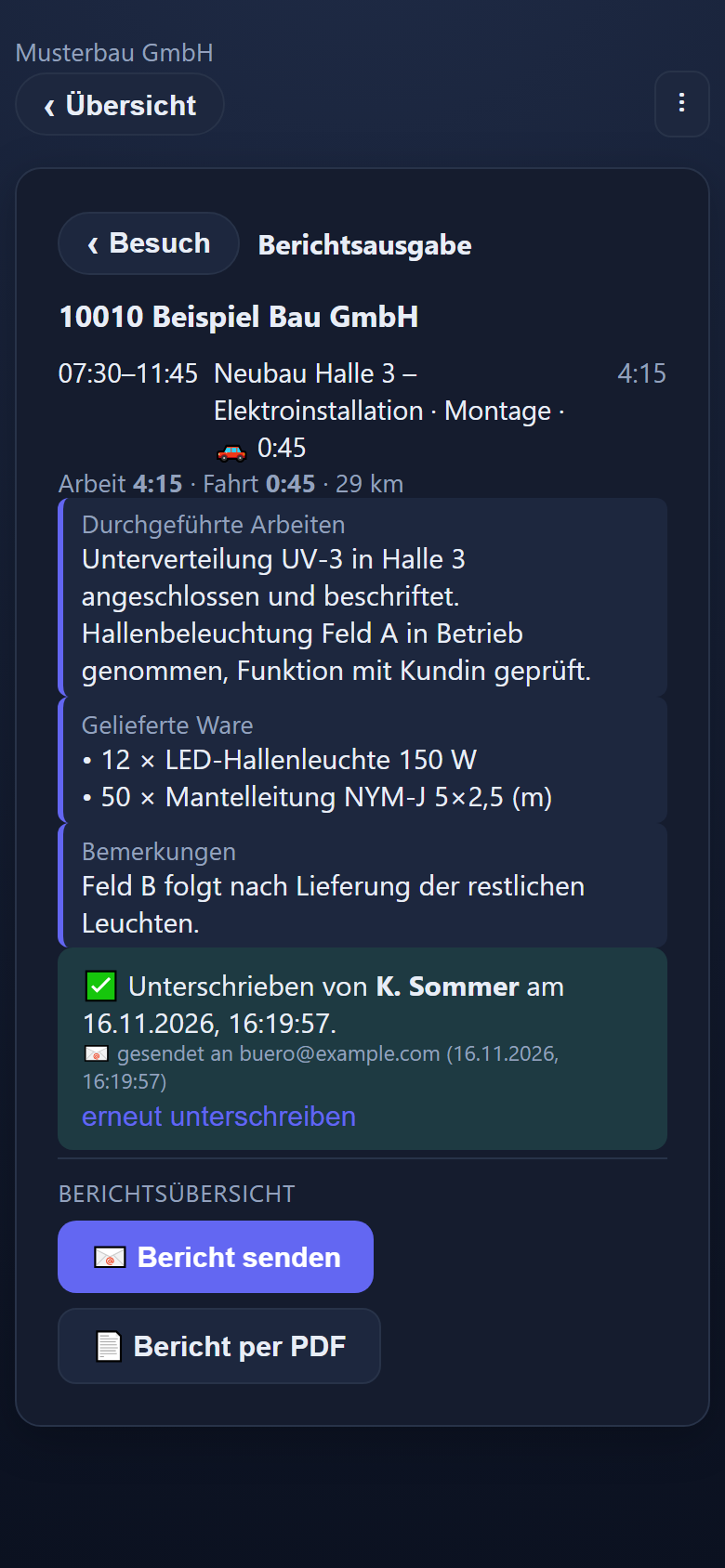
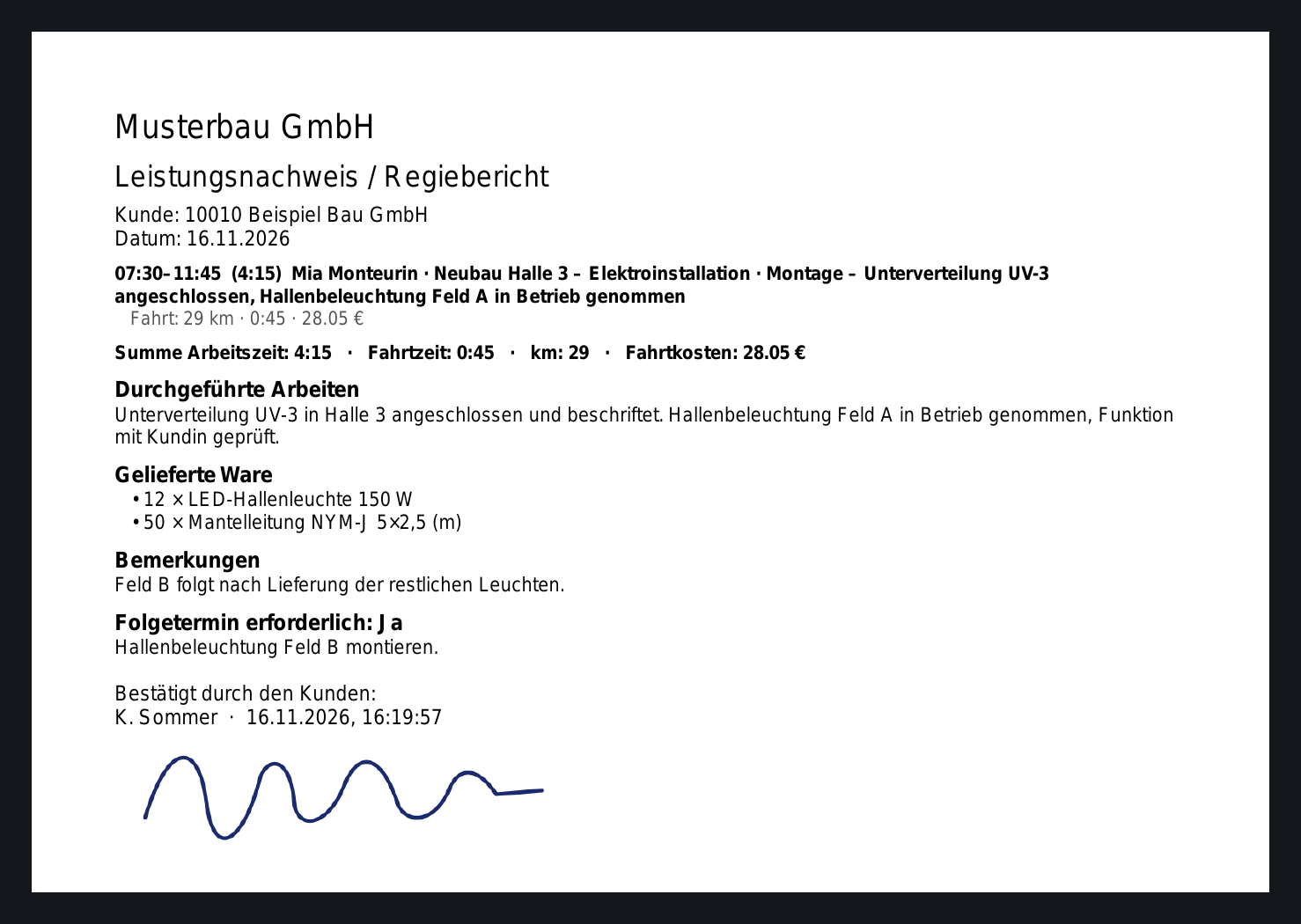
The visit report brings together all project sessions at one customer on one day: work performed, remarks, goods delivered (quantity · description) and a follow-up visit if needed. The customer signs directly on the phone or at the PC. You then open the report as a PDF and send it to the customer by email.
If email sending is set up in the time tracking, the visit report goes to the customer as a PDF by itself after the signature. The email address from the customer data is pre-filled and can be changed on site. Once signed, it can be sent again at any time. Replies from the customer go to your company's email address. Without email sending set up, you open the report as a PDF.
Photos belong to the visit: taken directly with the camera on the phone (menu ⋮ → Fotos → „📷 Foto“) or uploaded at the PC. They are attached to the visit — customer and day — and appear in the PDF on a page of their own after the signature.
The report for the customer is in German; in the PDF it is titled „Leistungsnachweis / Regiebericht“ (proof of work / time-and-materials report).
The week at a glance
The deployment plan shows one calendar week per employee. With „+“ in a cell you create an assignment: customer, optionally project and activity, time window from–to. Drag a block into another cell to move it; holding Ctrl or Alt copies it.
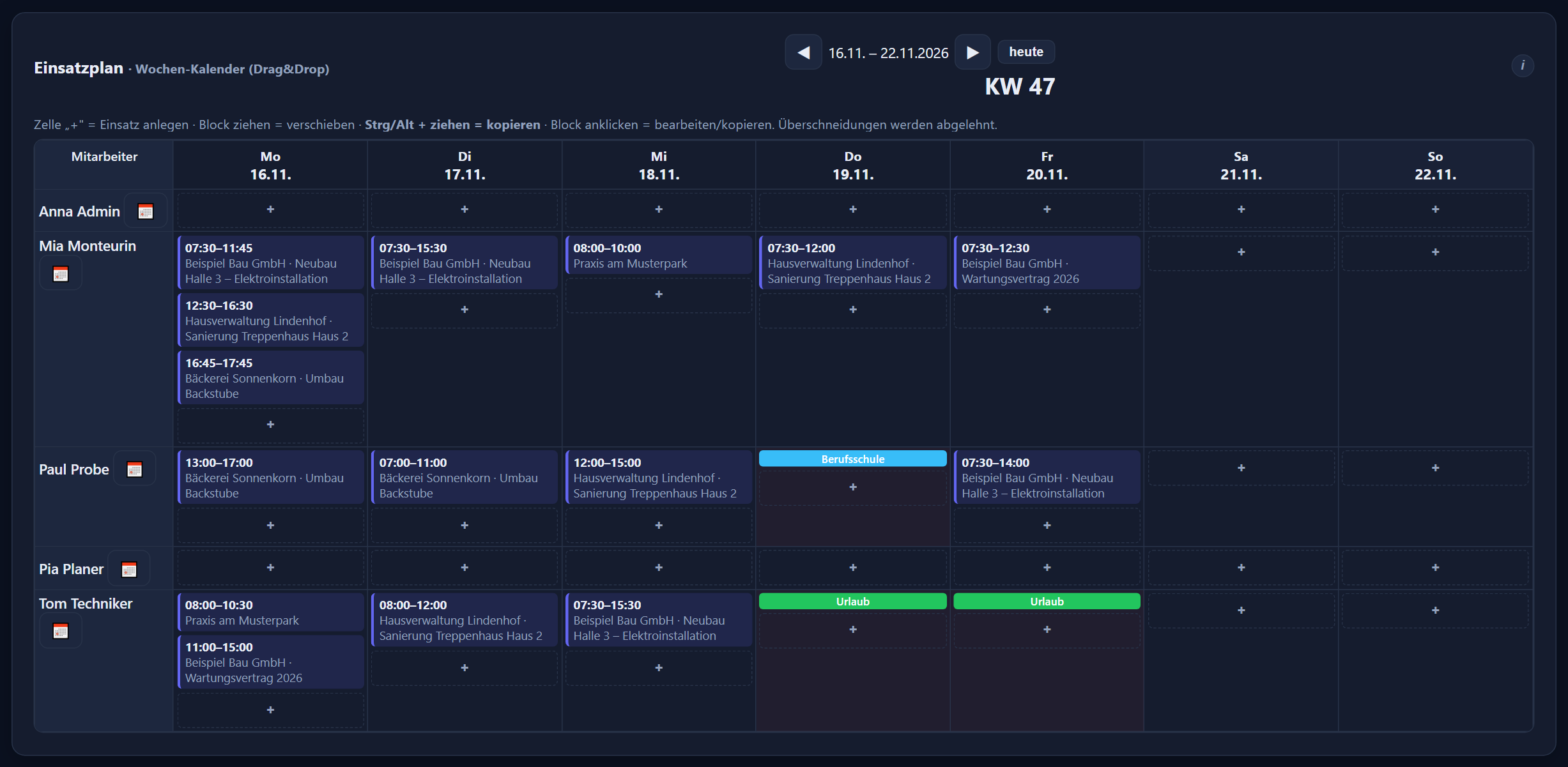
Overlaps with another assignment of the same person are rejected. Absences such as leave, sickness or vocational school appear in the plan for information.
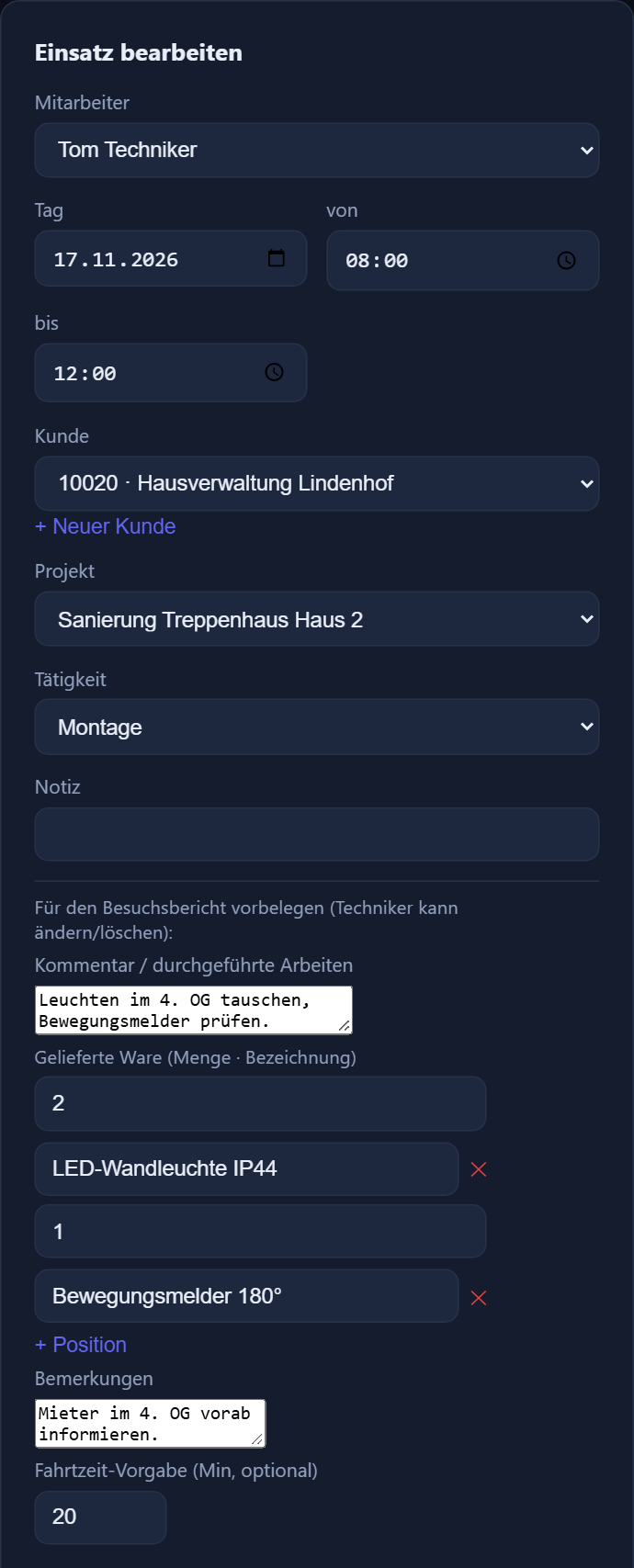
Work performed, remarks and goods delivered can be stored in the appointment. They appear pre-filled in the employee's visit report, and the employee can change them.
A travel time default in the appointment is suggested by the mobile app for the journeys when the employee taps the customer in their list of today's customers.
Employees with the „Einsatzplan (eigene Einsätze)“ (deployment plan, own assignments) permission see their group's assignments and plan their own assignments themselves.
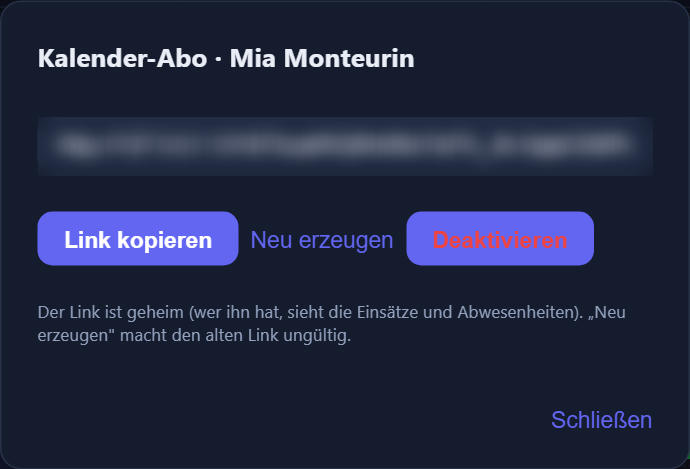
Your own assignments in your phone's calendar
Via the calendar symbol 📅 next to the name in the deployment plan you create a personal subscription link (ICS). Added to the phone or mail calendar as a calendar subscription, the person's planned assignments and absences appear by themselves (90 days back to 180 days ahead); the calendar fetches the subscription itself.
Types of sickness appear there only as „Krank“ (sick), and if you prefer, everything just reads „Abwesend“ (absent). „Neu erzeugen“ (generate new) invalidates the old link.
If the time tracking's calendar connection (CalDAV) is set up, the deployment plan also shows when an employee is already busy according to their calendar. If writing is switched on, planned assignments and absences go into the employees' calendars as appointments.
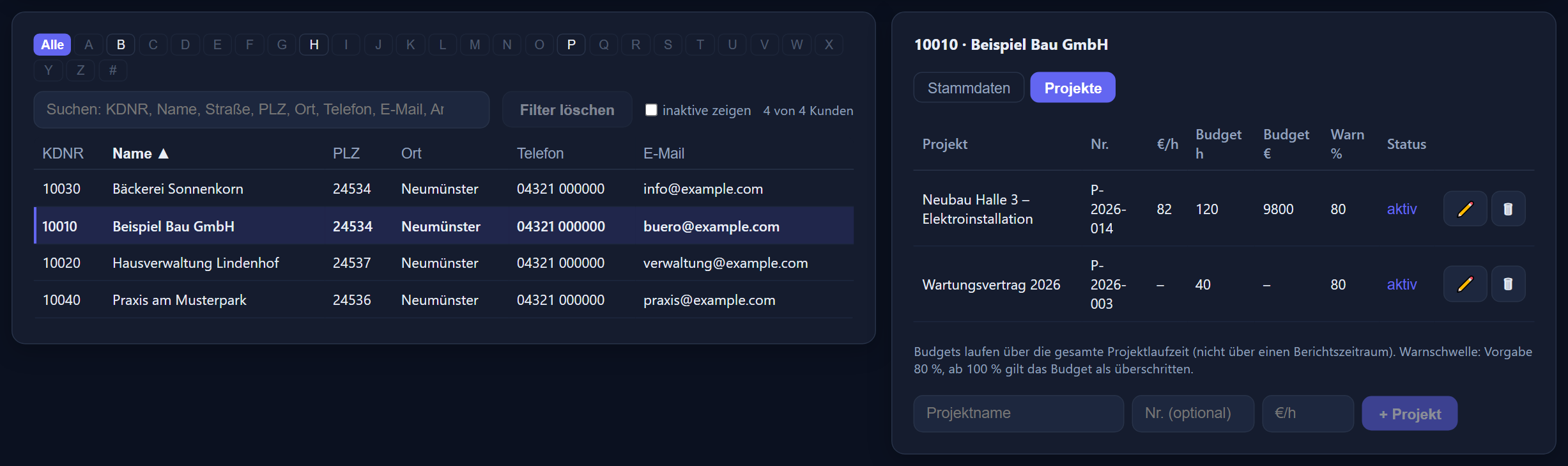
Rates, budgets and warning threshold per project
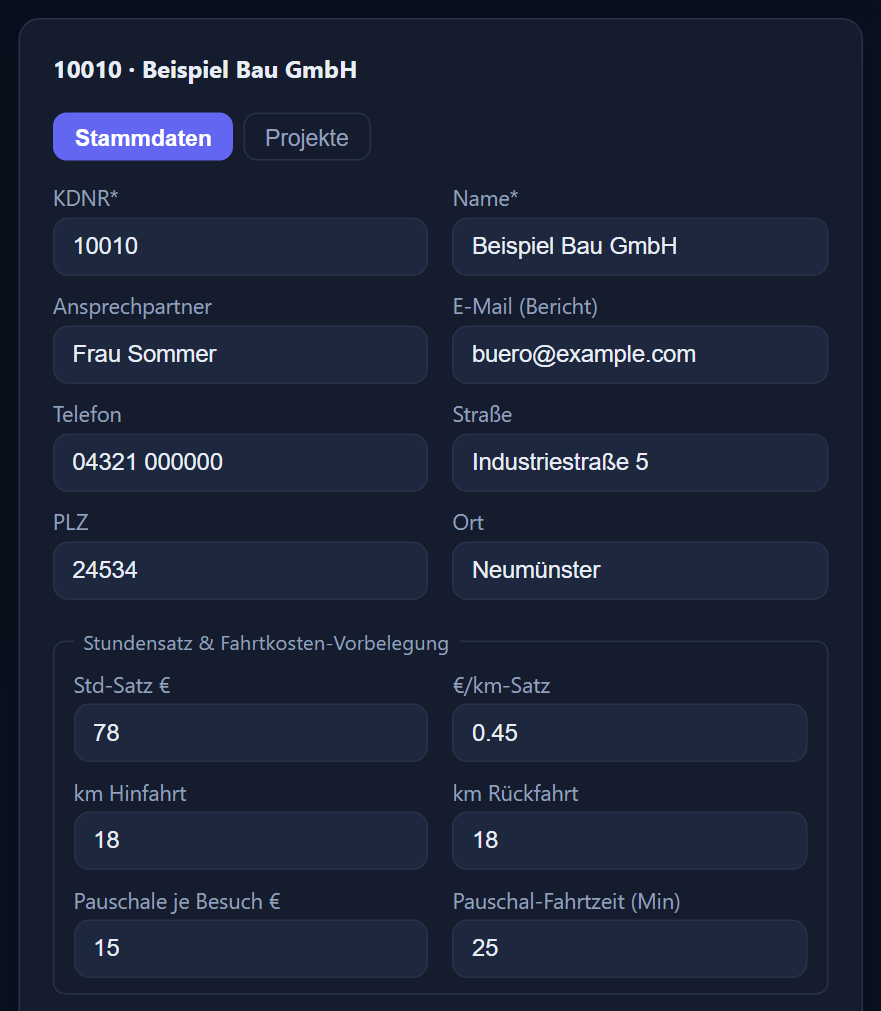
Under „Kunden“ (customers) you maintain the customer base with a freely assigned customer number (KDNR), address, contact person and „E-Mail (Bericht)“ (email for the report). In the „Projekte“ (projects) tab you create projects per customer with number, own €/h rate, hours budget, revenue budget (€) and warning threshold (default 80 %).
Each customer has an hourly rate, travel cost defaults („€/km-Satz“ (€/km rate), „km Hinfahrt“ (km outbound), „km Rückfahrt“ (km return), „Pauschale je Besuch €“ (flat charge per visit, €), „Pauschal-Fahrtzeit (Min)“ (flat-rate travel time, min)) and the location for the check.
Under „Tätigkeiten“ (activities) you maintain the types of service with „abrechenbar“ (billable) and an optional rate. The most specific rate applies: activity before project before customer. Customers, projects and activities are maintained by the administrator.
If you wish, the time tracking compares the location with the customer's address when project time is started on the phone. For this the customer needs coordinates — entered by hand or via „Koordinaten aus Adresse ermitteln“ (determine coordinates from address). The radius defaults to 250 m and can be changed for the company or per customer.
If the check for phones is set to „blockieren“ (block), project time does not start outside the radius, provided the phone supplies a location; without a location it starts unchecked. Individual users can be exempted.
Hours, revenue, journeys
The project report evaluates project time by period, customer, project and employee. The key figures: working time, of which billable, revenue (labour), travel time, km and travel costs. You group the totals by customer, project, activity or employee.
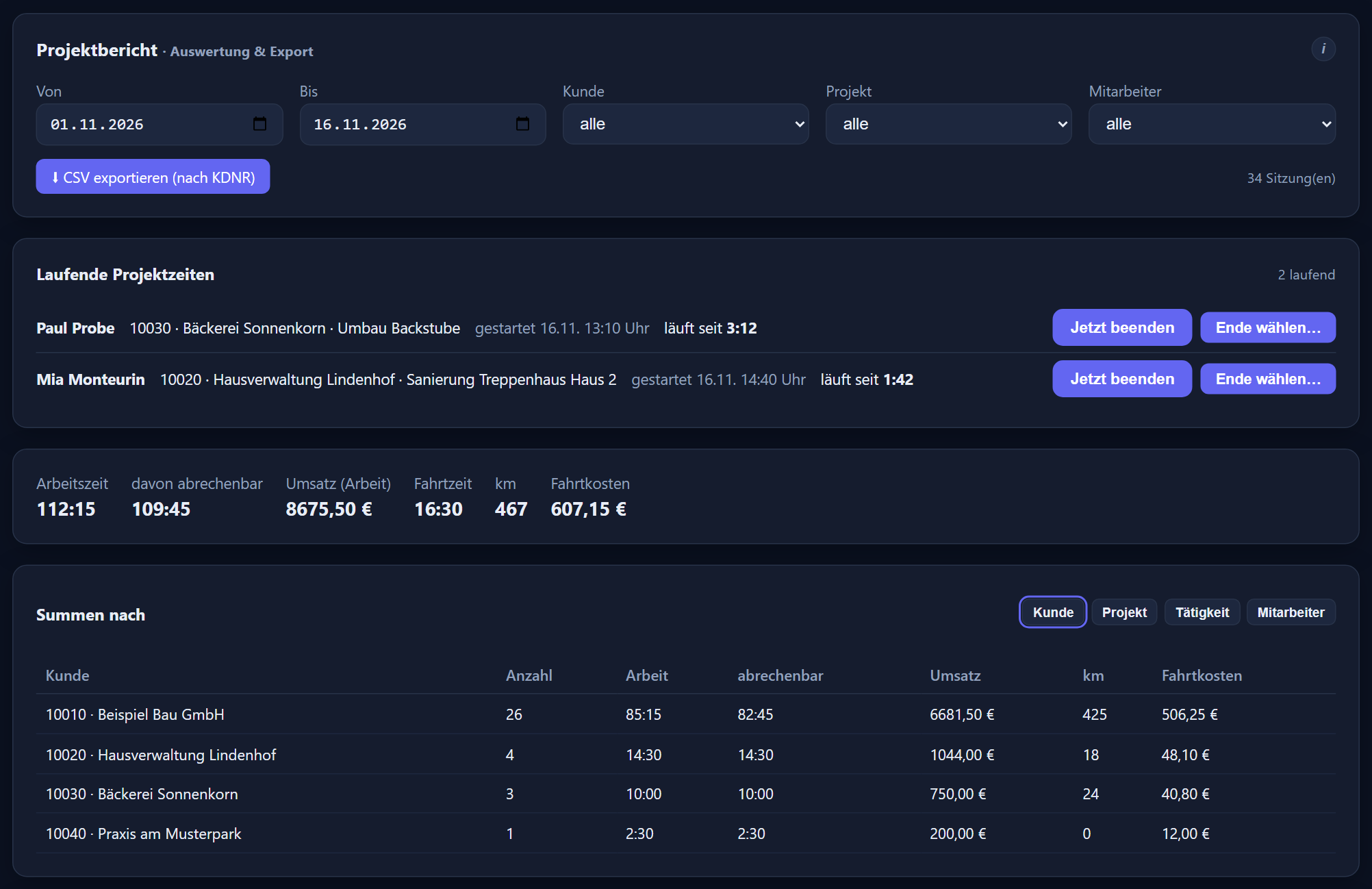
The „Laufende Projektzeiten“ (running project sessions) card shows open sessions; with „Jetzt beenden“ (end now) or „Ende wählen…“ (choose end…) you close forgotten ones, and after 12 hours they turn red.
Authorised users correct recorded project time under „Einzelsitzungen anzeigen“ (show individual sessions): times, customer, project, activity, „abrechenbar“ (billable) and journey.
„CSV exportieren (nach KDNR)“ (export CSV by customer number) downloads the completed project sessions of the period as a file — one row per session, the customer number (KDNR) in the first column, with duration, rate, amount for the work, km, travel time and travel costs — readable in Excel (semicolon-separated), for further processing, for example for your invoice.
Project overview with traffic light
„Projekt-Controlling“ (project controlling) shows the hours budget and the order/revenue budget of the selected project with bars, over the entire project duration. The „Projektübersicht“ (project overview) lists all projects (or those of the selected customer) with consumption and status, the most critical first, sortable by clicking the column headers.
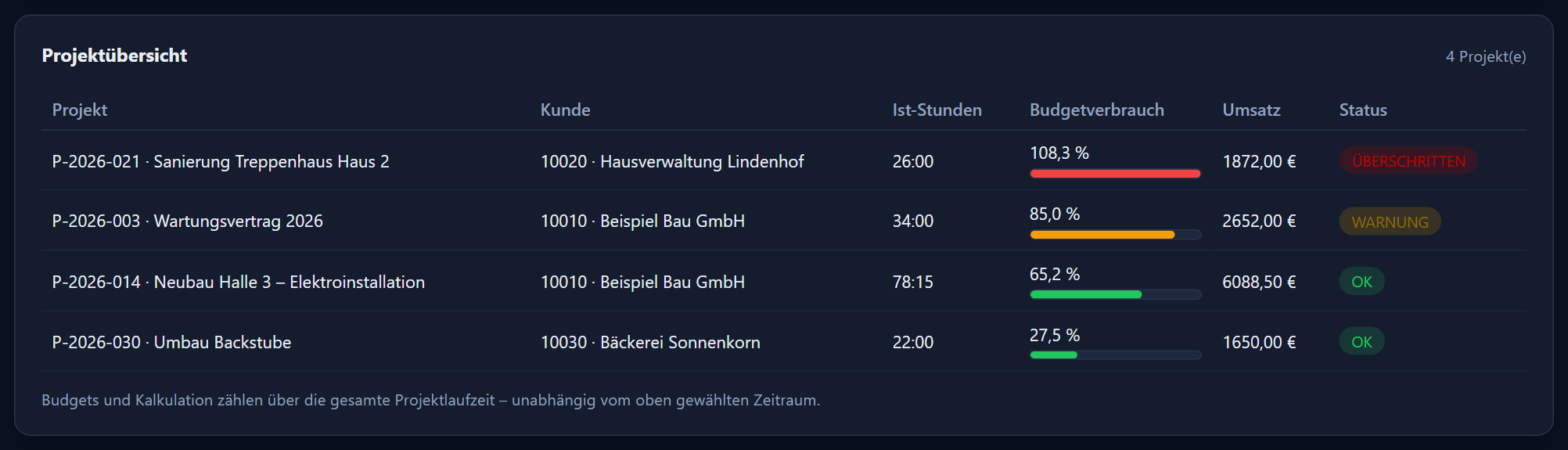
The traffic light shows „OK“ below the warning threshold, „WARNUNG“ (warning) from the warning threshold and „ÜBERSCHRITTEN“ (exceeded) from 100 %. If both budgets are set, the more critical status applies.
The budgets count over the entire project duration and across all employees.
Costs, contribution margin, margin
With the „Projekt-Kalkulation“ (project costing) permission you additionally see labour costs (project hours × the employee's internal cost rate), travel costs, total costs, contribution margin and margin, in the report and in project controlling over the entire project duration.
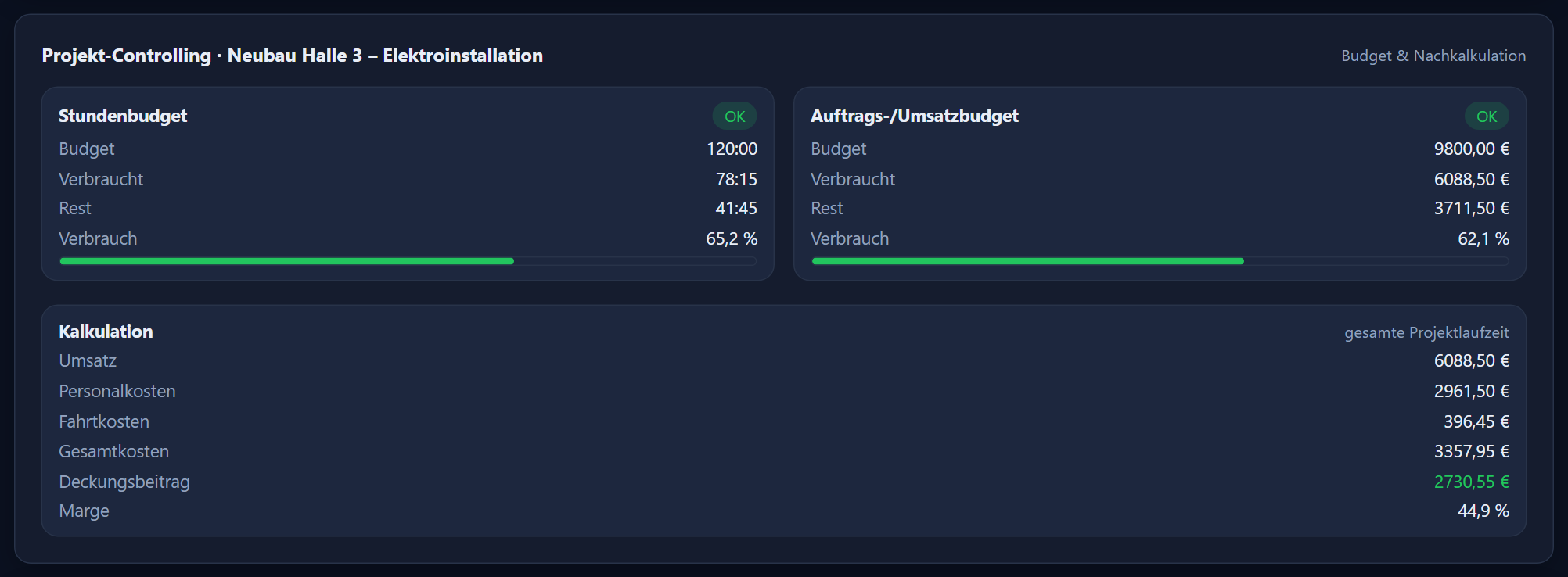
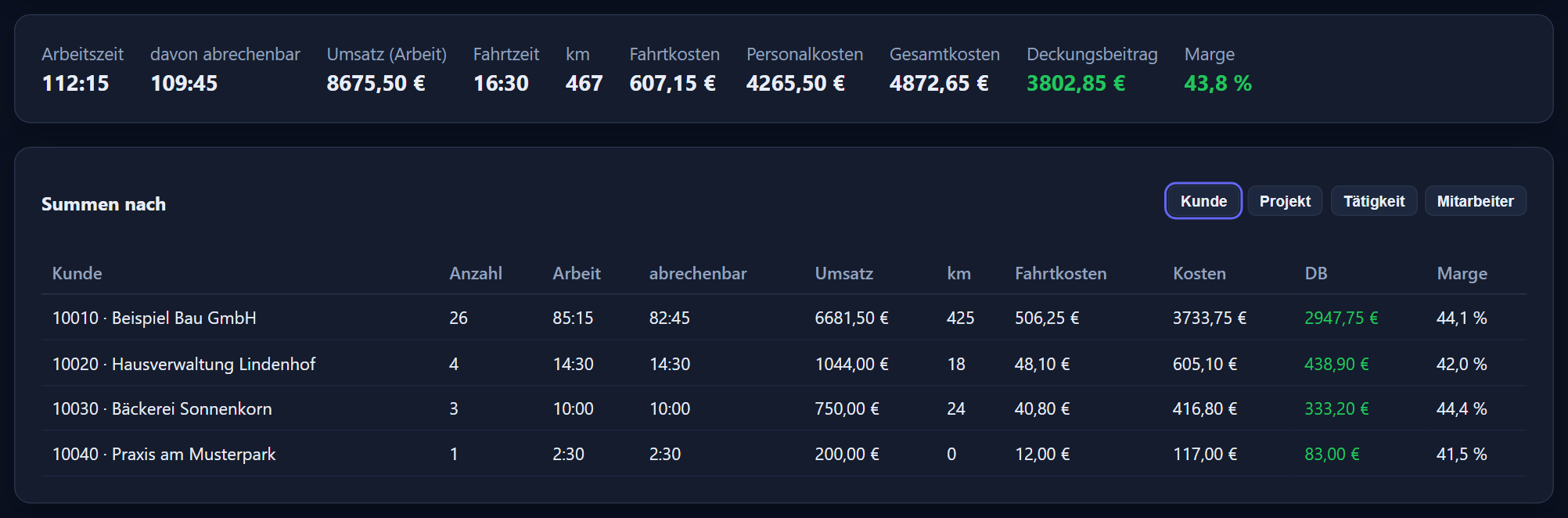
If a cost rate is missing, it says „Kalkulation unvollständig“ (costing incomplete).
A cost rate on file at the time of recording is stored with the session; later changes do not alter these sessions. If none was on file then, the employee's current rate applies.
Administrators always see the costing; „darf Zeiten bearbeiten“ (may edit times) alone is not enough. The CSV file also contains these columns only with the permission.
Who may do what
There is no separate Projektzeit permission. The roles of the time tracking apply — employee, department head, administrator — and the „darf Zeiten bearbeiten“ (may edit times) tick, plus the switches „Einsatzplan (eigene Einsätze)“ (deployment plan, own assignments) and „Projekt-Kalkulation“ (project costing).
Every user — employee, department head, administrator — clocks their own project time, at the PC under „Projektzeit“ and on the phone via the „Projektzeit“ tile. On the phone, the administrator enables Projektzeit per device.
Whoever records project time writes the visit report, has the customer sign it, opens it as a PDF and sends it — on the phone or at the PC.
Administrators see, edit and delete everyone's project time; department heads, employees with „darf Zeiten bearbeiten“ (may edit times) and deputies that of the employees in their area. Your own project time can be deleted.
Administrators as well as department heads and editors, the latter for the employees in their area.
Administrators and department heads or editors who are not limited to any groups — the budgets count across all employees.
Only with the „Projekt-Kalkulation“ (project costing) permission, administrators always.
Administrators plan all employees; department heads, editors and deputies plan the employees in their area. With „Einsatzplan (eigene Einsätze)“ (deployment plan, own assignments) an employee sees their group's assignments and creates, moves, copies and deletes their own assignments themselves.
Their own link: anyone who sees the deployment plan; planners also for the employees in their area.
Customers, projects, budgets, activities, enabling per phone and the location check are set by the administrator.
Two modules, one customer base
Projektzeit records how much time goes to which customer, which project and which activity — with hourly rates, budgets, revenue and, if you wish, post-calculation, plus visit report and deployment plan. ITN Service is for plannable service jobs: the technicians record times, material and work performed on the job, a service report is produced, and you output checked jobs as a file for invoicing. ITN Service knows no prices, rates or costs.
The two modules are separate areas with their own activities, their own planning and their own evaluation. What they share is the customer base and the users: a customer is created once and used in both modules.
You book the modules individually or together on top of the time tracking; ITN Service does not need Projektzeit. With both modules, the PC shows the areas „Projektplanung“ (project planning) and „Service“, and the phone shows the tiles „Projektzeit“ and „Service“.
Service time is treated like project time in the time account; if there is both on a day without clock-ins, they are combined and nothing counts twice.
€1.90 per user per month
€1.90 per active user per month plus VAT, on top of the time tracking.
Projektzeit is only available together with ITN-Zeiterfassung; it is booked as an addition with ITN.
What the time tracking itself costs is shown under the ITN-Zeiterfassung pricing.
Frequently asked questions about Projektzeit
Who is Projektzeit for?
For businesses that document and bill their work at the customer's premises: employees clock in at a desk or on their phone against customer, project and activity, record their journeys and have the visit report signed on site. The office plans the week in the deployment plan and sees hours, revenue and travel costs in the project report.
What does Projektzeit cost?
€1.90 per active user per month plus VAT, on top of ITN-Zeiterfassung. Projektzeit is only available together with ITN-Zeiterfassung; it is booked as an addition with ITN.
Does project time count twice in the time account?
No, never. Project time is billed through the customer. Anyone who clocks in and out with arrival and departure collects their working time only through those clock-ins; project time records alongside what the time was spent on. Only on days with no arrival or departure at all do the start and end of the project time, including the recorded travel times, count as the working time of the day.
How does the visit report reach the customer?
The customer signs directly on the phone or at the PC. If email sending is set up in the time tracking, the report goes to the customer as a PDF by itself after the signature; the email address from the customer data is pre-filled and can be changed on site. Replies from the customer go to your company's email address. Without email sending set up, you open the report as a PDF.
Can photos go into the visit report?
Yes. Photos belong to the visit: taken directly with the camera on the phone or uploaded at the PC. They are attached to the visit — customer and day — and appear in the PDF on a page of their own after the signature.
Which languages is the mobile app available in?
German, Russian, Polish and Hungarian, including Projektzeit with journeys and the visit report. The language is switched in the app's menu, and the office can set it per user. The PC interface is in German, as are the report and the email to the customer.
Can Projektzeit pass data to my invoicing software?
There is no interface. „CSV exportieren (nach KDNR)“ (export CSV by customer number) downloads the completed project sessions of the period as a file — one row per session, the customer number in the first column, with duration, rate, amount for the work, kilometres, travel time and travel costs. The file opens in Excel and is meant for further processing, for example for your invoice.
What happens if someone forgets to press „Geht“?
The „Laufende Projektzeiten“ (running project sessions) card in the project report shows open sessions; after 12 hours they are marked red. Authorised users close the forgotten session with „Jetzt beenden“ (end now) or „Ende wählen…“ (choose end…). They correct recorded project time under „Einzelsitzungen anzeigen“ (show individual sessions).
Who sees costs, contribution margin and margin?
Only users with the „Projekt-Kalkulation“ (project costing) permission; administrators always see the costing. „Darf Zeiten bearbeiten“ (may edit times) alone is not enough. The CSV file also contains the cost columns only with this permission.
Can Projektzeit check that the employee is at the customer's?
If you wish, the time tracking compares the location with the customer's address when project time is started on the phone; for this the customer needs coordinates. The radius defaults to 250 m and can be changed for the company or per customer. If the check is set to „blockieren“ (block), project time does not start outside the radius, provided the phone supplies a location; without a location it starts unchecked. Individual users can be exempted.
How do assignments get into the employees' calendars?
Through a personal subscription link (ICS), which you create next to the name in the deployment plan. Added to the phone or mail calendar as a calendar subscription, the person's planned assignments and absences appear by themselves, 90 days back to 180 days ahead. Types of sickness appear there only as „Krank“ (sick), and if you prefer, everything just reads „Abwesend“ (absent).
What is the difference from ITN Service?
Projektzeit records how much time goes to which customer, which project and which activity — with hourly rates, budgets, revenue and, if you wish, post-calculation, plus visit report and deployment plan. ITN Service is for plannable service jobs with a service report and output as a file for invoicing; ITN Service knows no prices, rates or costs. Both share the customer base and the users. You book the modules individually or together on top of the time tracking; ITN Service does not need Projektzeit.
All functions of the time tracking are listed in the feature reference. For plannable service jobs there is the ITN Service add-on module; the app itself is described under the mobile app.
Step by step in the manual (in German): Projektzeit · deployment plan · project report · customers & projects · activities.
How do you record time at the customer's today?
Tell us how your people currently keep track of hours, journeys and reports, and how that turns into the invoice. We will show you the way from clocking in at the customer's to the project report using your own example.
Send us your enquiry by email
The button below opens your mail programme with a prepared draft that already lists the details we need in order to quote. Prefer to talk? Give us a call.
Or simply write to info@itn-network.de. Please do not send us credentials or any of your employees' time records — figures are enough for a quote.