
Warn rather than forbid
If a technician is absent that day or the job overlaps with another, planning asks „Trotzdem einplanen?“ (schedule anyway?). Holding down the Ctrl key adds a second technician.
For businesses whose people work at the customer's premises: trades and building services, IT service companies, maintenance and customer service. The office plans the jobs, the technicians record times, material and work on their phones, the customer signs on site — and the result is the service report as a PDF.
An add-on module for ITN-Zeiterfassung — for businesses with technicians in the field.
Heating, plumbing, electrical, ventilation: installation and customer service at the customer's premises, often in pairs and with one vehicle. The times of both technicians are in the same job.
On-site appointments, installations, maintenance contracts. At the end, it is all there in black and white: what was done, how long it took and who signed for the customer.
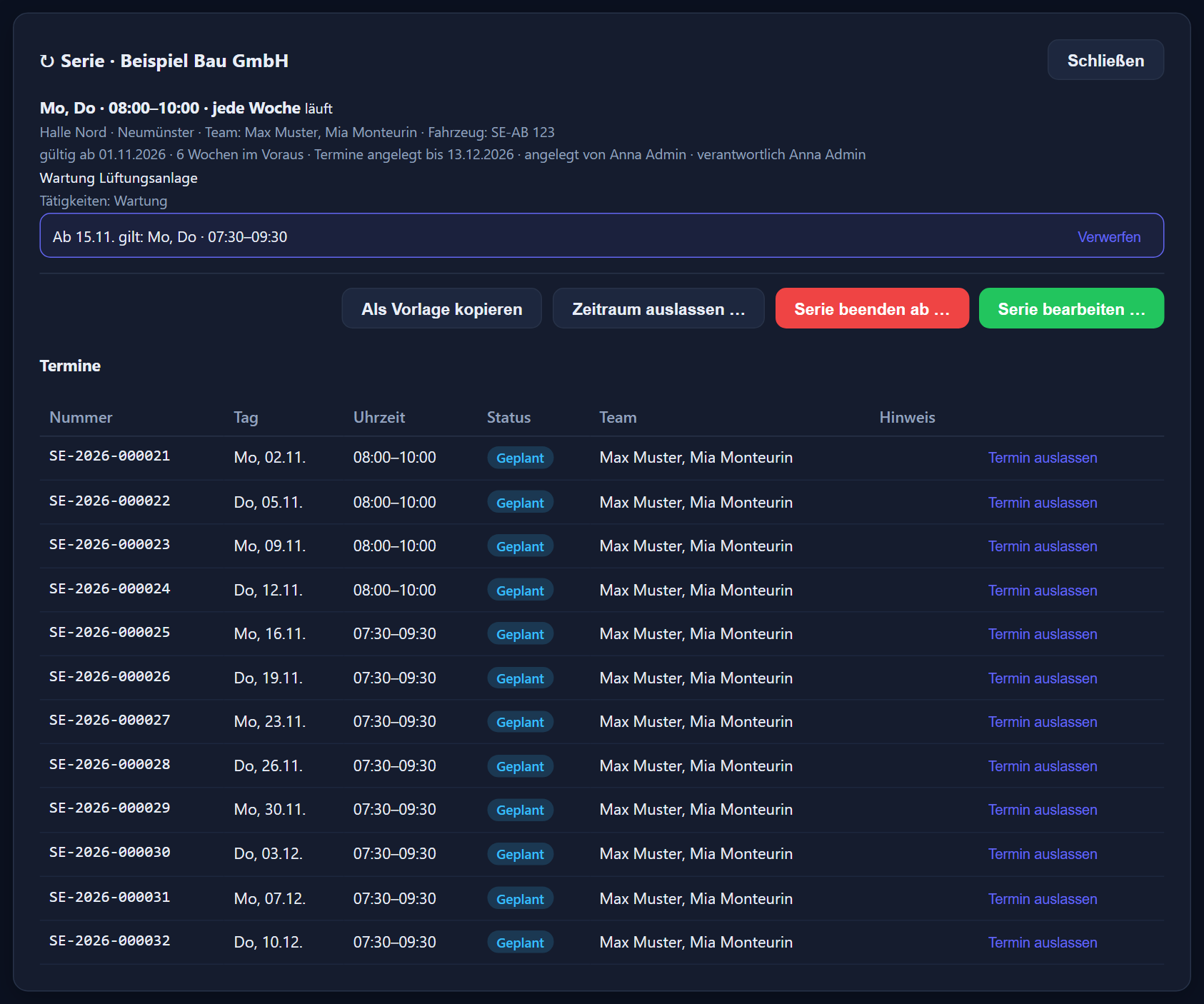
You set up regular maintenance once as a series. The appointments are created automatically — none on full public holidays, and anyone who is absent is not in the team.
Anyone with several jobs a day sees only their own on the phone and closes each one separately. If another job comes up on site, they create it themselves.
Every job goes through a fixed sequence. The first time or material entry sets it to „In Bearbeitung“ (in progress), closing it on the phone to „Erledigt“ (done). If something is not right, it goes back for correction with a reason — the technician sees the reason in the app and closes the job again.
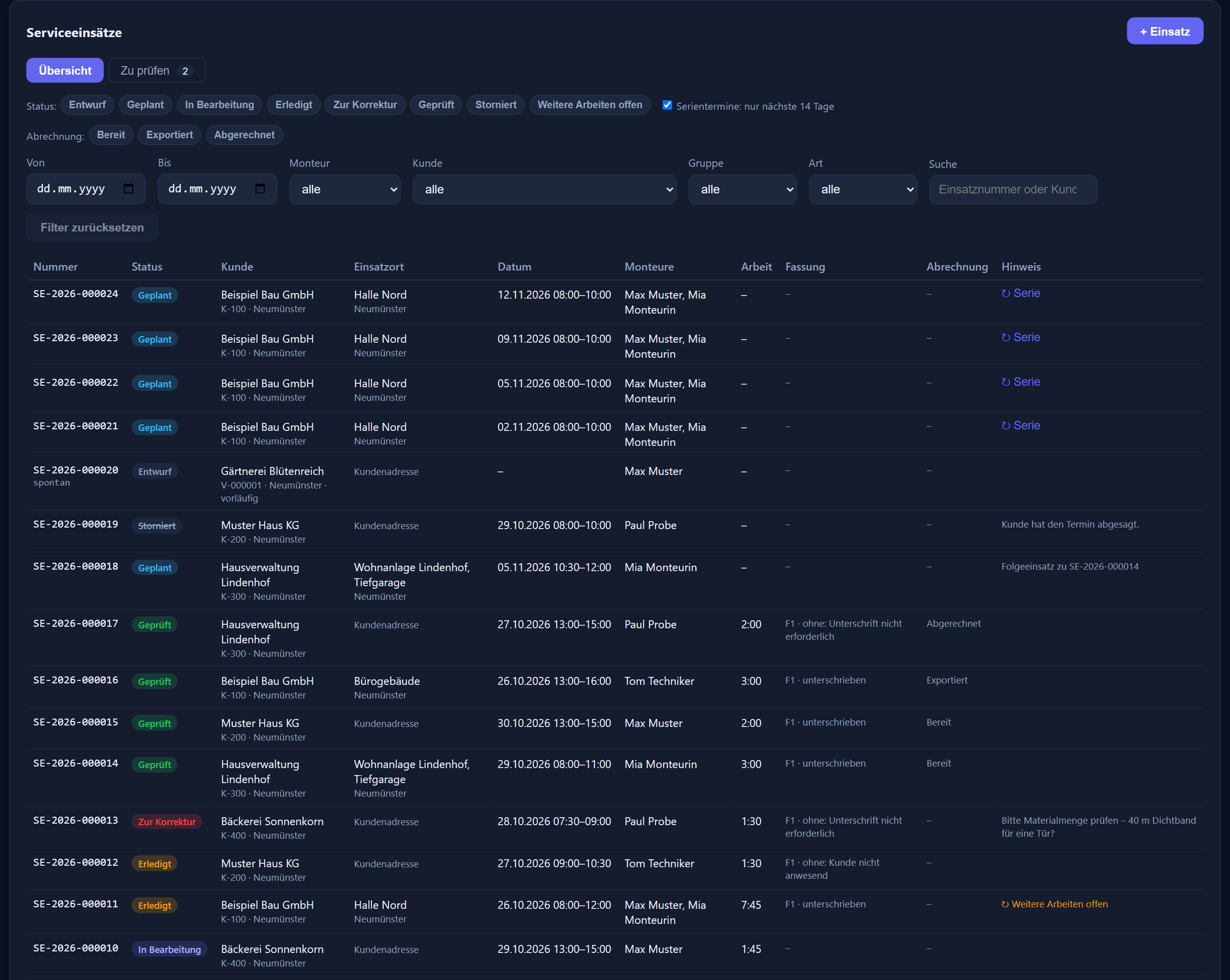
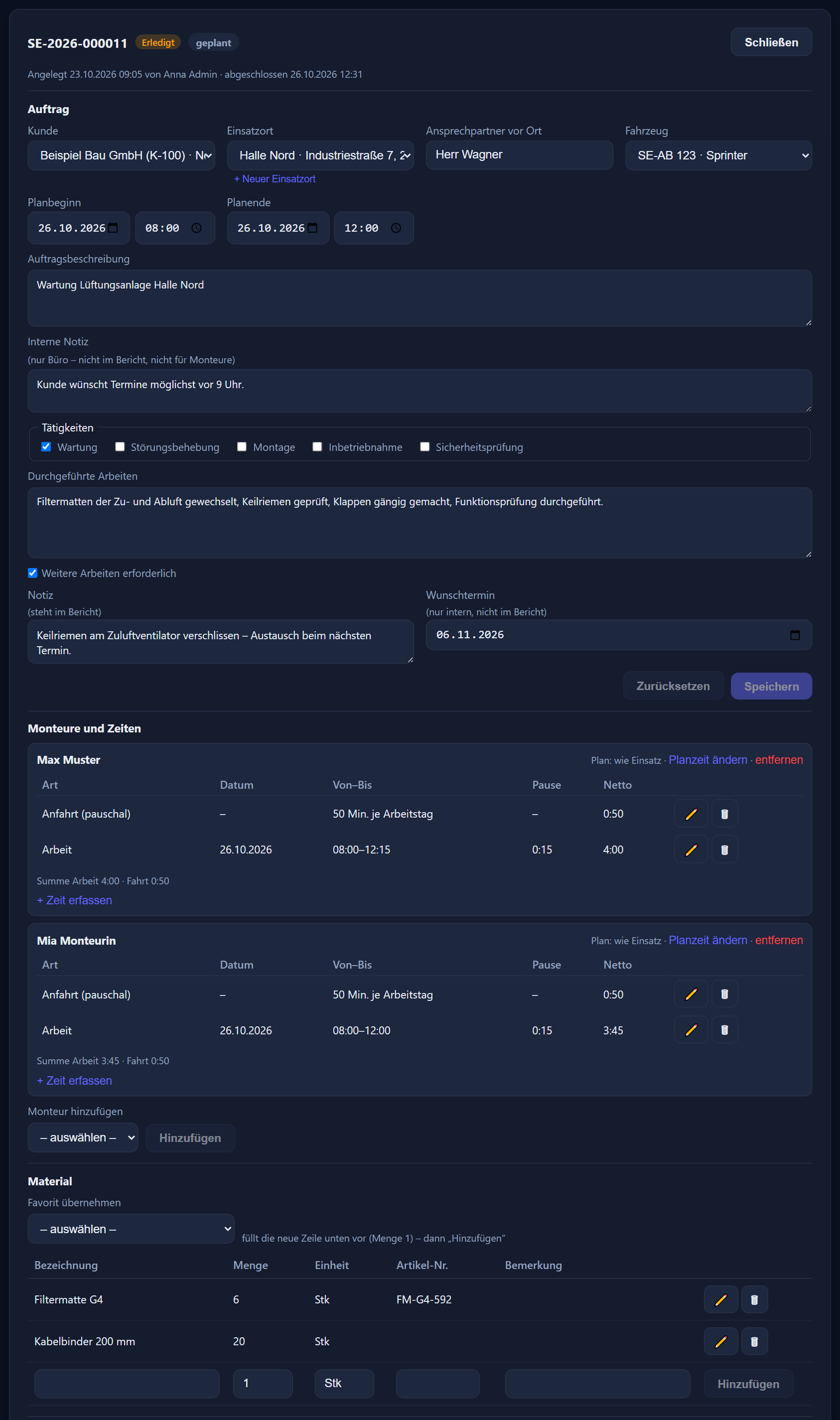
Search for the customer — by name, customer number, postcode or town —, choose the job location, enter the planned start and end, the order description and an internal note for the office only, tick the technicians. It is saved as a draft or straight away with „Einplanen“ (schedule).
If the customer is not yet on file, they are created as a provisional customer. If the program finds similar existing customers, it offers them for selection first; the administrator approves the new one or merges it with an existing one.
If another appointment is needed, the technician or the office ticks „Weitere Arbeiten erforderlich“ (further work required). „Folgeeinsatz anlegen“ (create follow-up job) then carries customer, job location and description over into the next job.
A cancelled job does not disappear but remains as a record. Every action appears in the change log with the job number.
Service planning shows the employees of each group in rows and the days in columns — by week or by month. Leave, sickness, vocational school and public holidays are right there in the grid, and the „Ungeplant“ (unplanned) bar collects everything that does not yet have a day or a technician.
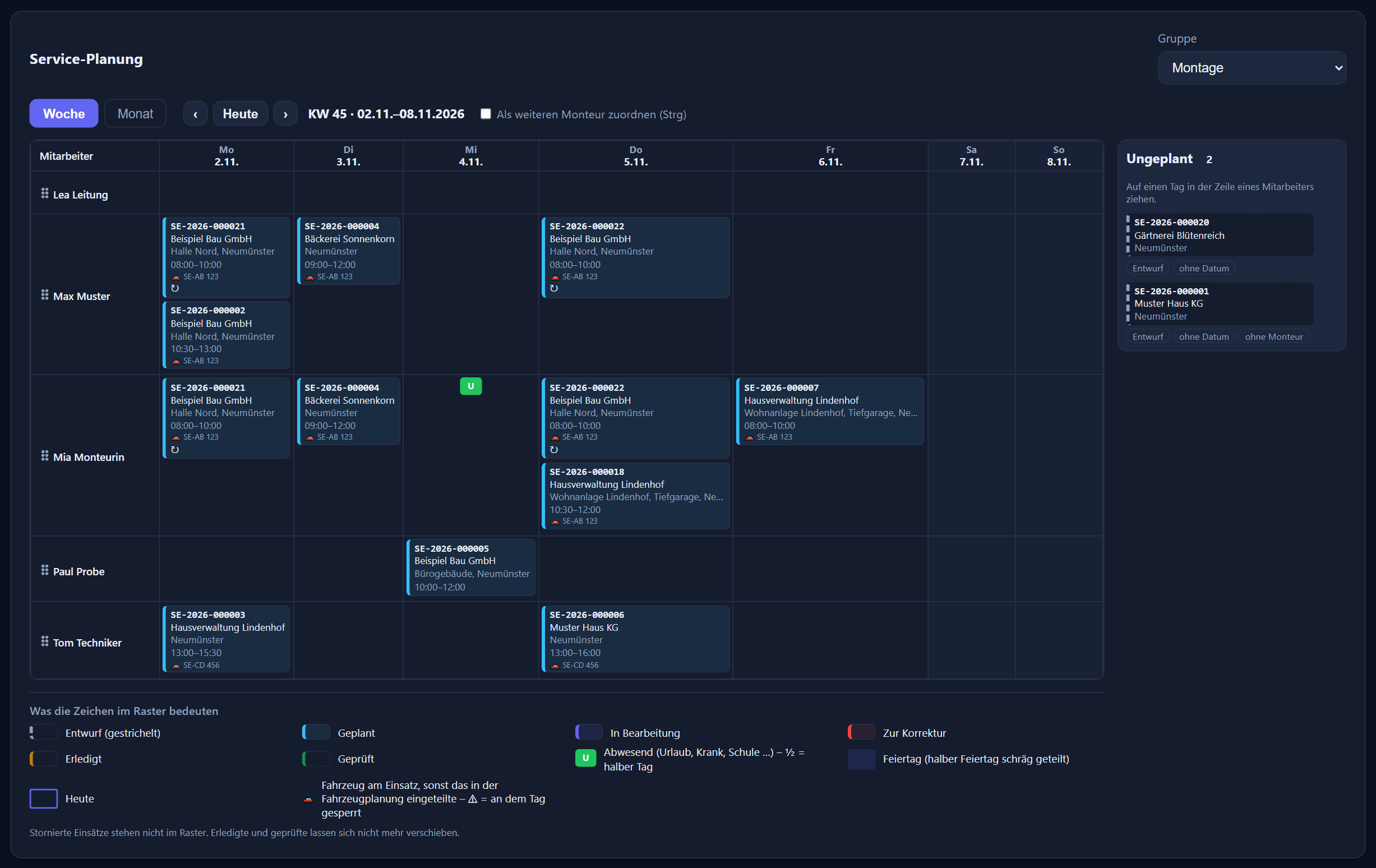
If a technician is absent that day or the job overlaps with another, planning asks „Trotzdem einplanen?“ (schedule anyway?). Holding down the Ctrl key adds a second technician.
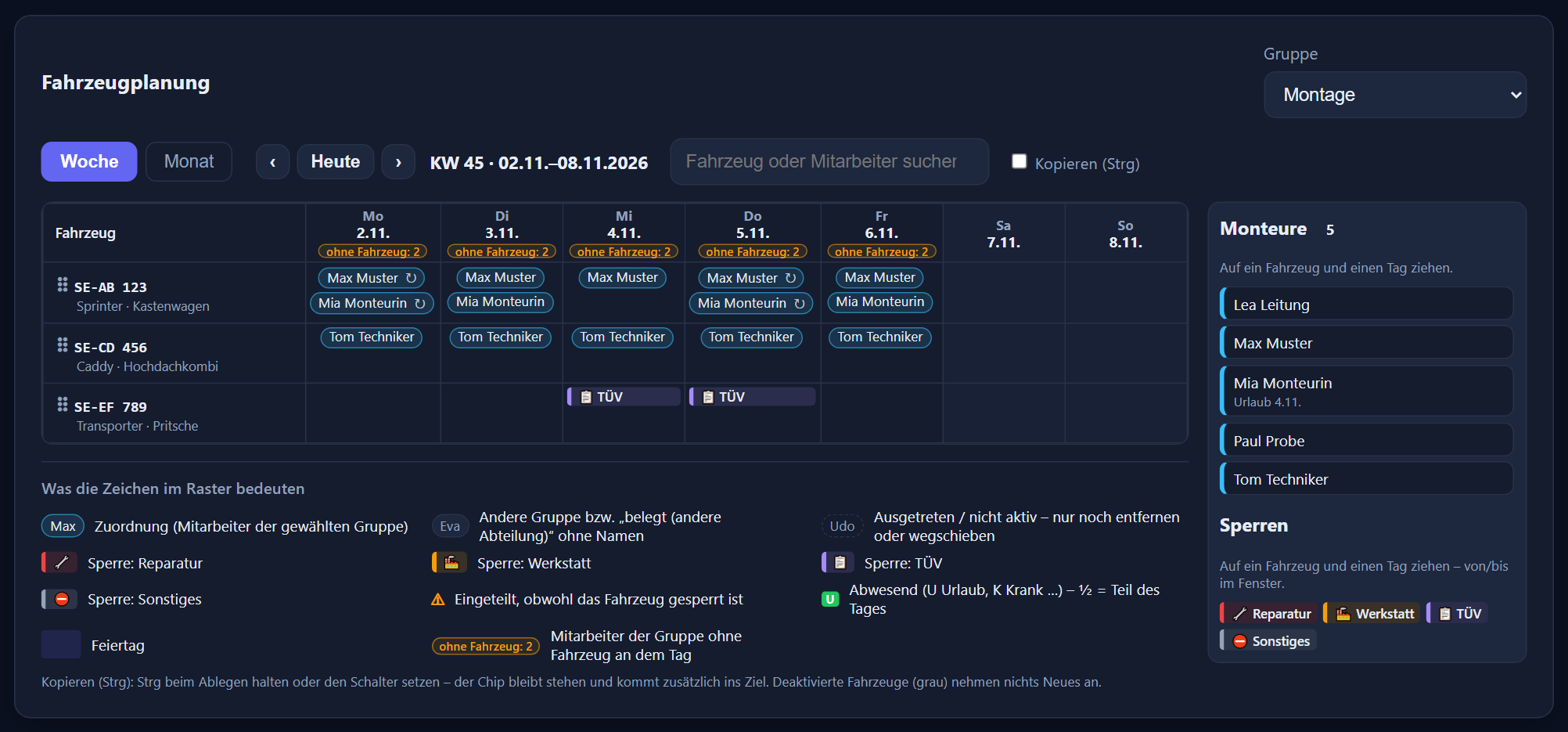
Drag technicians onto vehicle and day, extend assignments „bis …“ (until …). If a vehicle has to go to the workshop or for its TÜV inspection, you drag a block onto it; the header shows for each day how many are still without a vehicle.
Set up maintenance once as a series — from weekly to every four weeks. An hourly reconciliation keeps untouched future appointments up to date, for example when there are new absences or public holidays.
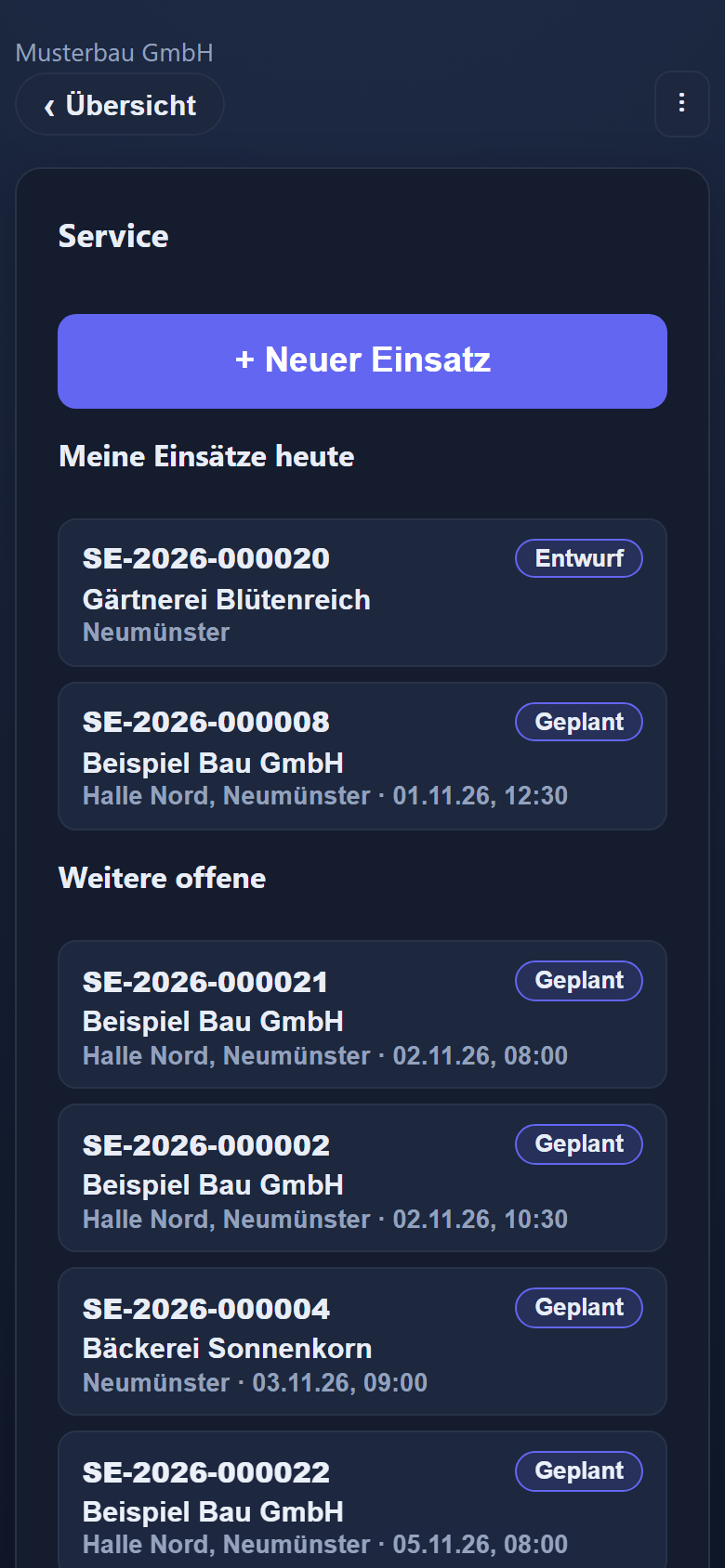
Under the „Service“ tile every technician sees „Meine Einsätze heute“ (my jobs today) and „Weitere offene“ (other open jobs) — only the jobs they are entered on. The job page has no save button: every entry is saved automatically.
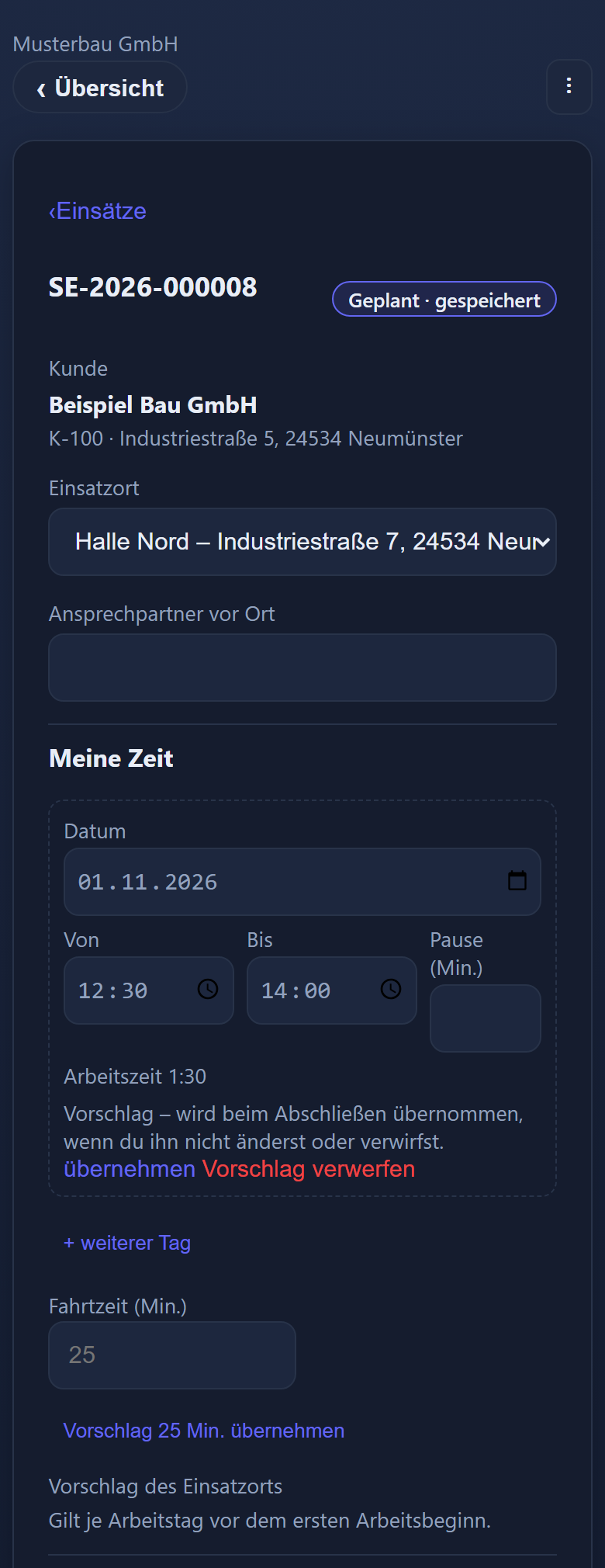
Job location and contact person, your own time with date, from, to and break — across several days too —, the travel time in minutes, colleagues, vehicle, activities to tap, the work carried out and the material with favourites.
The app suggests: end time = now, the travel time of the job location, the vehicle last used or allocated. A suggestion appears dashed and only counts once the technician taps it or closes the job.
The mobile app is available in German, Russian, Polish and Hungarian; the office can set the language per user. Activities and material favourites can be stored with translations. The report for the customer stays in German.
In the basement, in the underground car park, out in the country: without a connection the technician carries on working. Entries stay stored on the device and are transmitted as soon as there is a network again — including a new job and closing with a signature. Only a few things need the network, such as adding a colleague or opening the PDF. If the office has changed the same thing in the meantime, the app shows „Meine Eingabe“ (my entry) and „Stand im Büro“ (office version) side by side, and the technician decides.
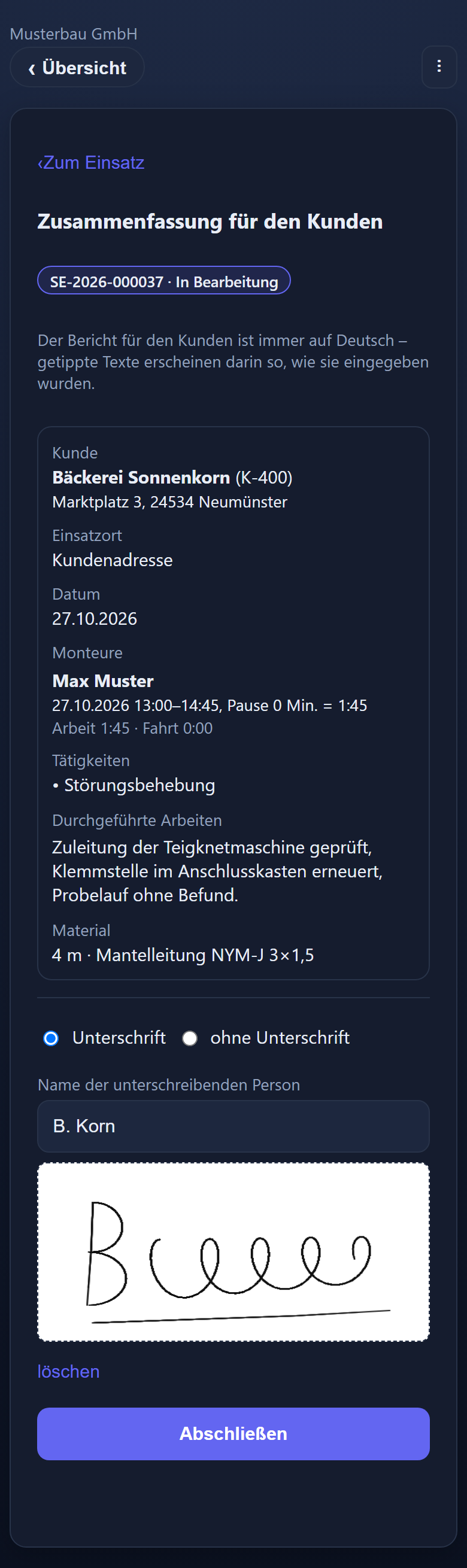
Once the work is recorded, the technician taps „Abschließen“ (close). The app shows the summary for the customer — customer, job location, date, times per technician, activities, work and material. The customer signs with a finger and adds their name.
As a PDF, always in German, with your company name and, if on file, your logo — without prices, without internal notes, with a checksum of the content. If the office changes anything after closing, a new version is created on checking; the signed one remains available.
From the office the report goes as a PDF attachment to the customer's address — sent through your own mail server, set up in the time tracking. Every email sent is recorded in the job.
Then the technician closes without a signature and chooses the reason: customer not present, signature refused or not required.
Completed jobs are collected on the „Zu prüfen“ (to check) tab. After „Prüfen und freigeben“ (check and release) a job is read-only and waits in billing. You write the invoice in your invoicing software as usual — the module knows no prices.
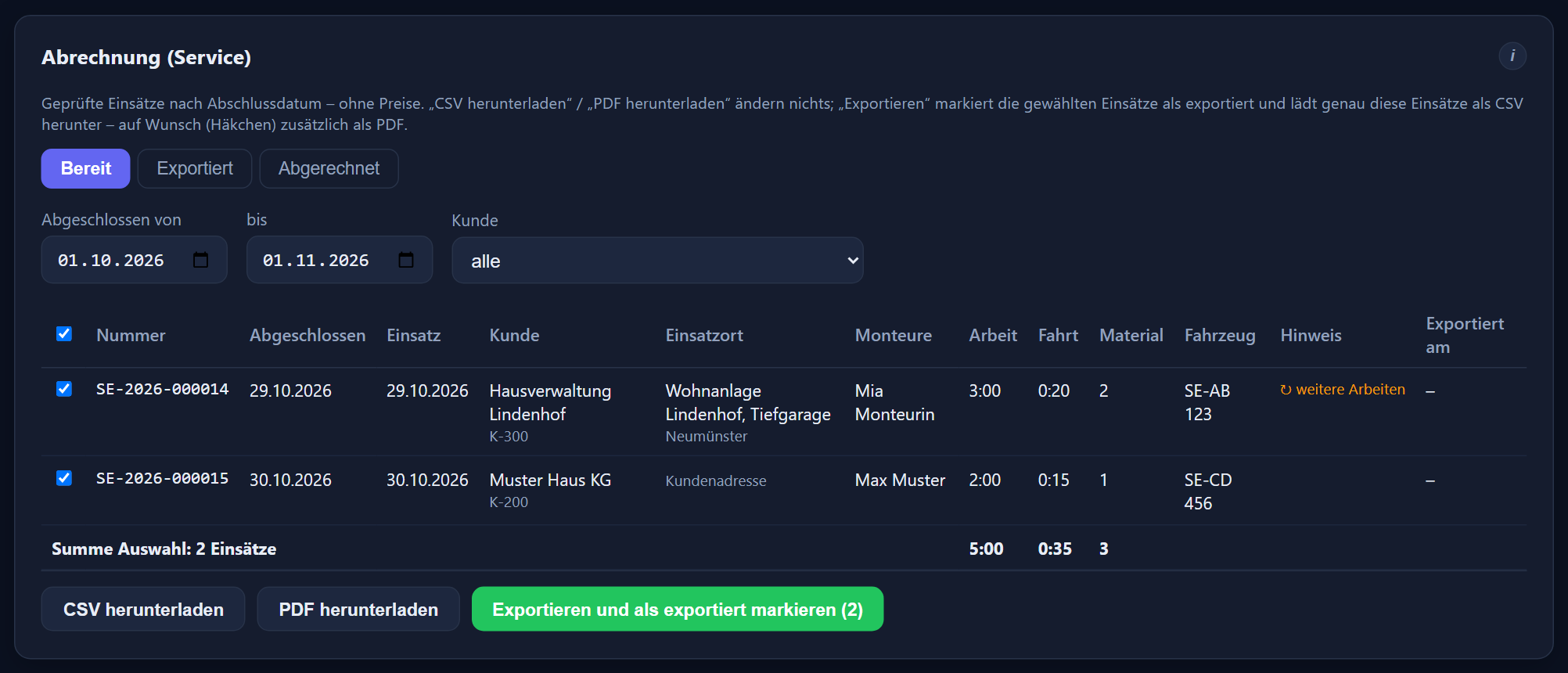
Choose a period by closing date and, optionally, a customer — „Exportieren und als exportiert markieren“ (export and mark as exported) downloads the jobs as a CSV file, and as a PDF billing summary as well if you wish. Every export run can be downloaded again later.
Per job: customer, job location, technicians, working and travel times, material and vehicle. Once the invoice is written, you mark the jobs as billed; a step back is only possible with a reason.
Like Projektzeit, never twice: if someone has clocked in, the clock-in applies. Only on days with no arrival or departure at all do the start and end of the service times count as arrival and departure. The payroll summary and the DATEV file have no separate column for service time; on those days it is included in the actual time.
Everyone who may edit times may plan, check and bill — administrators, department heads and editors, limited to certain groups if you wish. The administrator maintains the master data.
On top of ITN-Zeiterfassung, plus VAT. The users counted are the same as for the time tracking — the highest number of users enabled at the same time during the month, not just the technicians.
ITN Service then applies to the whole company. The Projektzeit add-on module is not needed for it.
Like the time tracking itself, ITN Service runs in the cloud, hosted in Germany.
What the time tracking itself costs is shown under the ITN-Zeiterfassung prices.
For businesses whose people work at the customer's premises: trades and building services, IT service companies and managed IT services providers, maintenance, installation and customer service. The office plans and checks, the technicians record on their phones, and the customer signs on site.
€1.90 per user per month plus VAT, on top of ITN-Zeiterfassung. The users counted are the same as for the time tracking — the highest number of users enabled at the same time during the month, not just the technicians. There is no separate count.
No. ITN Service is booked on top of the time tracking and then applies to the whole company; the Projektzeit add-on module is not needed for it. If you have both add-on modules, they share the customers — service activities and billing are separate parts of their own.
No. They work in the time tracking's mobile app under the „Service“ tile as soon as the module is booked and their phone is approved — with no additional switch per device. Any employee can work as a technician on a job.
German, Russian, Polish and Hungarian. The language is switched in the app's menu, and the office can set it per user. Service activities and material favourites can be stored with translations. The service report and the email to the customer are always in German.
Yes, with „+ Neuer Einsatz“ (new job) in the app. If the customer is not yet on file, they are created as a provisional customer; the administrator then approves them or merges them with an existing customer.
Then the technician closes the job „ohne Unterschrift“ (without signature) and chooses the reason: customer not present, signature refused or signature not required. The reason is recorded in the job.
No, and that is deliberate: the module knows no prices. You export checked jobs as a CSV file, and as a PDF billing summary as well if you wish — with customer, job location, technicians, working and travel times, material and vehicle. You write the invoice in your invoicing software as usual and then mark the jobs as billed.
Like Projektzeit, and never in addition: if someone has clocked in that day, the clock-in applies. Only on days with no arrival or departure at all do the start and end of the service times count as arrival and departure, with the break rule of the working time model. The payroll summary and the DATEV file have no separate column for service time; on days without clock-ins it is included in the actual time.
There is no separate service permission. Everyone who may edit times may create, plan, check and bill jobs — administrators, department heads and editors, limited to certain groups if you wish. The administrator maintains the master data. Every action appears in the change log with the job number.
As a series: customer, job location, team, vehicle, weekdays, time and an interval from „jede Woche“ (every week) to „jede 4. Woche“ (every 4th week). The appointments are created 1 to 13 weeks in advance, none on full public holidays, and anyone absent that day is not in the team. Before saving, a preview shows exactly which appointments will be created.
Everything in detail is in the ITN Service chapter of the feature reference. How the time tracking works on a building site is shown on the page for trades and crafts; the app itself is covered under mobile app.
Step by step in the manual (in German): ITN Service · jobs · planning · vehicles · series · billing · activities, material, customers · service on a phone.
Tell us how jobs are planned, recorded and billed today. We will show you the route from the order to the export file using your own example.
The button below opens your mail programme with a prepared draft that already lists the details we need in order to quote. Prefer to talk? Give us a call.
Or simply write to info@itn-network.de. Please do not send us credentials or any of your employees' time records — figures are enough for a quote.