
Keep your employees' documents in order
The add-on module for ITN-Zeiterfassung files your employees' documents per employee — for administrators only, with suggested retention periods that you check yourself and deletion proposals. It supports you in keeping records, but it is not a payroll program and does not replace a legal review.
- Filed per employee, document groups as tabs
- PDF only, each file encrypted individually
- New versions instead of overwriting
- Suggested retention periods that you check yourself
- Nothing is deleted without your approval
- Export as a ZIP file, readable without the time tracking
One file per employee
Document types with suggestions, your own types and document groups you name yourself, which appear as tabs in the file. For every document, the date, versions, retention period and status are in one place.
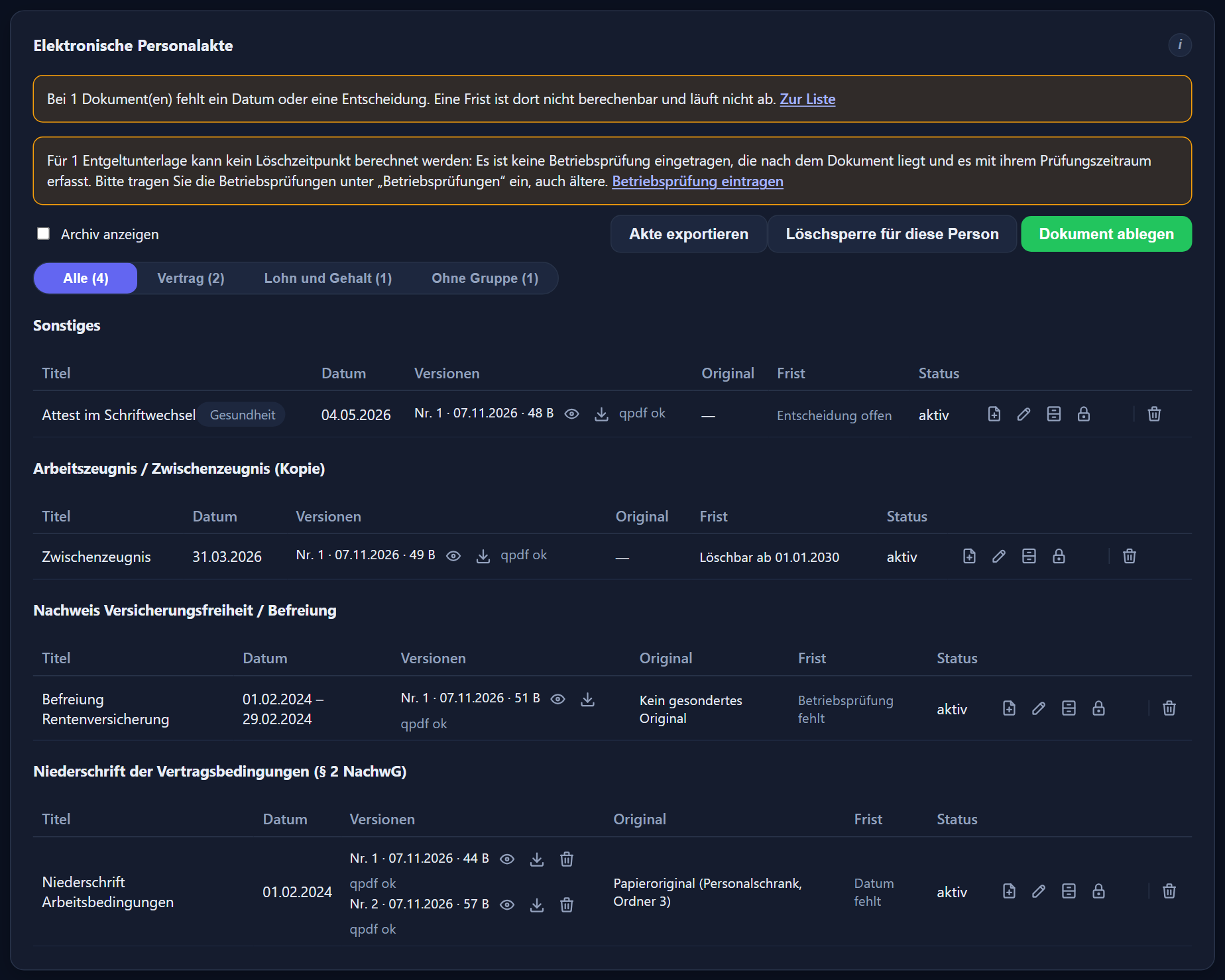
PDF files up to 25 MB are filed. PDFs with an opening password or with scripts, externally loaded content or attachments found in them are rejected, and for pay and tax records also PDFs with form fields. There is no virus scan.
A new file never overwrites the old one; each is a version of its own. Documents can be archived and reactivated, each with a reason.
For pay and contribution records the program asks where the original is kept: on paper, electronically elsewhere, as the filed file itself, or no separate original. You continue to store paper originals and electronic originals kept elsewhere yourself.
The files are for administrators only. Documents flagged as health or criminal-offence related can only be opened by administrators with the read right for that category.
Proposals, not automation
There are suggested retention periods per document type, plus deletion proposals and cards when a deletion deadline comes up. Nothing is deleted until you approve it.
All preset retention periods and deletion deadlines are recommendations by ITN and have not been checked legally. You check and change them yourself.
Church employers may be subject to rules of their own, such as church regulations on personnel files and record keeping, some with periods that run beyond the employee's departure. The recommendations do not take this into account — please check this yourself.
The program never deletes anything by itself. Documents are only deleted after your approval with a reason and your password, with a record of the deletion.
A deletion hold protects individual documents or whole persons.
Encrypted, with its own read right and an audit trail
Every file is encrypted individually. To open one, the program asks for your own password; the unlock lasts at most 8 hours.
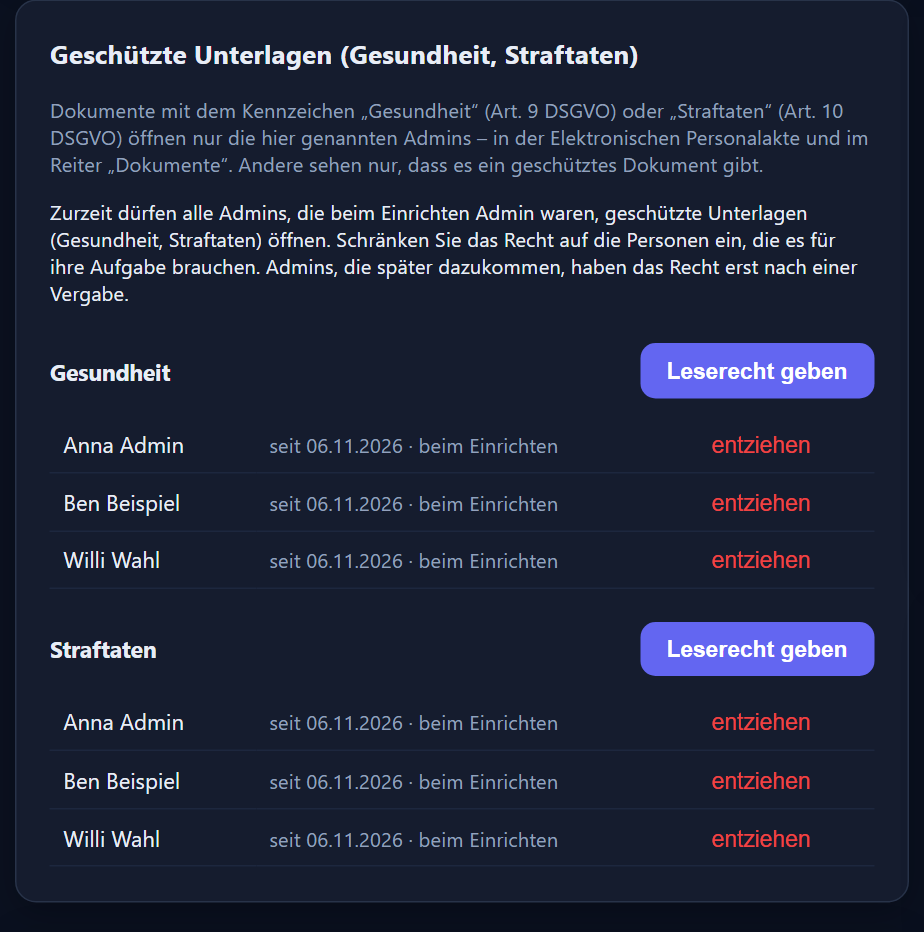
Flags for health and criminal offences with a read right of their own: such documents can only be opened by administrators with the read right for the category concerned. It is granted and withdrawn per category.
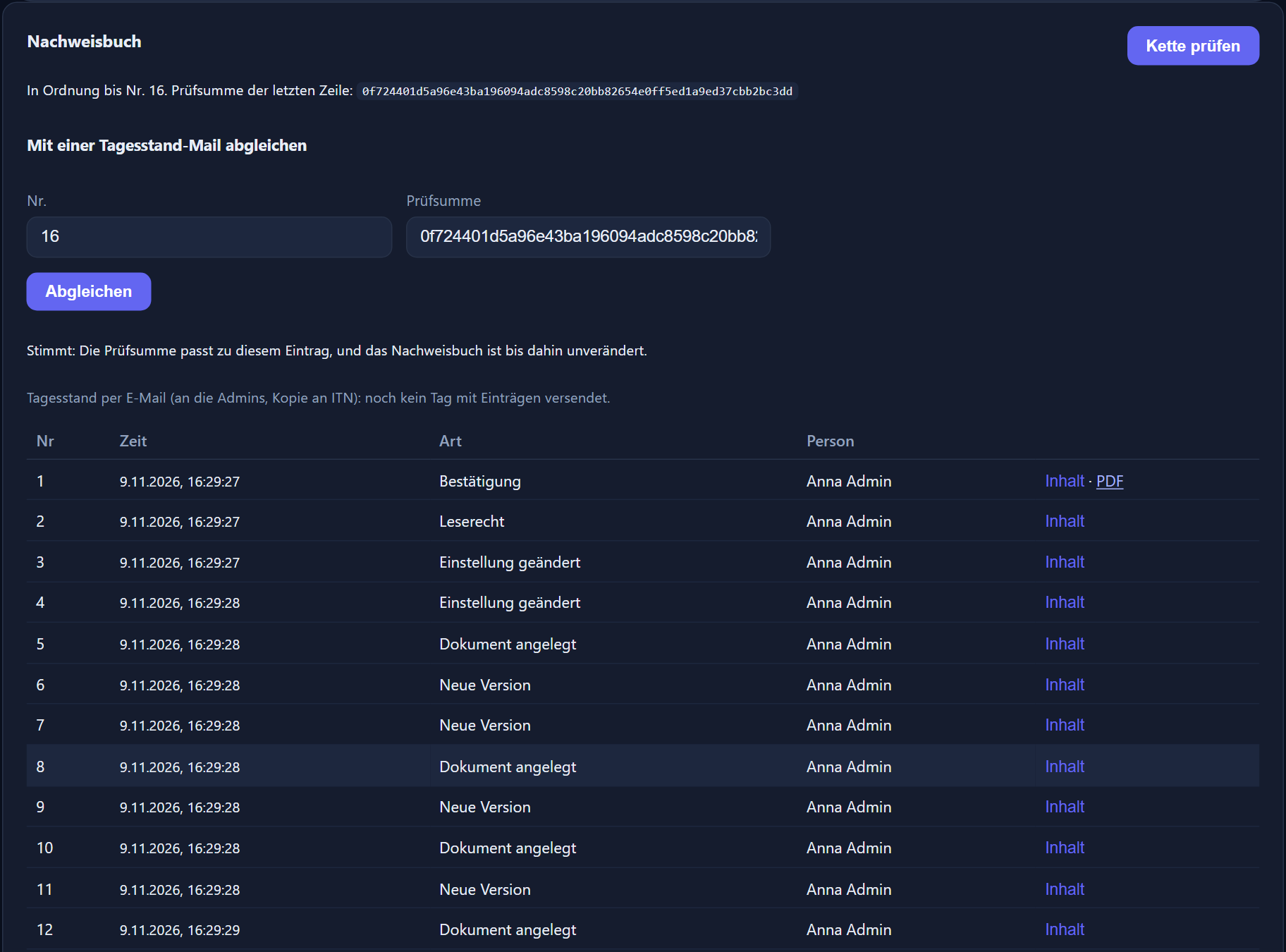
Every change is logged in a chain. The audit trail is kept in the database; evidence outside it is provided by the daily status emails, which go to the administrators on days with new entries, provided email sending is set up. After „Kette prüfen“ (check chain), the number and checksum from such an email can be compared.
Bulk retrieval of files is stopped. The time tracking keeps running in the meantime.
A procedure description for the module is available on request. What ITN support staff can and cannot see is set out in the questions below.
As a ZIP file, readable without the time tracking
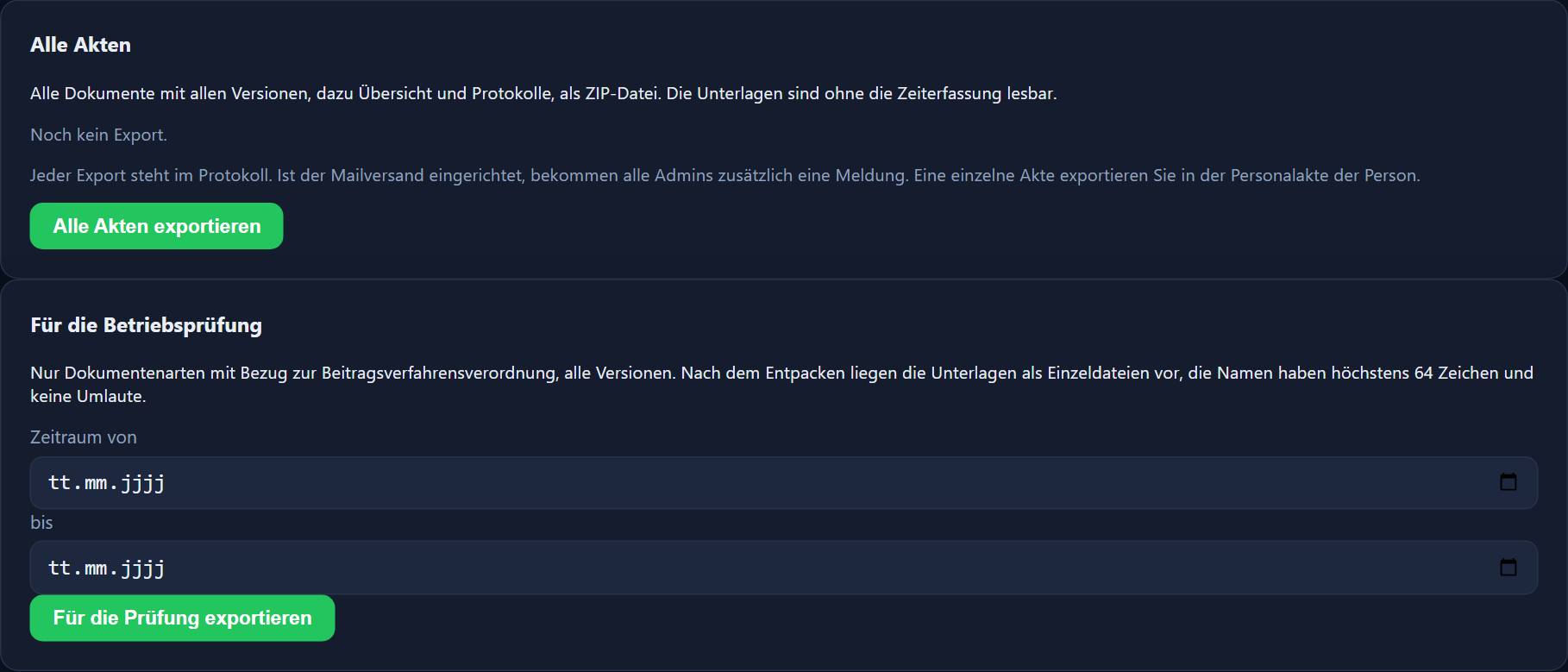
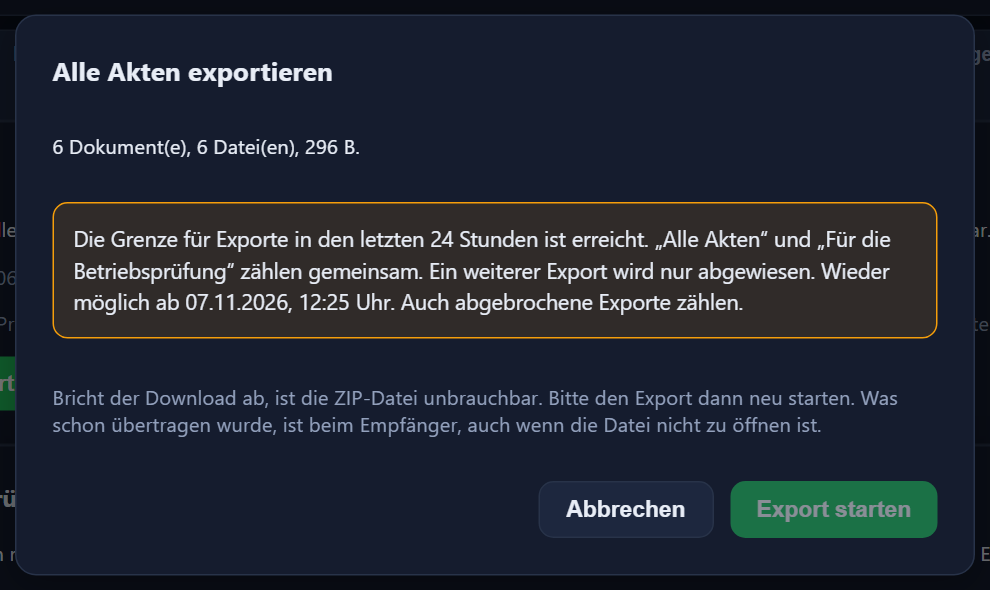
One file, all files or the output for the social security audit („Betriebsprüfung“) — each as a ZIP file. Exports of all files are limited; the window tells you when the next one is possible.
The documents can still be exported for three months. ITN does not undertake to keep them beyond those three months unless you commission continued storage separately; after that, deletion is due.
Whether you meet your record-keeping obligations after the end of the contract is for you to check. After the end of the contract, due deletions, deletion holds, postponements and audits can still be processed, audits once the declaration of responsibility has been confirmed; individual documents can then no longer be viewed.
€2.50 per active employee per month
In addition to ITN-Zeiterfassung, plus VAT. For church and non-profit employers €1.90 after review by ITN.

100 MB per active employee, at least 1 GB — shared between the personnel files, the files under „Dokumente“ (documents), the visit photos and, if you use ITN Service, the service photos.
Administrators activate the module under Verwaltung → Lizenzen (administration → licences) and can cancel it with effect from the end of the month. If it was activated by mistake, the activation can be undone once, until midnight of the same day; nothing is then charged. It is only available together with the time tracking.
The module is only available in the cloud, not on-premise. It is not offered to public authorities and other public bodies.
What the time tracking itself costs is set out in the pricing for ITN-Zeiterfassung.
Frequently asked questions about the electronic personnel file
What does the electronic personnel file cost?
€2.50 per active employee per month plus VAT, in addition to ITN-Zeiterfassung. For church and non-profit employers €1.90 after review by ITN.
Who is the module not available to?
The module is not offered to public authorities and other public bodies. It is only available in the cloud, not on-premise, and only together with ITN-Zeiterfassung.
How is the module booked and cancelled?
Administrators activate it themselves under Verwaltung → Lizenzen (administration → licences) and can cancel it with effect from the end of the month. If it was activated by mistake, the activation can be undone once, until midnight of the same day; nothing is then charged.
Which files can be filed?
PDF only, up to 25 MB. Every file is checked on upload: PDFs with an opening password or with scripts, externally loaded content or attachments found in them are rejected, and for pay and tax records also PDFs with form fields. There is no virus scan.
Have the suggested periods been checked legally?
No. All preset retention periods and deletion deadlines are recommendations by ITN and have not been checked legally; you check and change them yourself. Church employers may be subject to rules of their own, such as church regulations on personnel files and record keeping, some with periods that run beyond the employee's departure. The recommendations do not take this into account. The module supports you in keeping records, but it does not replace a legal review.
Does the program delete documents by itself?
No. It makes deletion proposals and shows cards when a deletion deadline comes up. Documents are only deleted after your approval with a reason and your password, with a record of the deletion. A deletion hold protects individual documents or whole persons.
Can ITN see my personnel files?
ITN support staff have no direct access within the application to documents in the electronic personnel file. This also applies to titles, notes, the audit trail and the export. It does not apply to the general „Dokumente“ (documents) area outside the module. Details without file content remain visible to ITN support, including the result of „Kette prüfen“ (check chain), the daily status and the PDF of the declaration of responsibility. In your company's log, the application does not show ITN support the lines on file operations and on read rights. ITN records operations of the module in its own operations log, including exports (your company's identifier, scope and purpose, even without an email to ITN), access blocks and their removal (if ITN removes one, with the identifier of the account concerned, the reason and details of the consultation), backing up, replacing, restoring and deleting your company's files (when replacing, restoring and deleting, with the reason) and operations on the encryption keys; titles, file names of your documents and file contents are not recorded there. For access blocks, ITN also sees the name of the account concerned in its operations overview. File operations that ITN support triggers itself, such as removing an access block, are not shown by the application in your company's log; if ITN replaces your files when restoring a backup, this appears in the audit trail („Daten ersetzt“, data replaced, ITN support, with the reason) and in the deletion log. ITN support continues to see the other log lines, for example on the protection flag of a file in the general „Dokumente“ area (in the log: area „Personalakte-Dateien“, personnel record files). Access is made possible above all by setting a password: if ITN support sets the password of an account, including when creating an account, this appears once in your log, and after their next sign-in to the time tracking at a PC (not in read-only access) the person concerned sees a notice asking them to change the password or have an admin set a new one. For up to 30 days, ITN can retrieve an unused set-up link again. Retrieving and using the link appear in the log; the note „Passwort durch ITN-Support gesetzt“ (password set by ITN support) disappears once the link is used. As the operator, ITN cannot rule out technical access outside the application with absolute certainty.
What happens after cancelling?
The documents can still be exported for three months. ITN does not undertake to keep them beyond those three months unless you commission continued storage separately; after that, deletion is due. Whether you meet your record-keeping obligations after the end of the contract is for you to check. After the end of the contract, due deletions, deletion holds, postponements and audits can still be processed, audits once the declaration of responsibility has been confirmed; individual documents can then no longer be viewed.
How much storage is included?
100 MB per active employee, at least 1 GB — shared between the personnel files, the files under „Dokumente“ (documents), the visit photos and, if you use ITN Service, the service photos.
Is there a procedure description?
Yes, a procedure description for the module is available on request.
The personnel record of the base version — a person's master data, account and rights — is described in the administration chapter of the feature reference.
How do you keep personnel documents today?
Tell us how many employees you have and where the documents are kept today. We will show you the module using an example.
Send us your enquiry by email
The button below opens your mail programme with a prepared draft that already lists the details we need in order to quote. Prefer to talk? Give us a call.
Or simply write to info@itn-network.de. Please do not send us credentials or any of your employees' time records — figures are enough for a quote.