
How digital time tracking works
From the tap to the figure in the payroll run: what actually happens between a clock-in and the month-end close — and the four points at which a business decides how the result looks.
The basicsMost queries turn on these three terms — not because they are difficult, but because they often go unspoken in the business. Here they are written out, with what follows at the turn of the month.
Target time is not a property of the person but of the day — and it comes from the working time model.
Every working time model has day cards from Monday to Sunday. Each says how long the day should be and which break rule applies. Somebody working eight hours Monday to Thursday and six on Friday does not have a special model — they have five day cards with different values.
Something practical follows from that: a month's target is not "40 hours times 4.3" but the sum of the day cards of the days that actually fall in that month. A month with a public holiday on a Tuesday has a different target from one without — and nobody has to enter anything for that.
For businesses that do not care about the daily distribution there is monthly flexitime: a monthly target is set and how it spreads across the days stays open. Both can exist side by side in the same house, because the model hangs on the person rather than on the business.
Not the span between arriving and leaving — but what is left of it after the break rule.
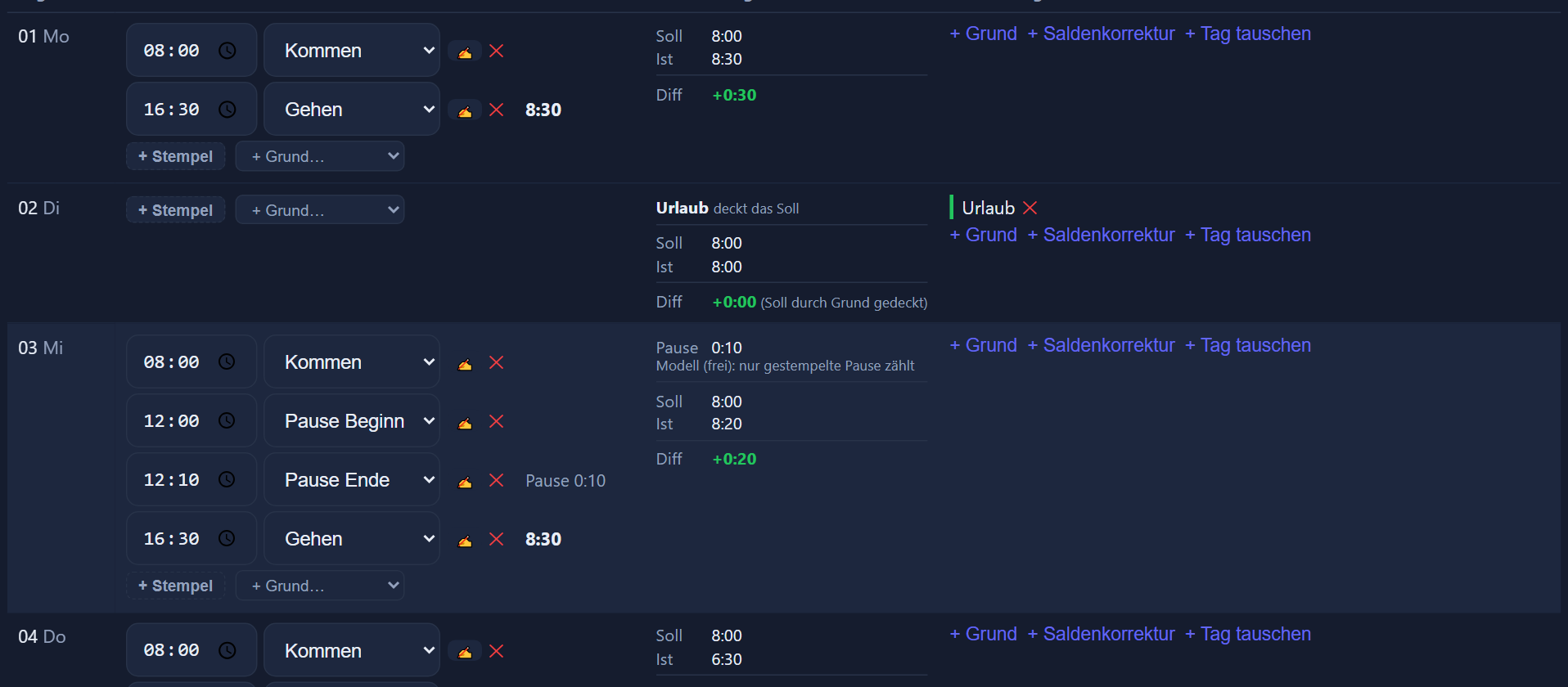
Between 07:00 and 16:30 lie nine and a half hours. Whether that becomes eight hours of actual time or nine is decided by the break rule: a clocked break, or a deduction by rule. That is exactly why it matters that the day row shows which rule applied — the question „why does it say eight?“ answers itself.
Absences affect actual time as well, and they do so differently. A paid whole-day absence with no clock-in covers the daily target: actual equals target, balance 0 — so neither a plus nor a minus arises. Unpaid leave does not cover it and is only recorded. Holiday additionally books against the leave account.
Actual minus target. That is the whole formula — what happens to the result is where it gets interesting.
Working nine hours against an eight-hour target gives one hour of credit that day. Working six gives two hours of deficit. Both appear in the day row, not only in an evaluation.
The sum of the month's days. The account card shows it together with the carry-over from previous months, the flexitime and the remaining leave — four figures that usually answer a query on their own.
Taking time off against a flexitime credit is entered as an absence type. The day's deficit then eats into the credit instead of standing there as an open minus.
Everyone sees their own figures — in the browser and in the mobile app. That is not a concession but the most effective way to find errors early: someone who knows their own account reports the forgotten clock-in in the same week.
Here two kinds of business part ways — and the choice is a setting, not a property of the software.
The flexitime account is switched on or off per working time model. When it is off, every month starts at zero: the previous month's balance stays in its month and does not travel. That suits businesses where extra hours are paid out or settled monthly.
When it is on, the balance of all previous months moves into the new month as a carry-over. The monthly balance then becomes a running account — what most people mean when they say „time account“.
Along with it comes the capping limit: it bounds the flexitime credit at the turn of the month and works upwards only. That lets you agree that credit is taken rather than saved up indefinitely — a rule that often exists in the business anyway and is only entered here.
Whether and at what level capping is permitted follows from the employment contract, a works agreement or a collective agreement. The application represents what you have agreed; the agreement itself is yours to make.
How a model is built in detail is under working time models and flexitime; the absence types and their route via the line manager under leave and absences.
Seeing these four side by side saves every trip back to the start of the month.
The sum of the day cards of this month's days — public holidays and model-free days already accounted for.
What was worked after the break rule, plus the days covered by a paid absence.
Actual minus target. A plus is saved time, a minus is open time — neither judged, until somebody agrees what to do with it.
What comes along from previous months, provided the flexitime account is switched on — bounded by the capping limit on request.
From the tap to the figure in the payroll run: what actually happens between a clock-in and the month-end close — and the four points at which a business decides how the result looks.
The basicsSchool days, block weeks and school holidays are part of the training year — and of the planning. How they are stored once and what happens to the daily target and the balance afterwards.
Apprenticeships